






A 2027 telehealth roadmap can fill up quickly. Video, scheduling, messaging, AI documentation, remote monitoring, integrations — all of them can look essential until engineering has to decide what gets delivered first.

If you are a product leader planning a roadmap for a new or existing telehealth product, the better question is which features your care model cannot afford to launch without. Some protect the basic patient and clinician experience. Others now come with regulatory, reimbursement, or interoperability deadlines that make them harder to postpone. And some popular additions can still wait.
This guide sorts 22 telehealth app features by where they matter most — patient experience, clinician workflow, compliance, integrations, and ongoing care — and explains what deserves priority for a 2027 build or rebuild.
Before we get into each part of the experience, it helps to see the whole roadmap in one place. The table below shows the features that matter most across the patient journey, clinician workflow, compliance, integrations, and ongoing care.
| Feature | Who it serves | Why it matters in 2027 |
|---|---|---|
| Sign-up with identity verification | Patients, compliance | Identity verification is part of the DEA’s proposed telemedicine prescribing framework |
| Pre-visit device and connection check | Patients, clinicians | Protects scheduled clinician time |
| Intake and e-consent before the visit | Patients, clinicians | Structured data reaches the chart before the call starts |
| Scheduling with a live waiting room | Patients, front desk | Sets expectations when clinicians run late |
| Video with audio-only fallback | Patients, billing | Medicare covers audio-only telehealth through December 31, 2027 |
| Accessible visit screens | Patients with disabilities | WCAG 2.1 AA deadline for larger HHS-funded providers: May 11, 2027 |
| Cost and coverage before booking | Patients, revenue cycle | Fewer billing disputes and support tickets |
| One clinician workspace | Clinicians | Fewer clicks per visit, better adoption |
| Ambient documentation with review | Clinicians | Evidence of lower burnout, if review is designed in |
| E-prescribing, including controlled substances | Clinicians, pharmacies | DEA prescribing flexibilities expire December 31, 2026 |
| Async inbox with triage | Clinicians, care teams | Keeps messaging from becoming unbounded work |
| Handoffs and team visibility | Care teams | Supports team-based and covering care |
| MFA, encryption and role-based access | Everyone | Core of the proposed HIPAA Security Rule update |
| Audit logs | Compliance | Answers “who accessed this record” quickly |
| Licensure and consent per visit | Compliance, operations | Cross-state care depends on it |
| No third-party trackers on sensitive pages | Compliance, marketing | An active area of OCR enforcement |
| FHIR-based EHR integration | Clinicians | Removes double documentation |
| Prior authorization status | Clinicians, patients | Payer FHIR APIs are due January 1, 2027 |
| Labs, pharmacy and referral routing | Clinicians | Closes the loop after the visit |
| Remote monitoring for 2 to 15 days of data | Patients, care teams | New Medicare RPM codes since January 2026 |
| Care-plan tasks and reminders | Patients | Drives engagement between visits |
| Behavioral health continuity | Patients, therapists | Mental health leads telehealth volume |
{{banner}}
A virtual visit can fail well before the clinician joins: at sign-in, at the camera prompt, or in a waiting room with no information. The features below follow the patient’s path in the order they encounter them, and we explain how to improve each step.
Account creation, identity verification, and insurance capture should feel like one task with visible progress. For example, a good upload screen doesn’t just include an uploading icon; it also explains why you need to upload your ID. The same goes for all other sign-up steps. Also, the patient should be able to stop halfway and come back without starting over.
The usual failure is fragmentation: verification split across an email link, an SMS code, and a document upload that opens in yet another window. Every channel switch loses a share of patients, and the drop-off happens before anyone has received any care.
If your product deals with prescription drugs, treat identity verification as part of a documented proof trail, not just a gatekeeping step. In its January 2025 proposed telemedicine rules, the DEA would have required certain telemedicine prescribers to verify patients’ identities and maintain photographic records or other documentation supporting that verification.
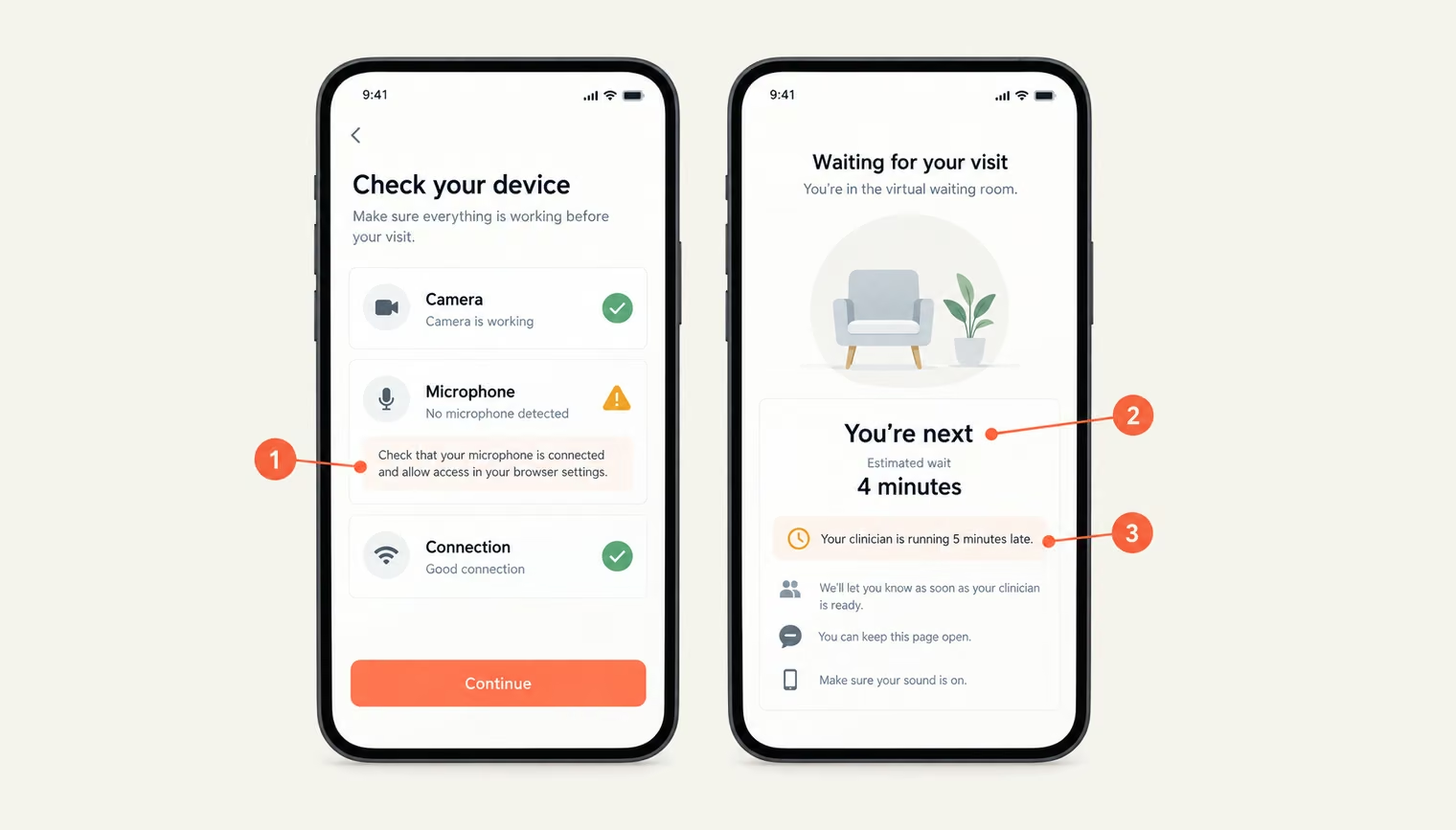
The check should run automatically 10 to 15 minutes before the start time, when the patient opens the visit link. It tests the camera, microphone, speaker, and connection, then explains any problem in plain language for the patient’s specific browser and device. “Camera blocked in Safari on iPhone: tap aA, then Website Settings, then Allow” is useful. “Please check your device settings” is not.
The better versions also send the result to the clinic side. If the check fails, front-desk staff can call the patient before the appointment instead of discovering the problem on the call.
The pre-visit flow should collect everything the clinician needs before the appointment starts. Intake forms can adapt to the visit type — a medication follow-up, for example, needs different questions than a first consultation — while skipping information already in the chart.
Once completed, answers flow into the chart as structured data that the clinician can scan in seconds, rather than as an attached PDF. The same flow can capture telehealth consent and, where ambient documentation is used, consent to recording. Each consent record needs a clear version and a link to the specific visit.
This also makes the intake format important. Fillable PDFs tend to create problems on mobile and can fail accessibility checks, making them a poor fit for a digital pre-visit workflow.
Telehealth scheduling has constraints that in-person scheduling doesn’t. The system needs to account for time zones and, for cross-state care, show only clinicians licensed in the state where the patient is located at the time of the visit.
When the patient enters the online waiting room, the experience needs to stay informative. Show their place in the queue, an estimated wait time, and a clear notice if the clinician is running late. On the staff side, allow the visit to be reassigned to another clinician without making the patient start over or sending a new link. For example, a static “Your provider will be with you shortly” screen leaves patients with no idea what’s happening — and gives them little reason to keep waiting.
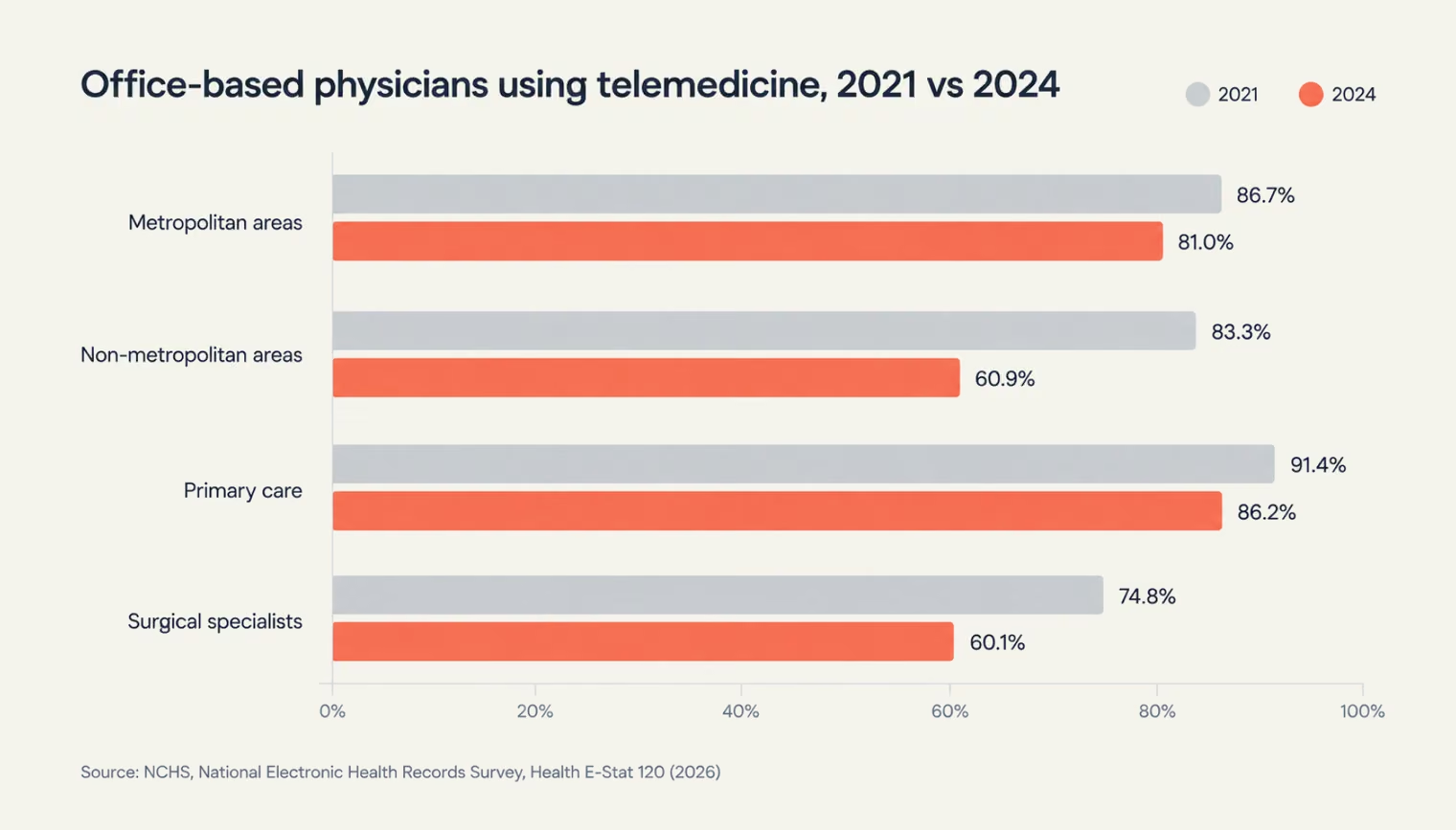
Connection quality varies more than product teams tend to assume, especially across different geographic areas. NCHS data shows that telemedicine use among office-based physicians in non-metropolitan areas fell from 83.3% in 2021 to 60.9% in 2024, while in metropolitan areas it moved from 86.7% to 81.0%. The survey doesn’t explain why, but it highlights the need for telehealth products to work reliably under less consistent connectivity.
That makes audio fallback part of the visit flow. When bandwidth drops, the app can detect the problem, offer a switch to audio, and keep the same visit record rather than forcing the patient to rebook. The change in modality also needs to be logged.
That record can matter beyond the user experience. For Medicare patients, audio-only telehealth remains available through December 31, 2027 under the Consolidated Appropriations Act, 2026. The DEA’s January 2025 proposed telemedicine rule also includes requirements around documenting telemedicine encounters and the modality used for controlled-substance prescribing.
The failure mode to avoid is simple: the video drops, the patient gets disconnected, and the only next step is to start over with a new appointment.
Accessibility comes with a firm deadline for a large part of the healthcare market. Under the HHS Section 504 rule, organizations that receive HHS funding and have 15 or more employees must make their web content and mobile apps conform to WCAG 2.1 Level AA by May 11, 2027. Smaller recipients have until May 10, 2028.
The requirement can also extend to apps provided through contracts or licensing arrangements, bringing telehealth vendors into their customers’ accessibility work. Building to WCAG 2.1 AA from the start therefore avoids treating accessibility as a separate compliance layer later.
The same standard is useful beyond the U.S. The NHS also uses WCAG 2.1 AA in its assessment criteria for digital tools, so designing to that level can support products intended for both markets.
For a visit screen, that means:
Teams that treat accessibility as a pre-launch audit usually end up rebuilding the call UI, the part of the product with the least room for layout changes. Accessibility is also one dimension of a broader question: Will the product work for every patient it will actually meet? See our equity-centered healthcare UX checklist.
Patients want to know what a visit will cost before they commit. Run an eligibility check during booking, show the estimated patient responsibility or self-pay price, and make any payment or card-storage step explicit. The goal is to surface the important financial details before the appointment is confirmed, not after the visit. A clear pre-booking view also reduces the problems that follow when the cost comes as a surprise: support requests, chargebacks, or patients who decide not to return.
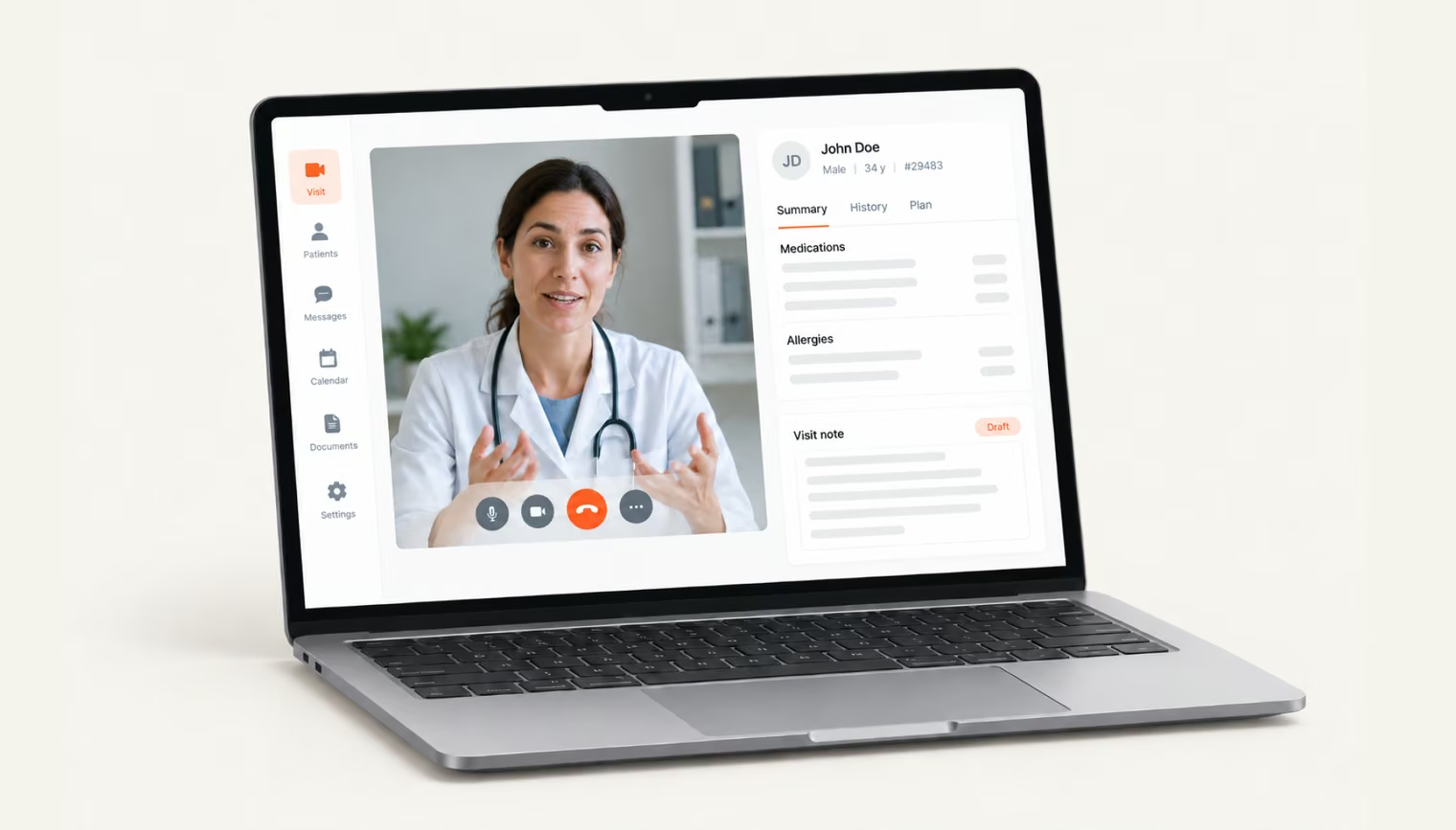
Patients choose whether to book a visit, but inside a health organization it is clinicians who determine if a telehealth product stays in use. A tool that adds clicks to every visit gets worked around, and a workaround in clinical software usually means data ends up in the wrong place.
The clinician should see the video, a patient summary, the intake answers, and the note in a single view that fits a standard laptop screen. Orders and prescriptions should be one step away. When the video sits in one app and the chart in another, clinicians spend the visit switching windows and looking away from the patient.
In a quality improvement study published in JAMA Network Open, 186 ambulatory clinicians across six U.S. health systems used an ambient scribe for 30 days. The share reporting burnout fell from 51.9% to 38.8%.
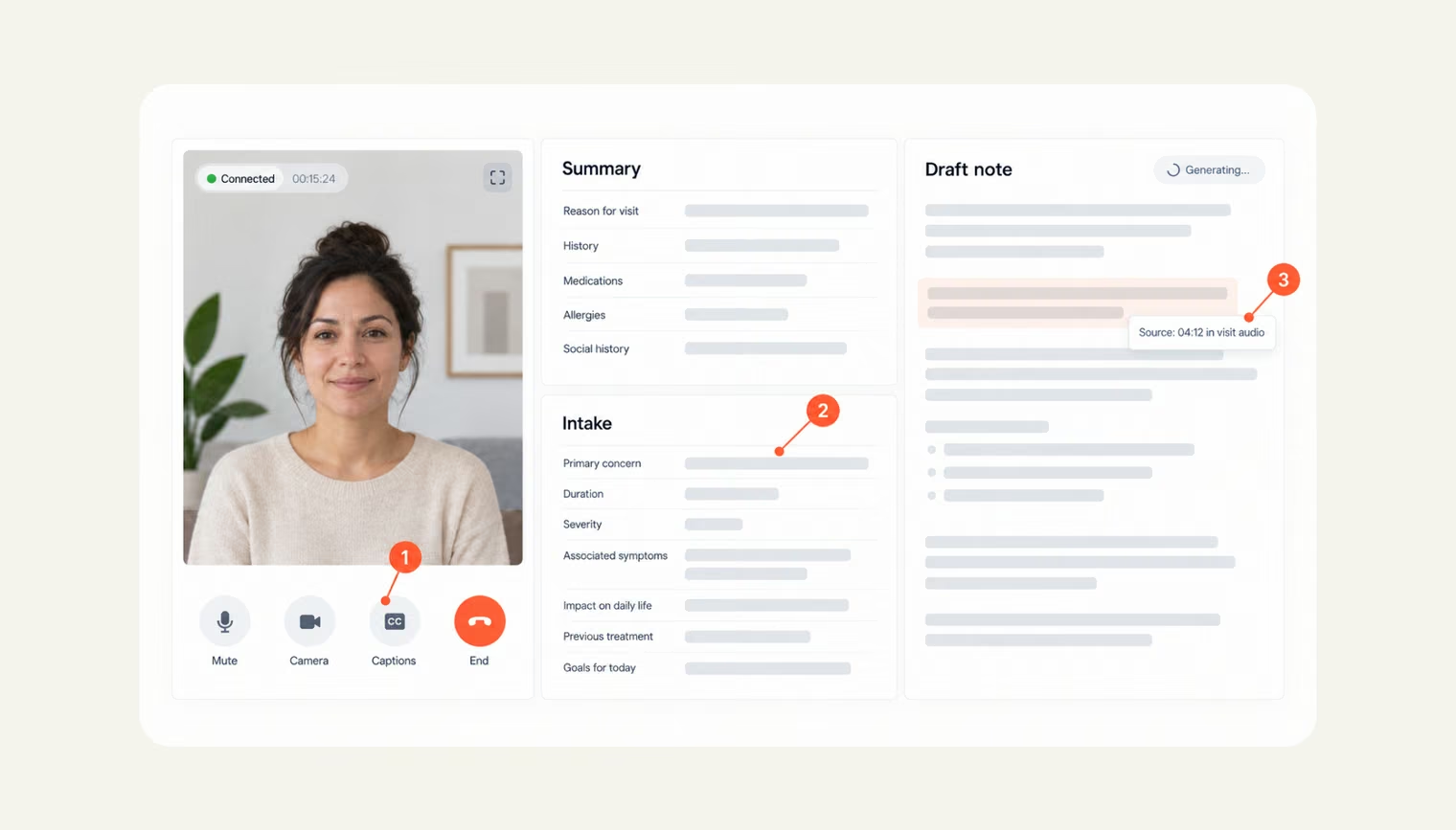
In general, ambient AI scribes record the visit and draft the clinical note for the clinician to review. The study also highlights a useful design pattern: clinicians could select parts of the draft note to view the underlying transcript or listen to the source audio. That traceability makes it easier to verify what the system captured and correct errors before signing. It’s possible if:
There is an honest tradeoff here. Ambient documentation adds recording consent, audio storage (which is PHI), another vendor relationship, and editing time. If drafts need heavy correction, the time savings shrink. So, plan to measure editing effort per note from the first pilot, and don’t promise clinicians a number before you have one. The review pattern matters as much as the model — and it’s one of several design decisions we cover in our clinician trust checklist for AI interfaces.
Routine e-prescribing is largely solved; controlled substances require more complex workflows. The DEA’s temporary telemedicine flexibilities currently allow controlled-substance prescribing without a prior in-person visit through December 31, 2026. A final special-registration rule is still pending.
The January 2025 proposal gives a reasonable guide to what the product may need. It included requirements for prescription drug monitoring program (PDMP) checks, audio-video technology, restrictions on Schedule II substances, reporting to the DEA, identity verification, clinician credentialing, and record retention. In product terms, that points to:
That last point matters most. If the final rule lands late this year with a short window before the extension ends, teams that can change rules through configuration will adapt in days. Teams that coded the rules into their flows will need a release.
Secure messaging lets patients write to their care team between visits and get a reply later, the way they would by email. Patients expect it, and it is one of the easiest telehealth features to get wrong.
The simplest version sends every message straight to the patient’s own clinician. In practice, that creates work with no limits. Clinicians have time blocked for visits but none for messages, so replies pile up and get written in the evening or at the weekend. Most of that work is also never billed, because it doesn’t count as a visit. Meanwhile, the patient doesn’t know when to expect an answer, so they write again or call the clinic.
A better setup has four parts:
Urgent messages need separate handling. If a patient writes “chest pain” or “can’t breathe,” the message can’t wait in a queue until the next morning. The system should recognize these warning words, immediately show the patient what to do, such as calling 911 or going to the nearest emergency department, and alert the care team at the same time.
Telehealth increasingly involves more than one clinician. A nurse may start the visit and bring in a physician, a covering clinician may take over a colleague’s patients, or a behavioral health specialist may join a primary care call.
The product needs to make these handoffs visible and seamless. Clinicians should be able to join a live visit, see the relevant patient context, and record what needs to happen next. The care team should also be able to see who owns each follow-up, so tasks don’t get lost between clinicians.
In a telehealth product, security shows up as screens and behaviors. Designing them alongside the core flows is far cheaper than fitting them into finished ones. It also keeps them from colliding with usability, which is where most security complaints from patients and clinicians come from.
HHS has proposed an overhaul of the HIPAA Security Rule that would require encryption of ePHI at rest and in transit, as well as multi-factor authentication, with limited exceptions. As of September 2026, the changes remain proposed, while the current Security Rule is still in effect.
The product challenge is making these controls work without disrupting care. Give patients accessible MFA options, such as passkeys, and use step-up authentication for sensitive actions. For clinicians, define access by role and care-team function, and make sure session timeouts do not interrupt an active visit. Security should protect the workflow rather than become another obstacle to care.
Every access, edit, export, and prescription event should be logged in a format the compliance team can search without an engineer. Logs that exist only in backend storage don’t help when someone asks who viewed a patient’s record last Tuesday. The same logging supports billing audits for remote monitoring, covered below.
Cross-state telehealth depends on keeping licensure and consent data precise. Store each clinician’s licenses and registrations by state, check them when scheduling, and tie the accepted consent version to the specific patient and visit.
Medicare adds another layer. In the CY 2026 Physician Fee Schedule final rule, CMS reiterated that practitioners need separate Medicare enrollment in each state where they furnish and bill services. The product should therefore treat state and payer requirements as part of the scheduling and billing workflow.
OCR has expanded its enforcement attention to tracking pixels and other third-party tools that can expose health information. For telehealth products, this is a product and marketing decision as much as a legal one. Keep third-party analytics and ad pixels off authenticated pages and booking flows, use first-party or server-side analytics where you need measurement, and review what each script on your site collects.
{{banner-2}}
When telehealth sits outside the patient record, clinicians have to bridge the gap themselves. Notes get copied, information gets entered twice, and the visit becomes another system to manage. Integration removes that extra work by connecting the telehealth workflow to the rest of the patient’s care.
Before the visit, bring the relevant problem list, medications, and allergies into the clinician’s workspace. Afterward, write the note, diagnoses, and orders back to the EHR. Where supported, SMART on FHIR can launch the telehealth experience from within the clinician’s existing system, avoiding another login and keeping the workflow in one place. This kind of integration is part of our healthcare work, including SMART on FHIR apps that connect to Epic, Cerner, and the systems providers already use.
Integration scope needs to be defined early. EHR access, vendor approvals, and testing can take weeks and may become a project bottleneck if they are left until development is already underway.
The CMS Interoperability and Prior Authorization Final Rule (CMS-0057-F) requires impacted payers — including Medicare Advantage, Medicaid and CHIP programs, and certain exchange plans — to implement four FHIR APIs by January 1, 2027: Patient Access, Provider Access, Payer-to-Payer, and Prior Authorization.
The rule also expands the Patient Access API. From January 1, 2027, it must include information about prior authorizations for non-drug items and services, including the authorization status and, where denied, the specific reason.
The rule applies to payers, not providers or app vendors. Its impact on care depends on whether the software can actually use the data. In a telehealth product, that could mean flagging orders that need prior authorization, showing the current status to clinicians, and giving patients a way to check their request without having to call.
A virtual visit often ends with an order: a lab test, a prescription, or a referral. Route each one electronically, show the patient where to go next (the nearest lab, the pharmacy that has the medication, the specialist who accepted the referral), and bring results back into the same record. From the patient’s side, the visit is finished only when the result or the medication is in their hands.
Some of the most useful telehealth technology in 2027 works when nobody is on a call. Chronic conditions, rehabilitation and mental health care happen mostly between appointments, and retention depends on what the product does in that time.
Medicare changed the economics of remote patient monitoring in 2026. The CY 2026 Physician Fee Schedule added CPT 99445, which covers device supply when a patient transmits data for 2 to 15 days in a 30-day period, and CPT 99470, which covers the first 10 minutes of treatment management in a month with at least one real-time interaction with the patient.
Before these codes, a patient who sent 12 days of readings generated clinical work and no billable device supply. The new codes are alternatives to the existing ones for the same period, not add-ons. For the product, that creates specific requirements:
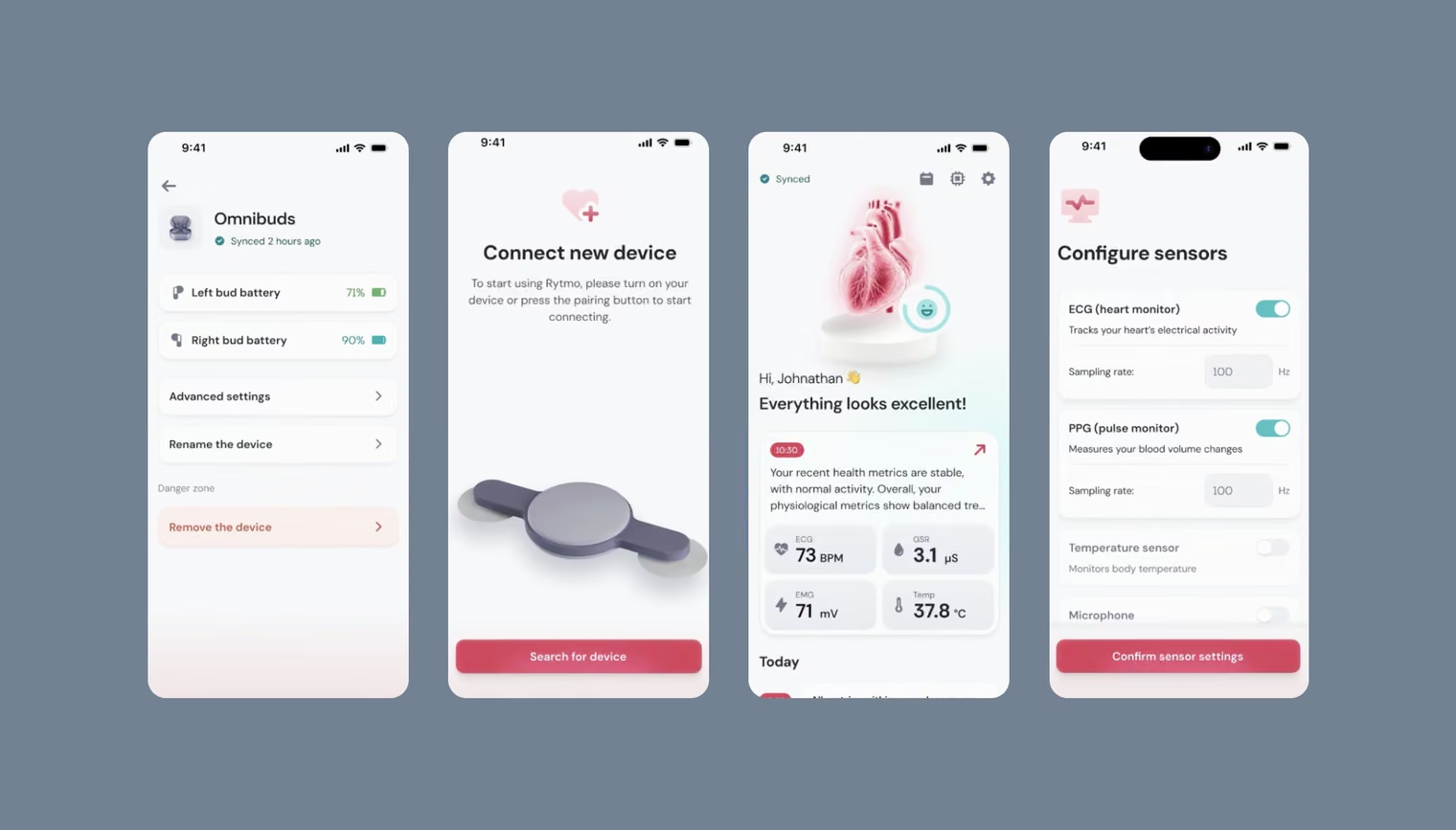
Our monitoring work includes Rytmo, a wearable cardiovascular platform spanning product design and development, and a hospital-grade remote patient monitoring system designed around real-time vitals and early risk detection.
Between-visit engagement works when it is tied to the clinician’s plan. Generic wellness content doesn’t do the same job. Tasks should come from the care plan, progress should be visible to both patient and clinician, reminders should adapt to what the patient actually does, and the clinician should see adherence at the start of the next visit.
Mental health is a major part of telehealth use. In FAIR Health’s Q2 2026 data, 53.7% of commercially insured patients with a telehealth claim were treated for a mental health condition. Among patients aged 19–30, the share was 70.9%.
Behavioral care has different product needs from urgent care, and patient app development for it starts with continuity. It calls for:
A product built around one-off urgent visits tends to handle these poorly.
Not everything that appears on telehealth feature lists belongs in a 2027 build. These are reasonable to postpone unless your clinical use case clearly needs them:
Any of these can move up the roadmap later if users ask for it and the clinical case holds up.
“Every feature on this list should earn its place with a patient on a weak connection or a clinician with 15 minutes per visit.”
Twenty-two features is too many to ship at once, and the right subset depends on what you are building. A simple way to sort them is to score each feature from 1 to 3 on three criteria:
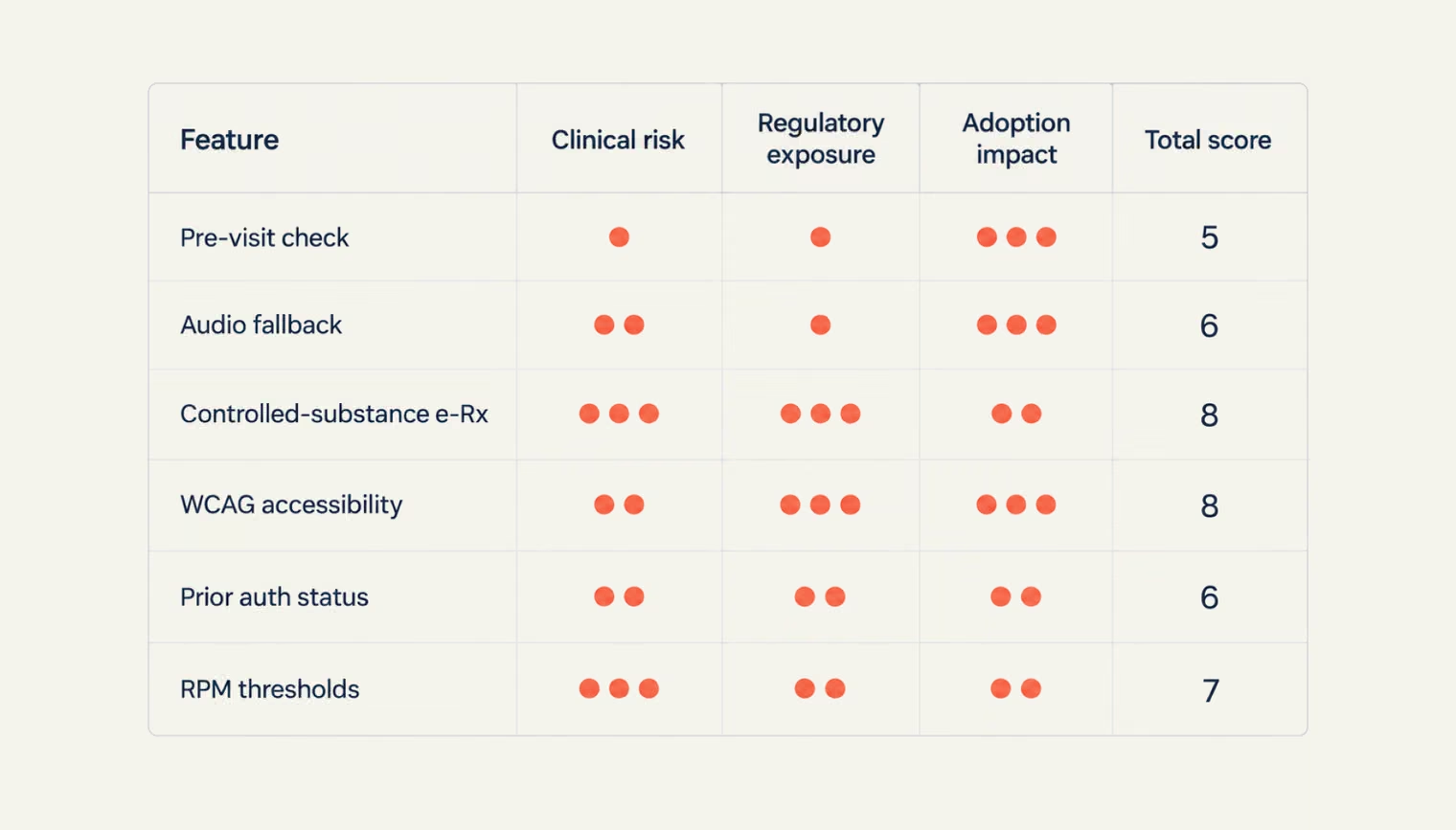
The highest-scoring features are where the roadmap should start. After that, the order depends on the care model: behavioral health, remote monitoring, and virtual urgent care will naturally produce different priorities. The goal is not to fit all 22 features into the build, but to know which ones your product cannot afford to get wrong.
{{banner-3}}
The core telehealth app features in 2027 cover four groups. Patient-facing features include identity verification, a pre-visit device check, intake, a live waiting room, video with audio-only fallback, and accessible screens. Clinician features include a single workspace, documentation support, and e-prescribing. Compliance features include MFA, audit logs, and licensure data. Continuity features include EHR integration, remote monitoring, and care-plan tasks. The right mix depends on your care model.
It requires sign-up with verification, scheduling, reliable video with a fallback, intake and consent, a clinician workspace, e-prescribing if you prescribe, and a baseline of security and accessibility. Our Telemedicine MVP Checklist covers 27 features — the 22 in this article plus five we evaluate on builds but cut from the list.
For Medicare, yes. The Consolidated Appropriations Act, 2026 extends coverage of audio-only telehealth through December 31, 2027. Commercial payers and state Medicaid programs set their own policies, so check the plans your patients use.
Organizations that receive HHS funding must make their web content and mobile apps conform to WCAG 2.1 Level AA. The deadline is May 11, 2027, for those with 15 or more employees, and May 10, 2028, for smaller ones. The rule covers apps provided through third parties, so telehealth vendors selling to hospitals and health centers should expect accessibility requirements in contracts.
The core product needs stay largely the same: reliable visits, accessible interfaces, clinician-friendly workflows, secure data handling, and strong integration with the wider care system. What changes is the regulatory and assurance framework around them. NHS-facing products may need to meet DTAC requirements covering clinical safety, data protection, security, interoperability, and usability, while accessibility expectations still align with WCAG 2.1 AA.
Yes. For many telemedicine health care teams, adding video visits, scheduling, and messaging to an existing patient portal or clinical platform is faster than launching a separate app. The work starts with a review of the current architecture and data model, then builds the telehealth features as an extension of what already exists.




.avif)