


Estimating software development time is one of the trickiest — yet essential — aspects of every project. Whether you’re building a mobile app, launching a SaaS platform, or developing an internal tool, accurate time estimation is fundamental to defining your budget, allocating resources, and ensuring client satisfaction. However, even experienced teams struggle to predict project timelines precisely.


When a company plans a new software product, the first question that arises is simple: “How long will it take?” The answer, however, is rarely straightforward. Software development time estimation is the process of forecasting how much time a team will need to design, build, test, and deliver a digital product. It blends technical insight, experience, and project data to create a timeline that’s realistic and achievable.
Time estimation isn’t just a planning exercise — it’s the foundation of project success. Accurate software estimates help align budgets, manage stakeholder expectations, and guide resource allocation. Misjudging timelines, on the other hand, can lead to cost overruns, rushed delivery, and quality issues.
If you’re interested in learning how time and cost are connected, you can explore our related post on How to estimate software development.
In this article, we will break down how professionals approach time estimation, what affects it, and how to make your software development estimates more reliable.
Key factors that affect development time
Even a well-organized project can take longer than expected. That’s because team size, architecture, requirements, and every piece of design change the pace of work. Below are the key factors that influence software development time estimation — and tips on how to address them.
Project complexity
The bigger or more technical your idea, the longer it’ll take. A simple scheduling tool can be built quickly. A large platform with complex architecture, multiple databases, and user levels takes much more time.
Framework choice, integrations, and performance needs all add hours. Advanced security or cross-platform features increase the load, too.
To see how these variables translate into cost, check our app cost estimation guide. It shows how feature depth and technology decisions directly affect both time and budget.
Requirements, clarity, and stability
Vague or changing requirements are one of the biggest time-killers. When the scope changes mid-project, teams have to backtrack, redesign, and rewrite the existing code.
To avoid this, set clear goals early. Confirm features, priorities, and deliverables before the first sprint begins. Keeping a stable scope protects your schedule and budget.
If you’re still shaping your first release, our MVP pricing overview shows that focusing on core features can help you launch sooner and gather feedback faster.
Design and UI complexity
Great design adds polish, but it also adds time. Custom animations, detailed visuals, and tailored user flows require extra rounds of feedback and implementation. The best idea here is to use simple layouts. Unlike interactive dashboards or motion-heavy apps that require more time, simple layouts load quickly. Aligning designers and developers early helps avoid long revisions later.
To help reduce your design timeline, explore our UI/UX design services. We streamline the visual process and user research to deliver precise, high-quality results efficiently.

Integration with other systems
Most modern software integrates with other systems, such as payment gateways, CRMs, analytics tools, or older internal systems. Each integration brings setup work, API testing, and dependency management. Delays often happen when third-party services change or documentation is incomplete. You should always reserve time for research and test runs before launch.
Working with specialists who understand these challenges can reduce risk. Learn how our product development services simplify integration planning and testing across diverse environments.
Resource constraints
Even the best timeline falls apart if you don’t have the right people or enough of them. Team size, experience level, and access to tools all influence the time it takes to complete tasks. For example, small teams may move efficiently on simple builds but struggle with large systems. Additionally, a lack of QA engineers or DevOps specialists can stretch schedules.
To help you scale or solve capacity issues, explore our software development outsourcing services. We can provide the flexible support needed to fill skill gaps and keep your project on schedule.
Unforeseen risks and delays
Every project runs into something unexpected, like bugs in libraries, hardware issues, sudden design changes, or communication delays. These “time eaters” can push delivery dates without warning.
The best way to handle them is to expect them. Therefore, add a 10–25 percent buffer to your time estimates and stay flexible as you proceed. Most importantly, ensure to communicate openly so minor issues don’t pile up.
“You can’t remove risk, but you can stop it from ruling your schedule.”
Even with perfect planning, projects inevitably face unforeseen technical challenges and dependency bottlenecks after launch, often leading to emergency fixes and overtime. If you need structured post-launch assistance, explore our application support and maintenance services to stabilize and optimize systems after deployment.
Common estimation techniques and methodologies
There’s no single right way to estimate time for software projects. Each method has its strengths, depending on your goals, data, and team setup. The best approach often combines several techniques for a more balanced view.
Here are the most common methods for creating reliable software development estimates.
Analogous estimation
Analogous estimation uses past experience as your reference point. You compare your current project to similar ones your team or company has already completed.
If the last e-commerce platform took six months, a new one with the same complexity might take around that long, too. Adjust the estimate for any differences: new features, integrations, or design changes.
This approach works well for early planning when you need a quick overview and don’t yet have all the details. However, it depends heavily on how accurate your past data is.
“Good estimation starts with good records. Every finished project becomes tomorrow’s benchmark.”
Bottom-up vs. top-down estimation
These two techniques take opposite routes to reach an estimate.
Bottom-up estimation starts small. You break the project into small parts, such as features, modules, or tasks, and estimate each one. Then you add them up to get the total. It’s detailed and often the most accurate method, especially for large or technical builds.
On the other hand, top-down estimation starts from the big picture. You look at the overall project goal and assign a general timeframe, then divide that into smaller stages. This method is faster but less precise.
A balanced approach often uses both. Top-down helps set expectations early, while bottom-up provides the validation you need as planning advances.
Parametric estimation
Parametric estimation relies on data. It uses measurable relationships between past work and new tasks to calculate time.
For example, if your team knows that developing one API endpoint usually takes five hours, and the new system needs 40 endpoints, you can multiply that to predict the total hours required.
“Numbers don’t replace judgment, but they make your judgment sharper.”
This method works best when you have consistent metrics and repeatable processes. With those in place, estimating software development time becomes much more objective.
Three-point estimation and PERT
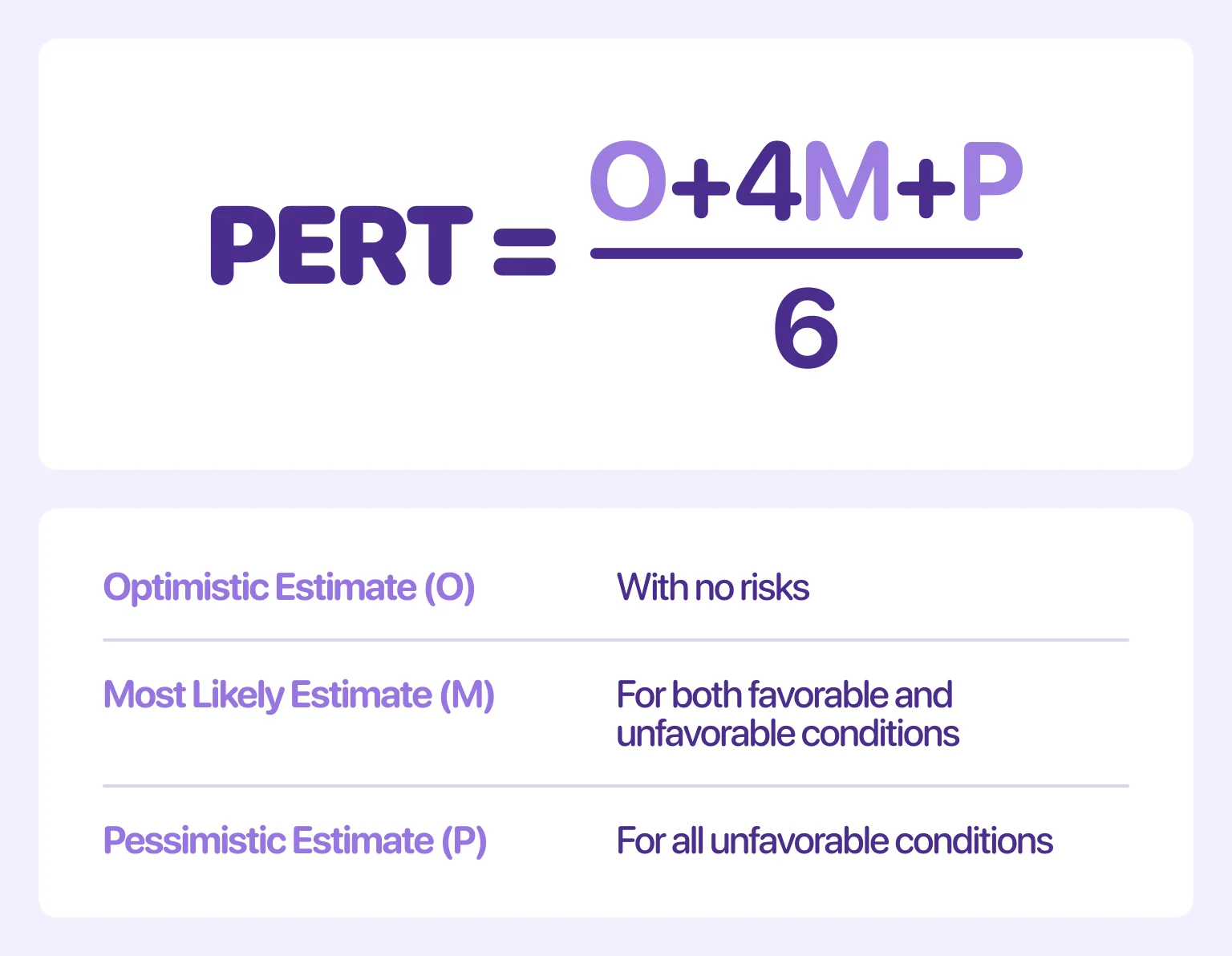
Three-point estimation, which includes the PERT method, uses three values to find a balanced estimate:
- Optimistic — the fastest possible completion time if everything goes right
- Pessimistic — the longest possible time if things go wrong
- Most likely — the realistic middle point
You calculate the final estimated time to complete by using this formula: PERT Estimate = (O + 4 x M + P) / 6. It assigns four times the weight to the “Most likely” outcome, which helps account for uncertainty and keeps your plan flexible.
Teams use this technique when working with new technologies or projects that carry a higher risk. It’s a simple way to include unpredictability without overcomplicating your process.
Function-point analysis
Function-point analysis focuses on what the software does rather than how it’s built. It measures functional components like inputs, outputs, data processing, and interfaces, and uses those to predict total effort.
The more features and interactions a product has, the longer the software development time estimation will be. This method works well for business systems, CRMs, or platforms with structured operations. It’s less about lines of code and more about end-user functionality, which makes it ideal for comparing productivity between teams or vendors.
Agile-based estimation
In Agile projects, you estimate effort instead of fixed time. Teams assign “story points” to tasks based on complexity, then track how many points they can finish per sprint. This becomes their “velocity,” which helps predict how long future work will take.
Still, the focus stays on collaboration and adaptability. Estimates evolve as the project moves forward, and teams adjust based on progress rather than rigid deadlines. If you want help building and maintaining Agile-ready software, our end-to-end product development services can support you with teams experienced in sprint-based planning and delivery cycles.
Step-by-step time estimation process
Once you understand the main factors and methods, the next step is applying them in the right order. Estimation works best when it follows a structured path — starting broad, then refining details as you learn more about the project.
Here’s a seven-step process you can follow for accurate software development estimates every time.
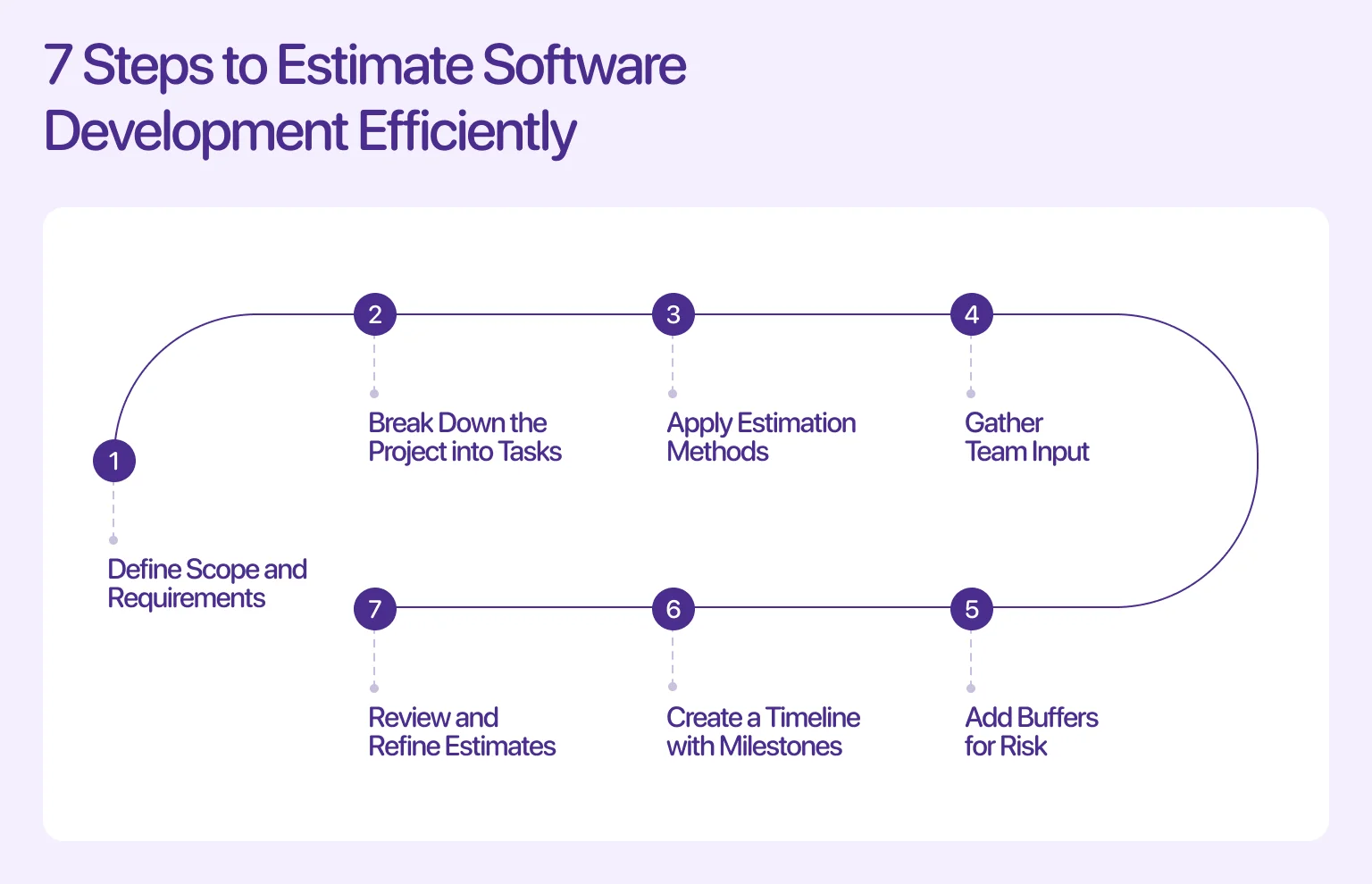
Step 1 — define scope and requirements
Every good estimate begins with clarity. You can’t predict development time without knowing what you’re building.
Define what the software must do, who will use it, and what outcomes it needs to deliver. Document features, integrations, and expected performance — these form the foundation for all later calculations.
“The clearer your scope, the fewer surprises you’ll face.”
Teams that skip this step usually spend more time fixing misunderstandings than writing code. For this reason, align with stakeholders early to make sure everyone agrees on goals and deliverables.
Step 2 — break down the project into tasks
A large project can feel overwhelming until you split it into smaller parts. Create a Work Breakdown Structure (WBS) that lists every module, feature, and supporting task.
Breaking things down helps your team see how each part fits together, making estimation easier. For example, instead of “build an authentication system,” write “create a login API,” “set up password reset,” and “test user sessions.” This detailed view exposes dependencies and hidden work you might otherwise miss. It also makes it easier to assign responsibilities later.
Step 3 — apply estimation methods
Once your task list is ready, apply the estimation method that fits best. For complex systems, you might use bottom-up estimation, while projects with some uncertainty could benefit from a combination of parametric and three-point estimation.
Choose the method that reflects your team’s experience and available data. You should use the same logic across all tasks so your total time estimate stays balanced. Remember that consistency is the key.
If needed, round individual task estimates up slightly rather than down. It’s always easier to finish early than explain why something’s late.
Step 4 — gather team input
No one knows the workload better than the people doing it. Bring your developers, designers, and QA engineers into the discussion. Their experience adds context that numbers alone can’t provide.
Hold short estimation sessions to review task lists and confirm or adjust time ranges. Encourage open conversation so potential issues surface early. And just like that, collaboration builds ownership, improves accuracy, and helps the whole team stay on the same page about the software development timeline.
Step 5 — add buffers for risk
Even the best plan needs breathing room. That’s why you need to add a buffer to cover delays, testing rounds, or last-minute feedback. You can learn from successful project managers and use a margin of 10–25%, depending on project complexity and risk level.
For example, if your core estimate is 10 weeks, adding a 20% buffer gives you 12 weeks — a realistic cushion that can absorb unexpected issues without hurting delivery dates.
Step 6 — create a timeline with milestones
Now that you have your total time, turn it into a schedule. Divide your project into milestones: planning, design, development, testing, and deployment, and assign each a target date.
Visualize dependencies between tasks, so you know what must be completed before the next phase begins. Tools like Gantt charts or sprint boards, in particular, make this step easier to manage. A visible timeline, in general, keeps your team accountable and gives clients or stakeholders a clear view of progress.
Step 7 — review and refine estimates
Estimation isn’t a one-time exercise. As development moves forward, review your assumptions against real progress. Adjust your software development estimates based on completed work and lessons learned.
Refining estimates keeps your project grounded in reality. It also builds a valuable knowledge base for future projects, making each new forecast more accurate than the last.
Estimating time across project phases
Each stage of development has its own pace. Some require creative work and collaboration, while others depend on testing or technical precision. Estimating time across phases helps you identify potential delays and plan resources accordingly. So, how do you approach software development time estimation for each phase of a project?
Discovery and planning phase
This phase is where ideas take shape. It includes researching the problem, analyzing requirements, and creating early wireframes or mockups. Not only that, the discovery and planning phase sets the direction for everything that follows.
Depending on the project’s complexity, this stage can take anywhere from a few days to several weeks. The larger the system is, the longer it takes to build, and the more workshops and validation it needs before development begins. During this time, teams also document technical details, such as architecture choices, API strategies, and security considerations.
To see how to gather complete and accurate requirements, explore our article on proper requirements gathering.
Design phase
Once requirements are finalized, design work begins. This phase covers everything from UX wireframes to high-fidelity UI mockups and interactive prototypes.
The more visual or custom your product, the longer this step takes. Simple dashboards may need a week or two; multi-platform applications with animations can take much longer. It’s also common to include review rounds with stakeholders or end users for feedback before moving to development. Each review adds time but improves the final experience.
If you’d like professional help creating user-focused designs, our UI/UX design services can guide your project from concept to clickable prototype.
Development phase
The development phase is where your product begins to take shape. It includes frontend, backend, database setup, and integration work. How long this takes depends on the tech stack, spec quality, and architecture.
Using reusable components or frameworks can speed up the process, while complex custom logic or multiple third-party integrations typically require more time. The majority of your overall timeline is often spent here, making efficiency critical. Proper dependency management, ensuring one task doesn't block another, is essential for momentum.
Poorly defined tasks or missing documentation can lead to costly rework, significantly stretching the schedule. Meanwhile, regular testing during this phase prevents bugs from piling up. Here, teams often use Agile sprints to organize work into short, measurable cycles.
If your organization needs help building scalable solutions, our custom software development services can provide full-stack teams who deliver efficiently across each sprint.
QA and testing phase
No project is complete without testing. QA ensures the software works as intended, meets requirements, and provides a smooth user experience. This phase includes unit testing, regression testing, integration testing, and user acceptance testing (UAT).
The time required depends on system size and how many iterations are needed to fix issues. Teams often significantly underestimate the effort for this stage, leading to rushed releases. Complex products or those handling sensitive data require longer, more rigorous testing protocols.
Investing in automated testing tools upfront can save considerable time and resources in the long run by accelerating these repetitive cycles. Plan at least one full testing cycle per major release, with additional time for retesting after bug fixes. A strong QA process protects both quality and schedule in the long run.
Best practices for more accurate time estimation
Even with solid methods and structured processes, estimating software development time can still go wrong if the workflow breaks down. So, let’s recap some previously mentioned practices and introduce new ones to help teams stay realistic, consistent, and transparent.
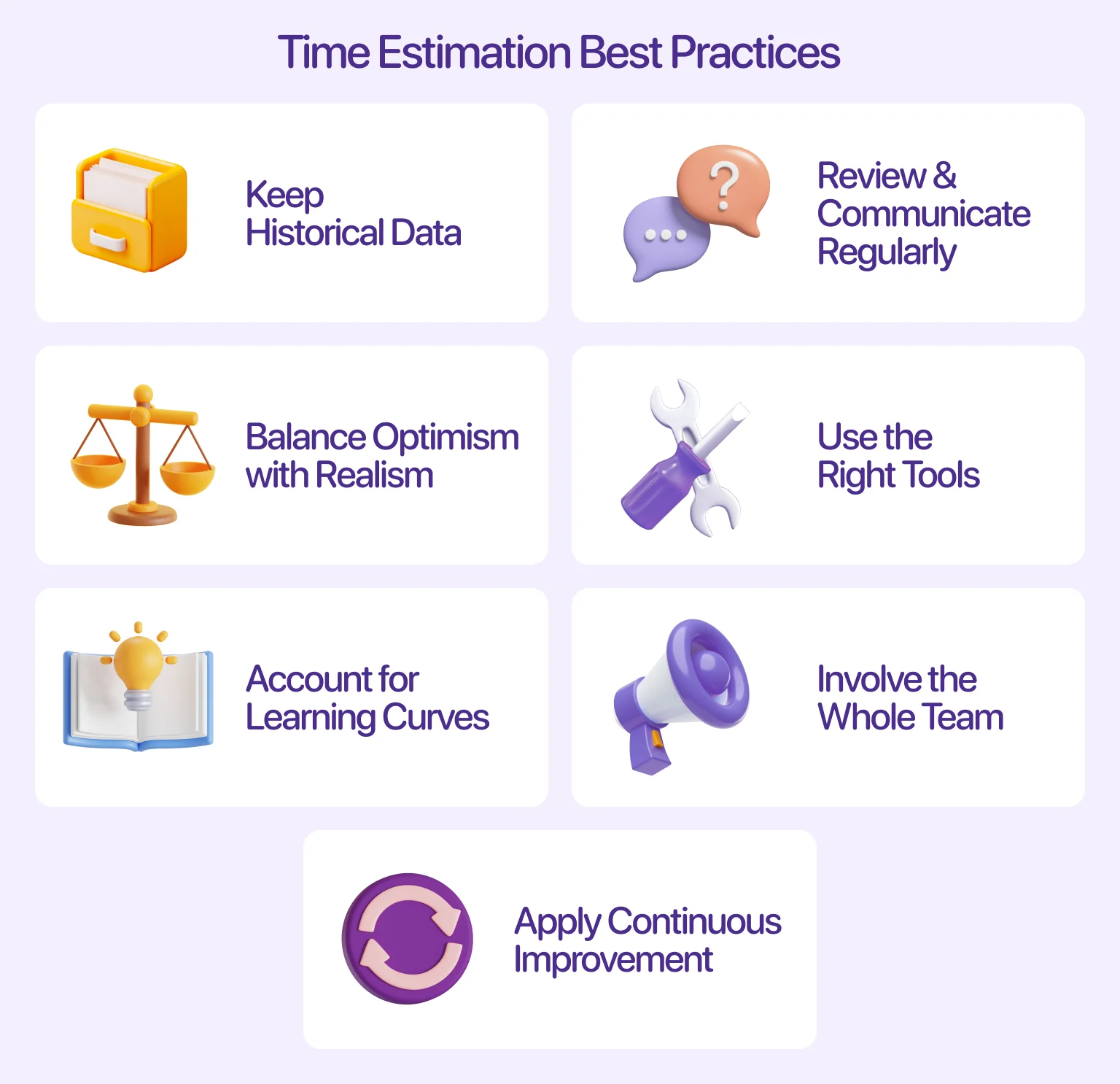
- Keep historical data
The data we collect during every project over time creates a database that improves accuracy and reveals patterns. This historical data is important for future estimates, allowing you to move beyond guesswork and apply a statistically reliable multiplier to new tasks. More importantly, reviewing discrepancies helps your team learn where complexity was underestimated, ensuring continuous improvement in forecasting.
- Review and communicate regularly
You should communicate estimates transparently with stakeholders and review them regularly. These check-ins keep teams aligned and give clients realistic updates on progress. Moreover, by officially updating your time estimates at the beginning of every work period (like a sprint or milestone), you change the estimate from a fixed paper plan into a flexible tool you actively use to manage the project. This open communication builds trust and lets your business and marketing teams schedule their launches with much more certainty.
- Balance optimism with realism
Build estimates with real-world factors in mind: meetings, feedback rounds, and context switching all take time. A key step is adding a calculated contingency buffer, usually 10–25% of the total work, right into your project schedule. This buffer protects your deadline from common problems and unexpected technical issues.
- Use the right tools
It’s common knowledge that project management and tracking tools simplify updates and help visualize your software development estimates. You can use platforms such as Jira, ClickUp, or Trello to keep tasks visible while also supporting Agile practices like story points and sprint tracking.
The key benefit is that these tools automatically track actual time spent against the initial estimate. Thus, you receive instant feedback on team velocity and efficiency, enabling you to build more accurate historical metrics for future forecasts.
- Account for learning curves
When a project uses new technologies or frameworks, remember to include learning time, since developers might need extra hours to test libraries or adjust unfamiliar workflows.
It is a common mistake not to set aside time for spikes or research (which is when the team investigates a new tool or hard integration). Blocking dedicated time helps developers avoid getting stuck on unfamiliar processes, enabling them to learn faster and produce higher-quality code.
- Involve the whole team
Time estimation improves when everyone contributes. Designers, QA engineers, and DevOps specialists often spot dependencies that developers might overlook.
Methods like Planning Poker or Wideband Delphi are great for collecting different expert opinions in an organized way. It allows team members to check each other’s work and makes sure all effort, even for specialized testing, is correctly included in the estimate.
- Apply continuous improvement
After a major project stage is completed, hold an official review meeting to document exactly where the estimates were incorrect and why they failed. This focus on institutional learning turns single mistakes into useful improvements for your process, so every finished project helps teach the team how to estimate better next time.
Estimation is about turning time into value
Accurate software development time estimation doesn’t happen by chance. It’s the result of careful planning, team collaboration, and continuous refinement. When you break down tasks, choose the right estimation methods, and communicate often, you create a predictable process that saves both time and money.
Before you start your next project, commit to aligning everyone on scope, complexity, and available resources. A few extra hours spent planning at the start can save weeks later on.
FAQ
Why invest in branding services services services?
What’s the difference between top-down and bottom-up estimation?
Top-down estimation begins with a total duration and distributes it across phases, whereas bottom-up estimation calculates the duration of each task and sums the total. The latter is more accurate but requires detailed information.
How much buffer time should be added to an estimate?
It depends on project complexity and risk. In general, add 10–25% to your estimated time to complete. Smaller internal projects can use the lower range, while larger or high-risk projects benefit from a wider buffer. This helps absorb delays, testing rounds, or scope adjustments without breaking deadlines.
Which estimation method is most accurate?
The bottom-up method is often the most reliable because it accounts for every feature and dependency. However, combining multiple approaches, such as parametric estimation and three-point estimation, can further enhance accuracy.
How often should estimates be reviewed?
Check your software development estimates at each milestone or sprint. Comparing planned versus actual time helps you identify trends and make adjustments early. Estimation should evolve as the project moves forward. Regular review keeps your timeline realistic and your communication transparent.
Can estimation be done without historical data?
Yes, though it takes more care. When you lack past metrics, rely on expert judgment and team discussions. Break tasks into smaller parts, use relative sizing (such as story points), and document the results carefully for future reference.