







A Node.js API that answered in milliseconds at launch can start timing out under a few thousand concurrent users, on a server whose CPU graph looks mostly idle. A bigger machine feels like the obvious fix, and for a single-threaded runtime, it often changes surprisingly little.
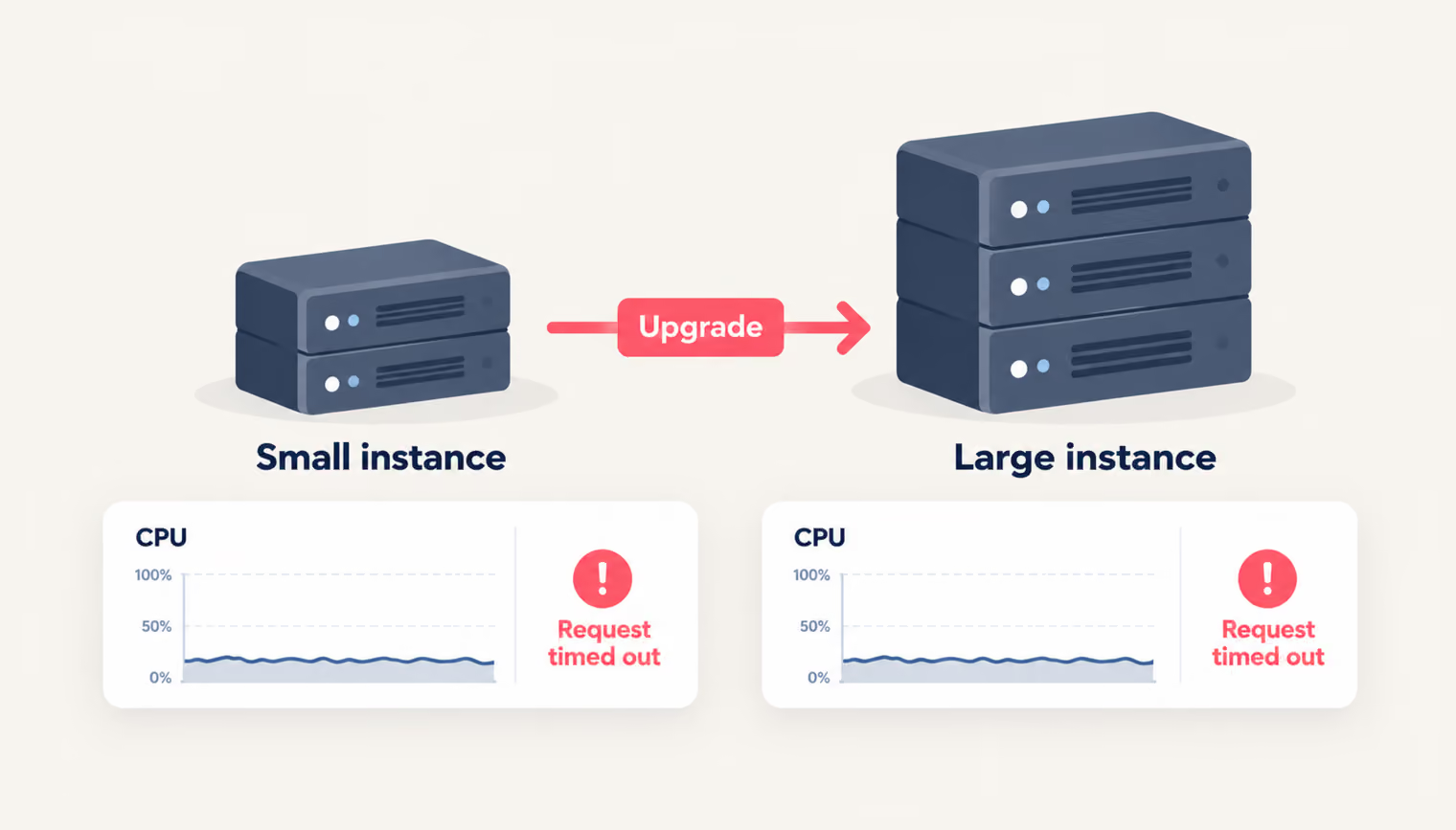
The reason lies in how Node.js runs JavaScript. One event loop executes the code on a single core, so a 16-core instance can report around 6% total CPU while that one core sits pinned at 100% and requests queue up behind it. Latency climbs in the logs long before anything crashes, then Nginx starts returning 504 Gateway Timeout errors, or Cloudflare reports the same failure as a 524. Extra capacity helps once the app can reach it, and which capacity to add depends on where the queue forms.
This guide covers when to scale a Node.js or Next.js backend up, when to scale it out, and how to set up each approach, from the code to AWS and the database.
{{banner}}
The wall is the point where a server can no longer process requests as fast as they arrive. Getting past it depends on two things: what scaling actually adds to a system, and how Node.js uses the hardware it runs on. Let’s take them in that order.
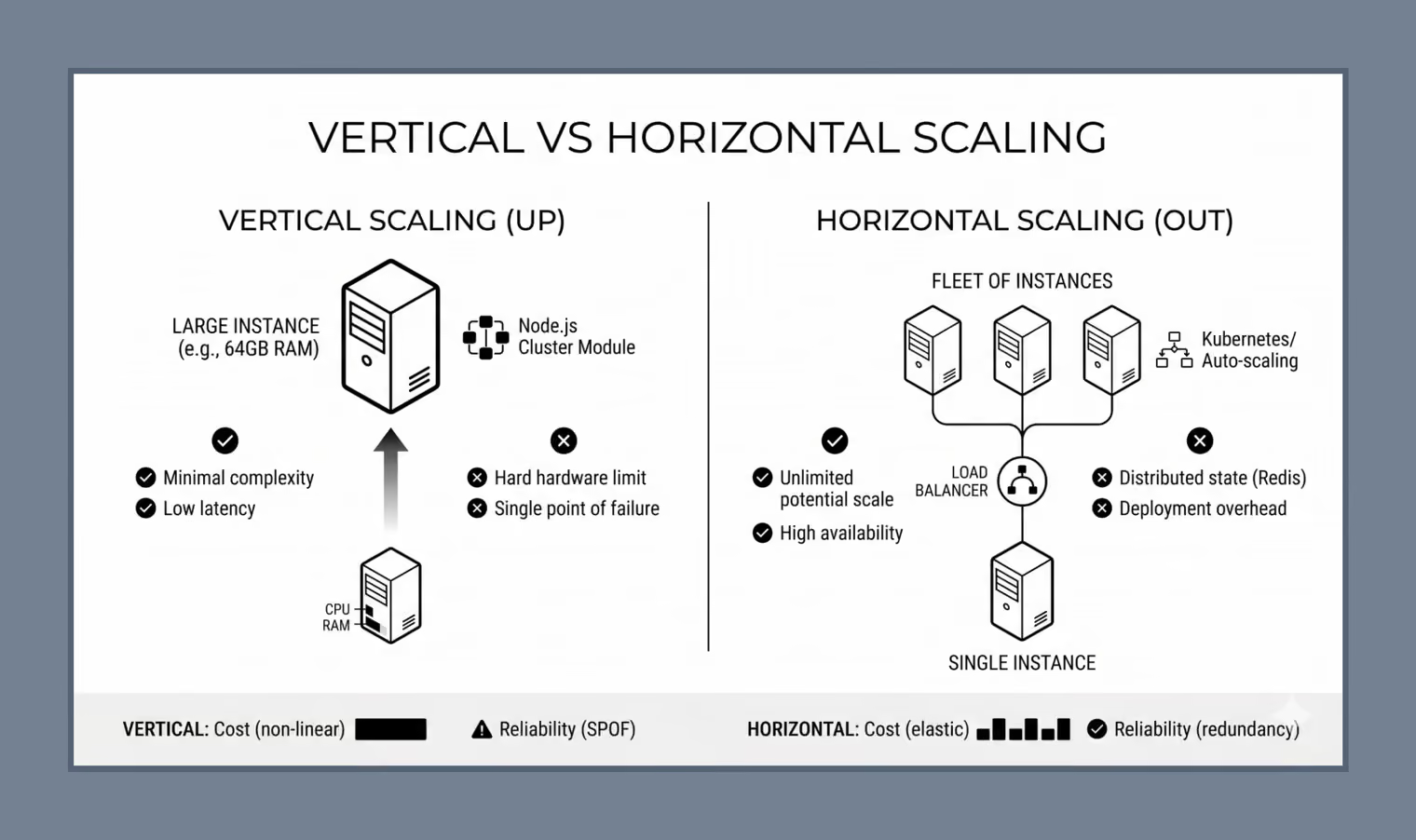
Scaling is the architectural strategy of increasing a system’s capacity to handle growing amounts of work. For a backend, it means keeping response time steady as the request count climbs from 100 requests per second (RPS) to 10,000. The way there is to add resources, either by making the existing “engine” more powerful or by adding more “engines” to the fleet.
A single larger server keeps the architecture simple, but it runs into a hardware limit, costs climb steeply with each size up, and it remains a single point of failure. A fleet raises the capacity ceiling and removes the single-server point of failure, in exchange for shared state and more deployment overhead.
Java and .NET commonly use multithreaded execution models that can spread application work across multiple CPU cores. Node.js runs all JavaScript on a single thread and stays fast by avoiding waits on slow operations. Network calls go to the operating system, file and crypto work goes to a small background thread pool, and the loop moves on to the next request while results arrive.
For an API that mostly queries databases and calls other services, this model holds thousands of open connections on modest hardware. Its limits, and what they mean for scaling, come down to three linked facts:
| The single-threaded nature | The bottleneck | The scaling implication |
|---|---|---|
| All JavaScript runs on one thread: the event loop. It works like a single-lane road: many I/O tasks can be in progress at once, while only one piece of code moves along the lane at any given moment. | A CPU-heavy task, such as resizing an image or generating a report, stops in the middle of that lane. Every request behind it waits until the task finishes, including requests that need a millisecond of work. | One process runs its JavaScript on one CPU core. Extra cores do not automatically increase JavaScript execution capacity for that process. To use more CPU cores for application work, Node.js can run multiple processes or move CPU-heavy work to worker threads. That is where vertical scaling for Node.js begins. |
Vertical scaling makes the existing server bigger, with more vCPUs, more memory, and faster disks. In many multithreaded stacks, extra CPU capacity can be used without changing the application architecture.
A Node.js app gets the extra memory right away, but the new cores only once it is set up to run across them. So there are three jobs: spreading a plain Node.js app across cores, doing the same for Next.js, and resizing the machine itself on AWS.
The starting point is a standard Express app with one deliberately expensive route. Its loop counts to a billion, about two seconds of pure CPU work, and however large the machine is, the whole app shares a single core:
const express = require('express');
const app = express();

app.get('/heavy-task', (req, res) => {
  // A task that takes 2 seconds to calculate
  let count = 0;
  for (let i = 0; i < 1e9; i++) count++;
  res.send(`Task finished: ${count}`);
});

app.listen(3000, () => console.log('Server running on port 3000'));
The cluster module lets a Node.js app run multiple worker processes across the available CPU cores. The primary process checks how many CPUs the machine has, forks one worker per core, and replaces any worker that dies. Each worker runs its own copy of the server on the same port:
const cluster = require('cluster');
const os = require('os');
const express = require('express');

if (cluster.isPrimary) {
  const numCPUs = os.cpus().length;
  console.log(`Primary process is running. Spawning ${numCPUs} workers...`);

  for (let i = 0; i < numCPUs; i++) {
    cluster.fork();
  }

  cluster.on('exit', (worker) => {
    console.log(`Worker ${worker.process.pid} died. Spawning a replacement...`);
    cluster.fork();
  });
} else {
  const app = express();

  app.get('/', (req, res) => {
    res.send(`Handled by worker process: ${process.pid}`);
  });

  app.listen(3000, () => {
    console.log(`Worker ${process.pid} started`);
  });
}
Each worker runs its own event loop and can handle incoming connections independently, allowing the application to use more of the machine’s CPU capacity. An 8-core machine now runs eight lanes instead of one. The route in this version reports which worker answered, so a few repeated requests show the load being spread.
Clustering has a blind spot, though, and it’s the slow route. The two-second /heavy-task loop still locks up the worker that receives it, and the requests queued on that worker sit and wait. Node.js has worker_threads for this case: the loop runs on a separate thread while the worker keeps answering. A job heavier still, such as a large report, belongs in a message queue that hands it to other servers. Memory is the other catch. Workers don’t share it, so a session saved by one worker is invisible to the rest, the same situation as on separate servers.
One process per core can be one of the simplest ways to get more from a Node.js server.
Next.js apps rarely use the cluster module directly. The framework is built to run on many kinds of infrastructure, and how it scales up depends on where it’s hosted:
pm2 start node_modules/next/dist/bin/next --name app -i max -- start, it runs one Next.js process per CPU core and restarts any that crash.Serverless architecture also blurs the line between vertical and horizontal scaling. You can give each function instance more resources, while the platform runs more instances as traffic grows.
On EC2, scaling up means changing the instance type, for example from a t3.micro (2 vCPUs, 1 GiB of memory) to an m7i.2xlarge (8 vCPUs, 32 GiB). For Node.js, the vCPU count matters most. Moving between two types with the same number of vCPUs, such as a t3.micro and an m5.large, adds memory and gives the cluster module nothing new to use.
The switch takes minutes: stop the instance, choose the new type, and start it again. Three constraints come with it:
A fleet behind a load balancer works if any instance can serve any request. No instance should be the only place where shared application state is stored, such as session data or persistent uploads. If Server A knows something that Server B doesn’t, users lose their state the moment the load balancer sends them elsewhere. Making instances interchangeable is most of the work, first in plain Express, then in Next.js, and then on the AWS services that run the fleet.
Sessions are where the local state usually hides. The default setup of express-session keeps them in a MemoryStore inside the Node.js process. That works on one server and breaks as soon as a second one joins, because each process can see only the sessions it created itself:
const session = require('express-session');

// Default MemoryStore stores sessions in local RAM
app.use(session({
  secret: 'keyboard cat',
  resave: false,
  saveUninitialized: true,
  cookie: { secure: false }
}));
The fix keeps the same middleware and points its store at Redis, which every instance reaches over the network:
const session = require('express-session');
const { RedisStore } = require('connect-redis');
const { createClient } = require('redis');

const redisClient = createClient({
  url: 'redis://shared-redis-server:6379'
});
redisClient.connect().catch(console.error);

app.use(session({
  store: new RedisStore({ client: redisClient }),
  secret: 'keyboard cat',
  resave: false,
  saveUninitialized: false
}));
The session now lives outside every app instance. A user’s first request can land on Server A, and the next one on Server B, and both servers read the same session from Redis. Load balancers also offer sticky sessions, which pin each user to one server. Sticky sessions can keep a user on the same instance, but if session state still lives only in that instance’s memory, a failure or replacement can still interrupt the session.
The same rule applies to Next.js development, since requests from one visitor can be handled by different instances. Anything an instance keeps for itself has to move to a service the whole fleet shares:
| Kept locally | Shared replacement |
|---|---|
| In-memory variables and caches | Redis |
| Session data | Redis |
| Uploaded files on the local disk | S3 or other object storage |
| App data in local files | PostgreSQL, MySQL or MongoDB |
The pattern is clearly with a cache. A plain object lives and dies with one process:
// Bad: local memory
let cache = {};
A Redis key is visible to every instance at once:
// Better: shared storage like Redis
await redis.set("key", "value");
await redis.get("key");
Next.js also keeps a state of its own that needs the same treatment. By default, its server cache for generated pages and fetched data sits on each instance’s local disk, so one instance can serve a page that another has already validated.
Two more settings have to match across the fleet:
NEXT_SERVER_ACTIONS_ENCRYPTION_KEY prevents that.deploymentId lets Next.js detect when a browser holds assets from the old version and reload the page.For cloud app development on AWS, three managed services cover the parts of a fleet that teams would otherwise build and run themselves:
| Service | Role in the fleet |
|---|---|
| Elastic Load Balancing | The entry point. It receives all traffic, checks each instance’s health, and sends requests only to instances that pass. |
| ASG (Auto Scaling group) | Adds or terminates EC2 instances based on demand. A target-tracking policy keeps a metric near a set value, for example, average CPU at 60%, and resizes the fleet to keep it there. |
| ElastiCache | Managed Redis-compatible storage for sessions, caches, and rate-limit counters, so instances do not depend on local memory for that state. |
The right choice depends on how traffic behaves and how much downtime the product can tolerate. The following criteria show where each approach fits:
| Criterion | Vertical scaling | Horizontal scaling |
|---|---|---|
| Capacity limit | The largest instance in the family | Grows with each added server, as long as shared infrastructure can keep up |
| Failure impact | One server failing takes the app down | A failed instance drops out and the load balancer routes around it |
| Cost | Rises with larger instance sizes and is paid continuously | Grows in small steps and shrinks when traffic drops |
| Scaling event | Stop, resize and restart, with downtime | New instances join behind the load balancer without downtime |
| State | Can stay in process memory | Shared application state should live in services such as Redis, a database, or object storage |
| Setup and debugging | One machine, one set of logs | A load balancer, shared stores and logs spread across instances |
| Best fit | Early-stage products and steady, predictable load | Uneven traffic and apps that must stay available through failures |
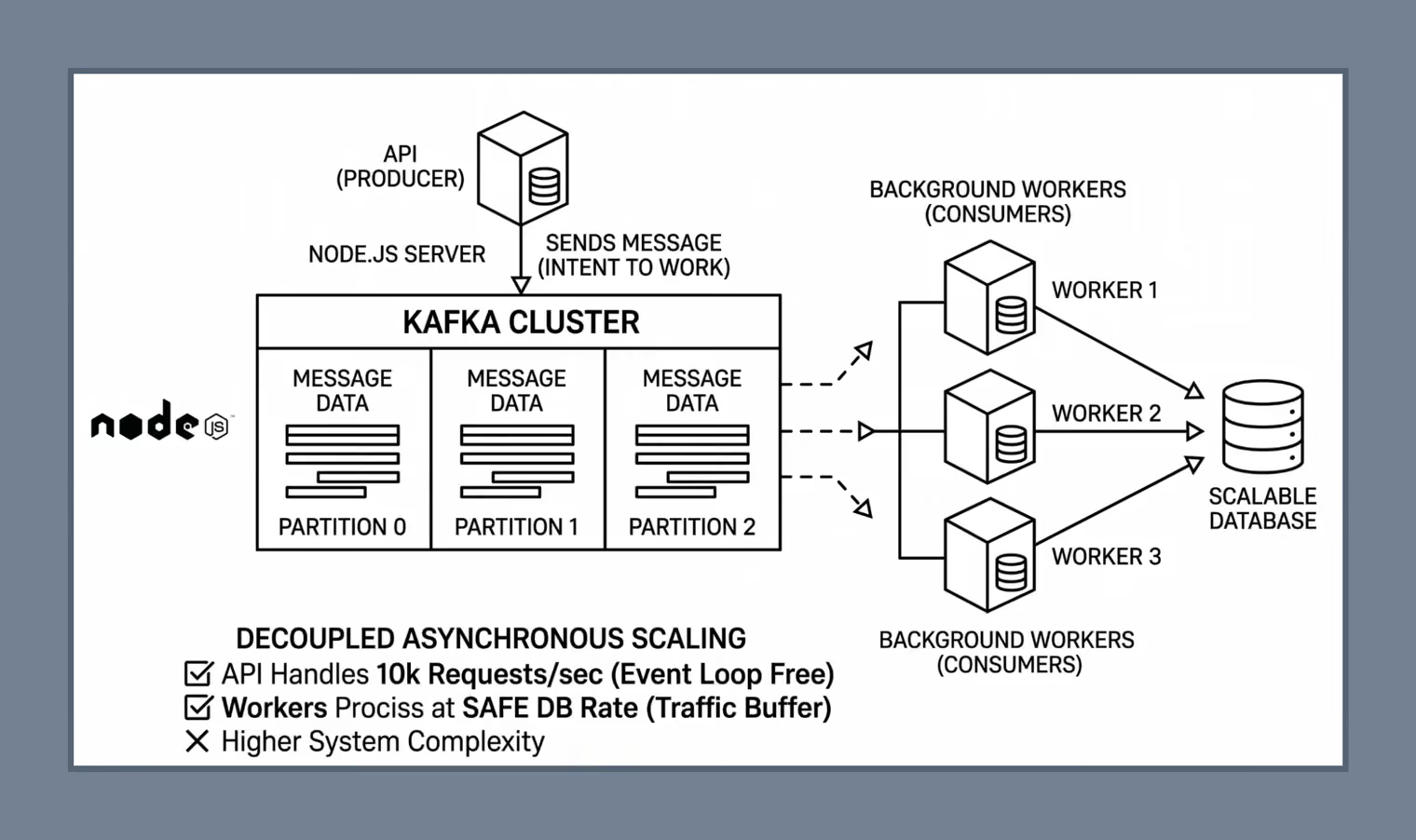
Clustering and extra servers increase how many requests a system can handle at once. Asynchronous scaling cuts how much work each request does while the user waits. When a user asks for something heavy, such as a 50 MB PDF report, the API can’t afford to tie up its event loop until the calculation finishes. It records the request, hands the job to a background process, and responds straight away with 202 Accepted.
In Kafka’s terms, the API is the producer, and a separate set of worker servers, the consumers, picks up the job. Kafka is one of the more operationally demanding tools for this pattern, so it matters as much to understand when it pays off as how it works.
It is often described as a distributed streaming platform. In practice, three components carry most of that meaning:
Kafka writes messages to disk and replicates them across brokers, so a crashed worker’s messages stay in the cluster. Its replacement resumes from the last committed offset. Because of this, a message can occasionally be processed twice, since Kafka’s default delivery guarantee is at-least-once. Workers that send emails or charge cards need to be idempotent, for example, by recording each job ID before acting on it.
Throughput grows as brokers and partitions are added, which is why Kafka runs behind large clickstream and telemetry pipelines. The full path runs from the API through the partitions to a group of workers writing to the database:
Kafka is often worth its operational cost in three situations:
Typical workloads include real-time fraud checks on financial transactions, clickstream and telemetry data from millions of active users, and heavy PDF or CSV reports.
Kafka turns a traffic spike into a steady stream the database can actually handle.
For many systems, Kafka adds more work than it removes:
Report exports are usually where teams first try offloading, for a fairly unglamorous reason: they’re what users complain about. Take a /generate-report route in Express that turns a month of sales data into a PDF. At the end of the month, finance and every regional manager hit “Export” within the same hour (it always seems to be the same hour), and that route is the first to time out. Moving it to Kafka takes three pieces of code.
The whole route is one await on heavyReportCalculation and a res.send with the finished PDF. Nothing reaches the browser until that await resolves, which, for a month of sales data, can take tens of seconds. The calculation also runs on the thread that serves every other route, so the sales overview page freezes for as long as the exports keep running:
app.post('/generate-report', async (req, res) => {
  // ❌ Blocks event loop (bad)
  const report = await heavyReportCalculation(req.body.data);
  res.send(report);
});
The new route publishes a message to the report-requests topic and responds with 202 Accepted within milliseconds, telling the client the work is queued:
const { Kafka } = require('kafkajs');

const kafka = new Kafka({
  clientId: 'api-service',
  brokers: ['localhost:9092'],
});

const producer = kafka.producer();

async function startProducer() {
  await producer.connect();
}

startProducer();

app.post('/generate-report', async (req, res) => {
  await producer.send({
    topic: 'report-requests',
    messages: [
      { value: JSON.stringify({ data: req.body.data }) }
    ],
  });

  // ✅ Immediate response
  res.status(202).json({
    message: 'Report is being processed',
  });
});
The heavy work moves to a separate process subscribed to the same topic. It runs on its own servers and scales by adding instances to the report-group consumer group, up to the topic’s partition count:
const { Kafka } = require('kafkajs');

const kafka = new Kafka({
  clientId: 'report-worker',
  brokers: ['localhost:9092'],
});

const consumer = kafka.consumer({ groupId: 'report-group' });

async function startConsumer() {
  await consumer.connect();
  await consumer.subscribe({ topic: 'report-requests', fromBeginning: false });

  await consumer.run({
    eachMessage: async ({ message }) => {
      const payload = JSON.parse(message.value.toString());

      console.log('Processing report...');

      const result = await heavyReportCalculation(payload.data);

      console.log('Report ready:', result);

      // You could also:
      // - save to DB
      // - upload to S3
      // - send email to user
    },
  });
}

startConsumer();
The consumer’s last step decides how the result reaches the user. The comments in the code list the usual options: save it to a database for the client to poll, upload the file to S3, or email a link.
The database is often one of the first layers to struggle under load, and one of the hardest to scale, because every copy of the data has to stay consistent. Horizontal scaling of the app makes the pressure worse: each new instance and each cluster worker opens its own connections and sends its own queries to the same database. There are four ways to relieve it, from simply buying a larger instance to rearranging how the data itself is stored.
On Amazon RDS, scaling up means changing the DB instance class to one with more CPU, memory, and storage throughput. The change requires a reboot, so it comes with a short window of downtime. On engines licensed per vCPU, such as SQL Server, extra cores also raise the license bill, and RDS lets teams set how many vCPUs an instance actually uses, so a larger class can add memory without paying for idle cores.
For a relational database, this matters more than it does for the app servers. In a standard setup, every write (INSERT, UPDATE, and DELETE) goes to a single primary instance. Replicas can take reads off the primary, but in a standard primary-replica setup writes still go to one primary, so scaling that primary is often the first way to absorb a heavier write workload. Its limit is the largest instance class available. Past that point, the remaining option is splitting the data itself.
A read replica is a copy of the primary database that serves queries. The application can route SELECT queries to the replicas. RDS for MySQL and PostgreSQL support multiple read replicas, which suits apps dominated by reads, such as feeds, dashboards, and catalogs, since several replicas can answer queries at once.
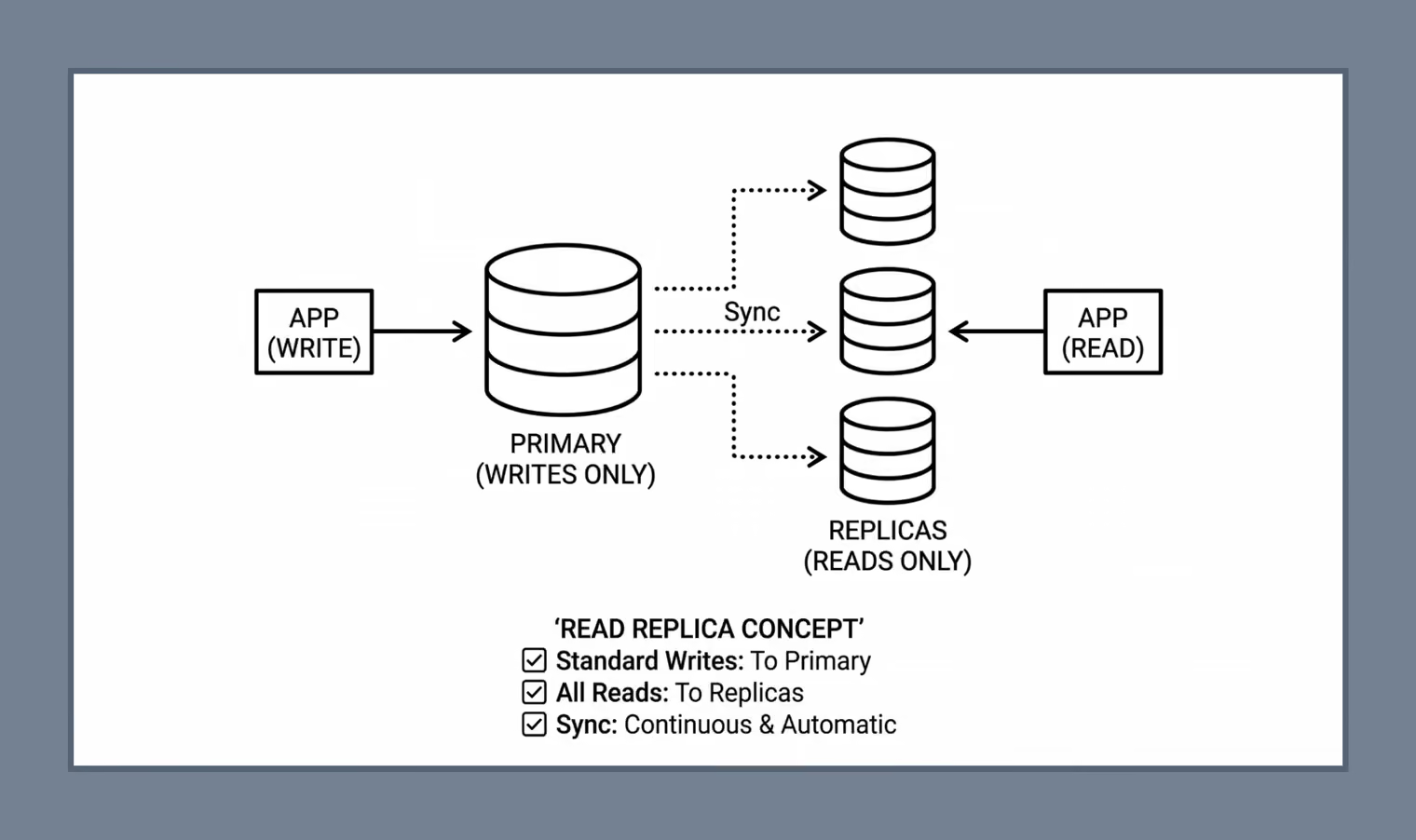
Replicas are updated asynchronously, so a replica can trail the primary by a moment. A user who saves a profile and immediately reloads it may see the old version if that read lands on a lagging replica. The usual fix is to send reads that follow a user’s own write to the primary for a short period.
Sharding splits the data into parts and stores each part on a separate database server. A shard key decides where each record lives. In the simplest version, users whose names start with A–G go to one shard, H–N to a second, and O–Z to a third.
A query router in the app reads the user ID on every request and sends it to the shard that owns that range. Each shard works independently and fast, at the cost of more servers to manage and data that is hard to redistribute later:
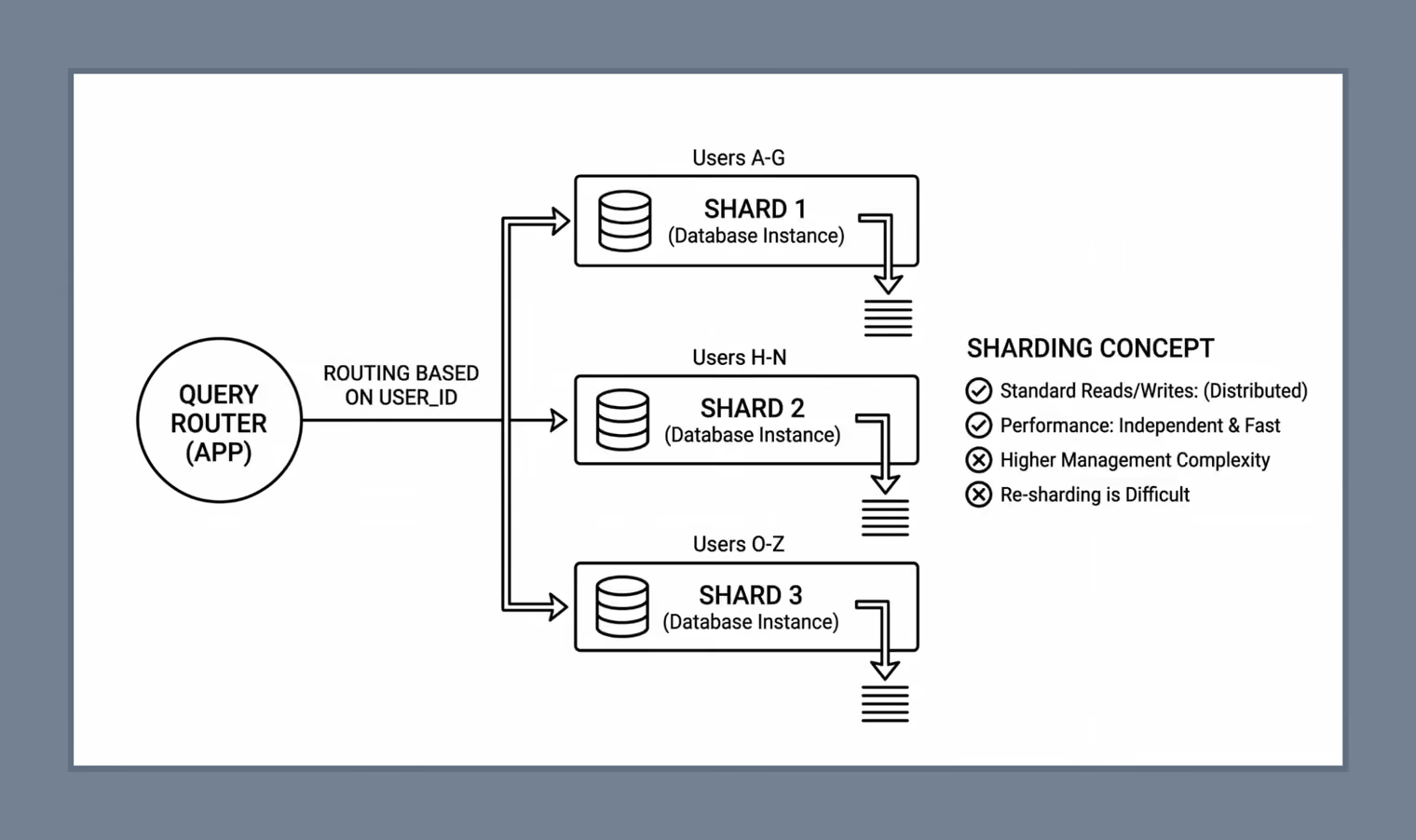
Splitting the data this way spreads writes as well as reads among several machines. The price shows up in queries that need every slice, like a report on all users, which has to collect and merge results from each server. Citus (PostgreSQL) and Vitess (MySQL) handle the routing and rebalancing.
Scaling the app out can increase the number of database connections. Every Node.js process keeps its own connection pool. Four instances running eight cluster workers each, with a pool of 10, hold 320 connections, and PostgreSQL’s default max_connections is typically 100. Raising the limit costs database memory for every connection.
The usual fix is a connection pooler between the app and the database. RDS Proxy keeps a pool of established connections and lets many app connections share them, and PgBouncer does the same for self-managed PostgreSQL. Without one, adding app servers can take the database down at the very moment the extra capacity is needed.
For many Node.js backends, scaling up is the simpler first move, as long as the app can use the added CPU capacity. Scaling out becomes necessary once a single machine can no longer absorb peak traffic or keep the app online through its own failure. At that point, the transition is much easier if the application was designed to stay stateless from the start. The practical rule is to solve today’s capacity problem with the simplest option that works, while keeping the application ready to run across multiple instances later.
{{banner-2}}