






Subscription systems accumulate complexity quietly. A webhook arrives twice, a plan change fires at the wrong moment, a payment fails, and the retry logic disagrees with your database — and your application state quietly drifts from the source of truth it depends on. How to build the architecture that prevents this?

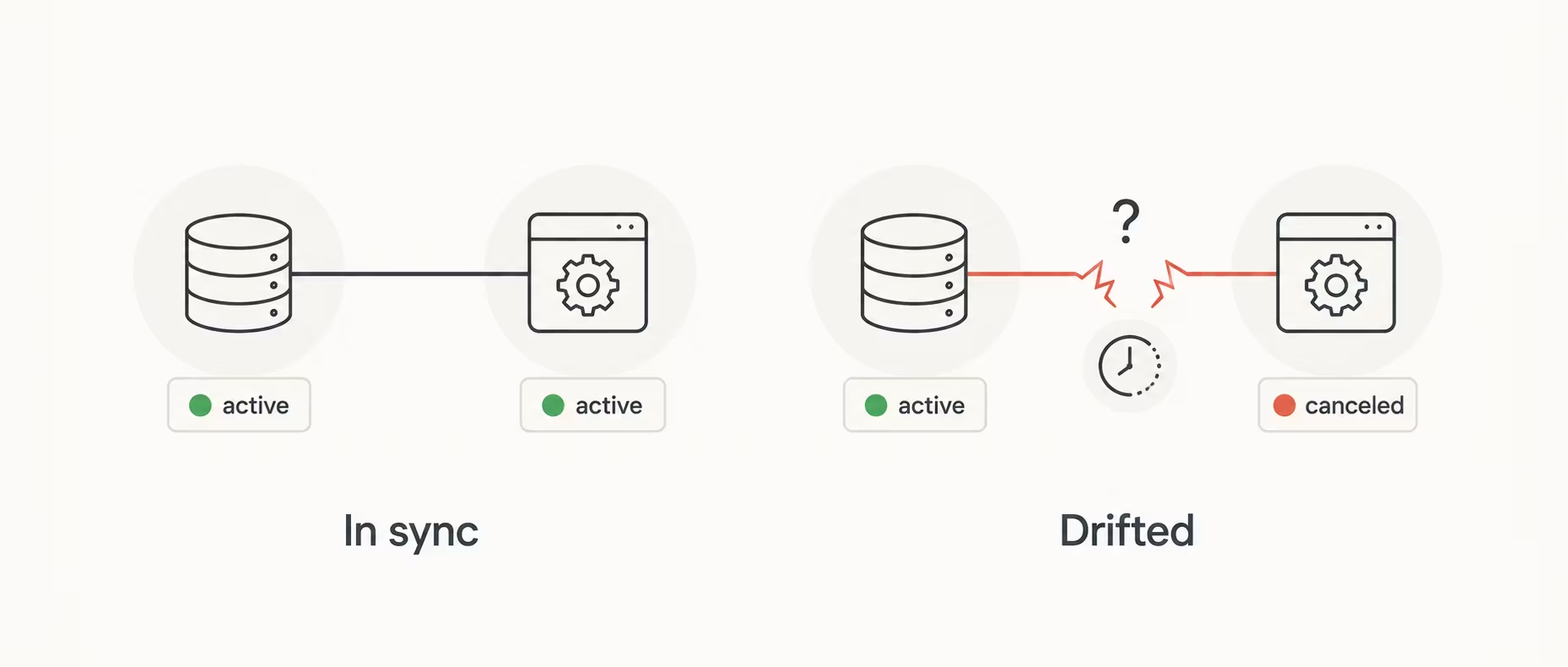
You build it around the right primitives — idempotent webhook handlers, deferred plan changes, and a status layer that translates the billing engine’s raw states into something your application can reason about. Each of these has a non-obvious answer that most tutorials skip entirely.
The following guide works through all of them using Stripe and NestJS, covering the full subscription lifecycle from first checkout to plan changes, cancellations, and access control — with the patterns that keep billing state consistent when things don’t go as planned.
Stripe is the de facto standard for subscription billing, and NestJS provides a structured module system that maps cleanly onto Stripe’s resource model — Customers → Subscriptions → Invoices → PaymentMethods.
The central challenge is handling the asynchronous, event-driven nature of billing: cards expire, users cancel mid-cycle, and trials convert. Your application state must stay consistent with Stripe’s source of truth at all times. Where that state lives is itself an architectural decision — microservices vs. monolithic architectures lays out the trade-offs.
The full subscription system architecture connects three layers — your NestJS API, Stripe’s billing infrastructure, and your local database — each with a distinct role:
┌─────────────────────────────────────────────────────┐
│                    Client (Browser)                 │
└─────────────────────┬───────────────────────────────┘
                      │ HTTPS
┌─────────────────────▼───────────────────────────────┐
│                 NestJS API                          │
│   ┌──────────────┐   ┌────────────┐   ┌──────────┐  │
│   │ BillingModule│   │StripeModule│   │ AuthGuard│  │
│   └──────┬───────┘   └─────┬──────┘   └──────────┘  │
│          │ SDK calls        │ Webhook verify        │
└──────────┼──────────────────┼───────────────────────┘
           │                  │
┌──────────▼──────────────────▼─────────────────────┐
│                   Stripe API                      │
│   Customers · Subscriptions · Invoices · Prices   │
└───────────────────────────────────────────────────┘
           │ Webhooks (async)
┌──────────▼───────────────────────────────────────┐
│             Prisma → PostgreSQL                  │
│   users · subscriptions · plans · invoices       │
└──────────────────────────────────────────────────┘The billing domain lives in its own module folder. The utils/ subfolder keeps pure functions (like the status mapper) separate from stateful services, and enums/ gives the domain types a stable import path that other modules can reference without pulling in service logic.
Here is how that breaks down in practice:
src/
├── app.module.ts
├── main.ts
│
├── billing/
│   ├── billing.module.ts
│   ├── billing.service.ts          # customer, checkout, portal, plan ops
│   ├── stripe-event-logger.service.ts  # wildcard webhook logger
│   │
│   ├── dto/
│   │   ├── change-plan.dto.ts
│   │   ├── renew-subscription.dto.ts
│   │   └── create-checkout-session.dto.ts
│   │
│   ├── enums/
│   │   └── subscription-status.enum.ts
│   │
│   └── utils/
│       └── map-stripe-status.ts
│
└── prisma/
    ├── prisma.module.ts
    ├── prisma.service.ts
└── schema.prismaBefore integrating Stripe, it helps to understand how its resources map onto the subscription lifecycle. Seven of them do the essential work:
| Resource | Purpose | Key fields |
|---|---|---|
| Customer | Maps to your user. Persists payment methods. | ID, email, metadata |
| Product | What you’re selling (e.g. “Pro Plan”) | ID, name, type |
| Price | Pricing configuration on a Product | unit_amount, currency, recurring |
| Subscription | Recurring billing relationship | status, current_period_end, items |
| Invoice | Monthly billing document | status, amount_due, hosted_invoice_url |
| Payment intent | Represents a payment attempt | status, client_secret |
| Webhook event | Async notifications from Stripe | type, data.object |
Install @golevelup/nestjs-stripe — it wraps the Stripe SDK, registers the webhook endpoint automatically, verifies signatures, and routes events via decorators. Start by installing the required packages:
npm install @golevelup/nestjs-stripe stripe @nestjs/configUse forRootAsync to pull credentials from ConfigService. The library registers its own webhook controller at /stripe/webhook (configurable) and handles signature verification internally. Wire it into app.module.ts as follows:
import { Module } from '@nestjs/common';
import { ConfigModule, ConfigService } from '@nestjs/config';
import { StripeModule } from '@golevelup/nestjs-stripe';
import { BillingModule } from './billing/billing.module';

@Module({
  imports: [
    ConfigModule.forRoot({ isGlobal: true }),
    StripeModule.forRootAsync(StripeModule, {
      inject: [ConfigService],
      useFactory: (cfg: ConfigService) => ({
        apiKey: cfg.getOrThrow('STRIPE_SECRET_KEY'),
        webhookConfig: {
          stripeSecrets: {
            account: cfg.getOrThrow('STRIPE_WEBHOOK_SECRET'),
            accountTest: cfg.getOrThrow('STRIPE_WEBHOOK_SECRET_TEST'),
          },
          requestBodyProperty: 'rawBody', // required -- see main.ts below
          decorators: [],                 // optional: e.g. [SkipThrottle()]
        },
      }),
    }),
    BillingModule,
  ],
})
export class AppModule {}
main.ts — enable raw body parsing (required for webhook signature verification):
import { NestFactory } from '@nestjs/core';
import { NestExpressApplication } from '@nestjs/platform-express';
import { AppModule } from './app.module';

async function bootstrap() {
  const app = await NestFactory.create<NestExpressApplication>(AppModule, {
    rawBody: true, // NestJS 10+ built-in
  });
  await app.listen(3000);
}
bootstrap();
Note: requestBodyProperty: 'rawBody' tells the library to read the raw buffer from req.rawBody rather than the parsed JSON body — critical for constructEvent() signature verification to pass.
Every billing resource in Stripe — subscriptions, invoices, payment methods — attaches to a Customer. Getting the Customer lifecycle right from the start prevents a class of bugs that are difficult to untangle later.
A Stripe Customer maps 1-to-1 with your User. Create one on registration and store the stripe_customer_id in your database. Never recreate customers for the same user — payment methods are attached to the customer record. The following implementation in billing/billing.service.ts covers both cases:
import { InjectStripeClient } from '@golevelup/nestjs-stripe';

@Injectable()
export class BillingService {
  constructor(
    @InjectStripeClient() private stripe: Stripe,
    private prisma: PrismaService,
  ) {}

  async getOrCreateCustomer(userId: string): Promise<string> {
    const user = await this.prisma.user.findUniqueOrThrow({
      where: { id: userId },
    });

    if (user.stripeCustomerId) {
      return user.stripeCustomerId;
    }

    const customer = await this.stripe.customers.create({
      email: user.email,
      metadata: { userId },  // crucial -- link back to your DB
    });

    await this.prisma.user.update({
      where: { id: userId },
      data: { stripeCustomerId: customer.id },
    });

    return customer.id;
  }
}
Best practice: Store userId in Stripe’s metadata field on every resource (Customer, Subscription). This allows you to reconstruct context in webhook handlers without a separate DB lookup chain.
Products and Prices are defined once and referenced everywhere — in checkout sessions, subscription schedules, and access guards. How you seed and reference them shapes the maintainability of the entire billing system.
Define Products and Prices in Stripe’s dashboard or via a seed script. Reference their IDs in environment variables — never hardcode price IDs in business logic. Store them in your.env file:
STRIPE_PRICE_BASIC=price_1OxxxxxxxxxA
STRIPE_PRICE_PRO=price_1OxxxxxxxxxB
STRIPE_PRICE_ENTERPRISE=price_1OxxxxxxxxxCStripe’s hosted Checkout page offloads PCI compliance, card validation, and payment UI to Stripe’s domain. Understanding how the session lifecycle works is essential before writing a single line of integration code.
Stripe’s hosted Checkout page is the fastest path to PCI compliance. Your server creates a session and redirects the browser to Stripe’s domain — no card data ever touches your servers.
The full checkout flow follows five steps, each with a distinct responsibility:
The method below gets or creates a Stripe Customer for the user, then opens a Checkout Session in subscription mode. The {CHECKOUT_SESSION_ID} placeholder in success_url is filled by Stripe automatically — you can use it to verify the session on the success page if needed. allow_promotion_codes: true surfaces Stripe’s built-in coupon input without any extra work on your side. Putting it all together in billing/billing.service.ts:
async createCheckoutSession(userId: string, priceId: string) {
  const customerId = await this.getOrCreateCustomer(userId);

  const session = await this.stripe.checkout.sessions.create({
    mode: 'subscription',
    customer: customerId,
    line_items: [{ price: priceId, quantity: 1 }],
    success_url: `${this.cfg.get('APP_URL')}/billing/success?session_id={CHECKOUT_SESSION_ID}`,
    cancel_url: `${this.cfg.get('APP_URL')}/billing/cancel`,
    subscription_data: {
      metadata: { userId },
      trial_period_days: 14,  // optional trial
    },
    allow_promotion_codes: true,
  });

  return { url: session.url };
}
The point of hosted Checkout is simple: your app creates the session, Stripe handles the card data.
Checkout starts the subscription flow, but the redirect back to your app should not decide access. That responsibility belongs to webhooks. Every meaningful subscription state change in Stripe arrives as an event, so this is where subscription logic actually lives.
@golevelup/nestjs-stripe completely replaces the manual webhook controller. Under the hood, it handles three things:
You no longer write a controller, parse raw bodies, or catch signature errors yourself.
Decorate individual methods with @StripeWebhookHandler('event.type'). Each method receives the fully-typed Stripe event object. Split handlers by domain — keep subscription logic in BillingService, payment logic in PaymentService, etc. The subscription-related handlers live in billing/billing.service.ts:
import { Injectable, Logger } from '@nestjs/common';
import { StripeWebhookHandler } from '@golevelup/nestjs-stripe';
import Stripe from 'stripe';
import { PrismaService } from '../prisma/prisma.service';

@Injectable()
export class BillingService {
  private readonly logger = new Logger(BillingService.name);

  constructor(private prisma: PrismaService) {}

  @StripeWebhookHandler('checkout.session.completed')
  async onCheckoutCompleted(evt: Stripe.CheckoutSessionCompletedEvent) {
    const session = evt.data.object;
    const userId = session.metadata?.userId;
    if (!userId) return;

    // Subscription is created by Stripe; sync it on the next event.
    // Optionally provision access immediately using session.subscription.
    this.logger.log(`Checkout completed for user ${userId}`);
  }

  @StripeWebhookHandler('customer.subscription.updated')
  async onSubscriptionUpdated(evt: Stripe.CustomerSubscriptionUpdatedEvent) {
    await this.syncSubscription(evt.data.object);
  }

  @StripeWebhookHandler('customer.subscription.deleted')
  async onSubscriptionDeleted(evt: Stripe.CustomerSubscriptionDeletedEvent) {
    await this.syncSubscription(evt.data.object);
  }

  @StripeWebhookHandler('invoice.payment_succeeded')
  async onPaymentSucceeded(evt: Stripe.InvoicePaymentSucceededEvent) {
    const invoice = evt.data.object;
    this.logger.log(`Payment succeeded: invoice ${invoice.id}`);
    // e.g. extend access, send receipt email
  }

  @StripeWebhookHandler('invoice.payment_failed')
  async onPaymentFailed(evt: Stripe.InvoicePaymentFailedEvent) {
    const invoice = evt.data.object;
    this.logger.warn(`Payment failed: invoice ${invoice.id}`);
    // e.g. send dunning email, restrict access after grace period
  }

  private async syncSubscription(sub: Stripe.Subscription) {
    const userId = sub.metadata?.userId;
    if (!userId) return;

    await this.prisma.subscription.upsert({
      where: { stripeSubscriptionId: sub.id },
      create: {
        userId,
        stripeSubscriptionId: sub.id,
        status: sub.status,
        priceId: sub.items.data[0].price.id,
        currentPeriodEnd: new Date(sub.current_period_end * 1000),
      },
      update: {
        status: sub.status,
        currentPeriodEnd: new Date(sub.current_period_end * 1000),
        cancelAtPeriodEnd: sub.cancel_at_period_end,
      },
    });
  }
}Use '*' to catch all events — useful for a dedicated logging or audit service. This is separate from your business-logic handlers, so it doesn’t mix concerns. It receives every event Stripe sends, including ones you haven’t explicitly handled, giving you full observability without touching the domain services. A dedicated service handles this cleanly:
@Injectable()
export class StripeEventLogger {
  private readonly logger = new Logger('StripeEvents');

  @StripeWebhookHandler('*')
  logAll(evt: Stripe.Event) {
    this.logger.debug(`[${evt.type}] id=${evt.id}`);
  }
}Every class using @StripeWebhookHandler must be a provider in a module that’s imported into AppModule, so the library can discover it. The library scans the NestJS dependency injection container at bootstrap — if a handler class isn’t registered as a provider, its decorated methods are simply never found, and events are silently dropped. Both handler classes are registered in billing/billing.module.ts:
import { Module } from '@nestjs/common';
import { BillingService } from './billing.service';
import { StripeEventLogger } from './stripe-event-logger.service';

@Module({
  providers: [BillingService, StripeEventLogger],
  exports: [BillingService],
})
export class BillingModule {}The library does not handle duplicate delivery — Stripe may send the same event more than once. Guard against it with a processed-events table. The check-then-process-then-write pattern should ideally be wrapped in a database transaction to prevent a race condition where two concurrent deliveries of the same event both pass the findUnique check before either writes the record. Applied to the subscription updated handler:
@StripeWebhookHandler('customer.subscription.updated')
async onSubscriptionUpdated(evt: Stripe.CustomerSubscriptionUpdatedEvent) {
  const already = await this.prisma.stripeEvent.findUnique({
    where: { stripeEventId: evt.id },
  });
  if (already) return;

  await this.syncSubscription(evt.data.object);

  await this.prisma.stripeEvent.create({
    data: { stripeEventId: evt.id, type: evt.type },
  });
}Global enhancers (guards, interceptors) also run on webhook handlers because the library uses NestJS’s External Contexts mechanism, which plugs into the full lifecycle. This means your JwtAuthGuard, throttling interceptors, or logging middleware will fire on every incoming webhook — usually not what you want. Identify and skip them using the STRIPE_WEBHOOK_CONTEXT_TYPE constant exported by the library:
import { STRIPE_WEBHOOK_CONTEXT_TYPE } from '@golevelup/nestjs-stripe';

@Injectable()
export class ExampleGuard implements CanActivate {
  canActivate(ctx: ExecutionContext): boolean {
    if (ctx.getType() === STRIPE_WEBHOOK_CONTEXT_TYPE) {
      return true; // skip auth for webhook handlers
    }
    // ... your normal guard logic
    return true;
  }
}The Customer Portal solves a problem most teams underestimate: how much UI work goes into letting users manage their own billing. Stripe handles all of it, but the integration has prerequisites worth understanding before writing any code.
The Stripe Customer Portal lets users manage subscriptions, change plans, update payment methods, and cancel — all without you building any UI. Enable it in the Stripe dashboard and create a session server-side.
The portal session is created server-side and returns a short-lived URL. Your frontend redirects to it — Stripe handles everything from there. The return_url brings the user back to your app when they’re done. Note that the portal must be configured in the Stripe Dashboard first (branding, allowed actions, cancellation policies) before sessions can be created. Wiring this up in billing.service.ts:
async createPortalSession(userId: string, returnUrl: string) {
  const user = await this.prisma.user.findUniqueOrThrow({
    where: { id: userId },
  });

  if (!user.stripeCustomerId) {
    throw new BadRequestException('No billing account found');
  }

  const session = await this.stripe.billingPortal.sessions.create({
    customer: user.stripeCustomerId,
    return_url: returnUrl,
  });

  return { url: session.url };
}
Trials are where subscription lifecycle complexity first becomes visible — a user enters with no payment obligation, and the system has to know exactly when and how to transition them to a paying state. What Stripe tracks during that window and how your application should respond start with the trial configuration itself.
Trials in Stripe are configured at the Price level or overridden per-subscription. The subscription status is trialing until the trial ends, at which point Stripe attempts the first charge. Below are the statuses your application will encounter during and after a trial:
| Subscription Status | Meaning | Access? |
|---|---|---|
| trialing | In free trial period | ✓ Full |
| active | Paid and current | ✓ Full |
| past_due | Payment failed, retrying | Configurable |
| canceled | Subscription ended | ✗ |
| unpaid | All retries exhausted | ✗ |
| incomplete | Initial payment failed | ✗ |
Once the trial period ends and Stripe attempts the first charge, your application needs a way to enforce access based on the resulting status. The guard queries your local database directly, keeping the check fast and free of external latency:
@Injectable()
export class ActiveSubscriptionGuard implements CanActivate {
  constructor(private prisma: PrismaService) {}

  async canActivate(ctx: ExecutionContext): Promise<boolean> {
    const req = ctx.switchToHttp().getRequest();
    const userId = req.user.id;

    const sub = await this.prisma.subscription.findFirst({
      where: {
        userId,
        status: { in: ['active', 'trialing'] },
      },
    });

    if (!sub) throw new ForbiddenException('Active subscription required');
    return true;
  }
}Once the initial subscription is active, the system stops being a simple checkout flow. The real complexity moves to what happens later: users change plans, cancel mid-cycle, return after cancellation, or fall into payment failure states.
Three operations cover most of that surface: changing plans mid-cycle, canceling at period end, and re-subscribing after cancellation. All three need to account for active SubscriptionSchedules — if one exists and isn’t released first, Stripe will reject the update.
Changing a plan mid-cycle uses SubscriptionSchedule so the switch happens at the end of the current billing period rather than immediately. The operation follows four steps in sequence:
The full changePlan method in billing/billing.service.ts puts these steps together:
async changePlan(user: UserDto, body: ChangePlanDto) {
  if (!user.stripeCustomerId) {
    throw new NotFoundException(`No subscription found for user ${user.id}`);
  }

  // Always sort -- customer may have multiple historical subscriptions
  const subscription = (
    await this.stripe.subscriptions.list({
      customer: user.stripeCustomerId,
      status: 'all',
    })
  ).data.sort((a, b) => b.created - a.created)[0];

  // Release any lingering schedule -- otherwise Stripe rejects phase updates
  const lastSchedule = await this.stripe.subscriptionSchedules.list({
    customer: user.stripeCustomerId,
  });
  if (lastSchedule.data[0] && lastSchedule.data[0].status !== 'released') {
    await this.stripe.subscriptionSchedules.release(lastSchedule.data[0].id);
  }

  // If user previously canceled at period end, undo that first
  if (subscription.cancel_at_period_end) {
    await this.stripe.subscriptions.update(subscription.id, {
      cancel_at_period_end: false,
    });
  }

  // Only create a schedule if the price is actually changing
  if (subscription.items.data[0].price.id === body.priceId) {
    return; // already on the requested plan
  }

  // Create schedule from current subscription -- phase[0] is the current period
  const schedule = await this.stripe.subscriptionSchedules.create({
    from_subscription: subscription.id,
  });

  // Phase 0: keep current plan until period end
  // Phase 1: switch to new plan for one month, then Stripe auto-renews
  return this.stripe.subscriptionSchedules.update(schedule.id, {
    phases: [
      {
        items: [{
          price: schedule.phases[0].items[0].price as string,
          quantity: schedule.phases[0].items[0].quantity,
        }],
        start_date: schedule.phases[0].start_date,
        end_date: schedule.phases[0].end_date,
      },
      {
        items: [{ price: body.priceId, quantity: 1 }],
        duration: { interval: 'month', interval_count: 1 },
      },
    ],
  });
}
Why SubscriptionSchedule? A direct subscriptions.update() with a new price applies the change immediately and generates a prorated invoice. Schedules defer the switch to the next billing boundary — no surprise charges mid-cycle.
Phase duration caveat: The second phase duration controls how long Stripe runs it before releasing the schedule and continuing the subscription normally. Set interval_count to match your billing cycle (1 month for monthly plans, 1 year for annual).
In subscription billing, when a change happens matters as much as how it happens.
Cancellation sets cancel_at_period_end: true rather than terminating immediately. The user retains access until current_period_end, then Stripe fires customer.subscription.deleted. Here is how that translates into code:
async cancelSubscription(user: UserDto) {
  if (!user.stripeCustomerId) {
    throw new NotFoundException(`No subscription found for user ${user.id}`);
  }

  const subscriptionId = (
    await this.stripe.subscriptions.list({
      customer: user.stripeCustomerId,
    })
  ).data[0]?.id;

  if (!subscriptionId) {
    throw new NotFoundException('No active subscription found');
  }

  // Release any active schedule -- scheduled phase changes must be cleared
  // before cancel_at_period_end can be set
  const lastSchedule = await this.stripe.subscriptionSchedules.list({
    customer: user.stripeCustomerId,
  });
  if (lastSchedule.data[0] && lastSchedule.data[0].status !== 'released') {
    await this.stripe.subscriptionSchedules.release(lastSchedule.data[0].id);
  }

  // Soft cancel -- access remains until period end
  return this.stripe.subscriptions.update(subscriptionId, {
    cancel_at_period_end: true,
  });
}
After this call, the webhook customer.subscription.updated fires with cancel_at_period_end: true. Your syncSubscription handler should persist that flag so your UI can show “Cancels on [date]” rather than hiding access immediately.
Renewal applies only when the subscription status is canceled (fully ended, not just cancel_at_period_end). It creates a fresh Checkout Session on the existing customer, preserving their saved payment methods. The renew subscription method handles this case:
async renewSubscription(user: UserDto, body: RenewSubscriptionDto) {
  if (!user.stripeCustomerId) {
    throw new NotFoundException('This user has no billing account');
  }

  // Sort by created desc -- pick the most recent subscription
  const subscriptions = await this.stripe.subscriptions.list({
    customer: user.stripeCustomerId,
    status: 'all',
  });
  subscriptions.data.sort((a, b) => b.created - a.created);

  if (!subscriptions.data[0] || subscriptions.data[0].status !== 'canceled') {
    throw new ForbiddenException(
      'Renew is only available for fully canceled subscriptions',
    );
  }

  // Create a new checkout session -- reuses existing customer & saved cards
  return this.stripe.checkout.sessions.create({
    customer: user.stripeCustomerId,
    mode: 'subscription',
    line_items: [{ price: body.priceId, quantity: 1 }],
    success_url: `${this.configService.frontUrl}/${body.language}/subscription/success`,
    cancel_url: `${this.configService.frontUrl}/${body.language}/profile/billing`,
  });
}
cancel_at_period_end vs. canceled: A subscription with cancel_at_period_end: true is still active — it hasn’t expired yet. renewSubscription should be blocked for those users (they should call changePlan or undo the cancellation via the Customer Portal instead).
Raw billing states rarely map cleanly onto what an application actually needs to communicate — to guards, to the frontend, to business logic. A translation layer between Stripe and your domain is what keeps those concerns from bleeding into each other.
Stripe has 7 raw subscription statuses. Your application typically needs fewer, more user-meaningful states. Map them explicitly — never expose Stripe’s raw status directly to the frontend. The table below shows how each Stripe status maps to a domain state and what access it grants:
| Stripe status | Domain status | Access | Meaning |
|---|---|---|---|
| trialing | TRIAL | ✓ Full | Free trial, no charge yet |
| active | PAID | ✓ Full | Current, paid |
| active + cancel_at_period_end: true | CANCELLED | ✓ Until period end | Canceled, access until current_period_end |
| past_due | PAST_DUE | ✓ Grace | Payment failed, Stripe retrying (Smart Retries) |
| unpaid | UNPAID | ✗ | All retries exhausted, requires manual action |
| incomplete | PENDING | ✗ | Initial payment not confirmed yet |
| incomplete_expired | EXPIRED | ✗ | Initial payment window passed (23h) |
| canceled | EXPIRED | ✗ | Fully terminated |
Define the enum in a dedicated file and import it wherever subscription status is referenced — guards, services, DTOs, and API responses. Using a TypeScript enum (rather than string literals) means typos are caught at compile time, and your IDE can autocomplete all valid states. Place it in subscription-status.enum.ts and import from there across the entire billing domain:
// subscription-status.enum.ts
export enum SubscriptionStatus {
  PENDING   = 'PENDING',   // incomplete -- awaiting initial payment
  TRIAL     = 'TRIAL',     // trialing
  PAID      = 'PAID',      // active, not cancelled
  CANCELLED = 'CANCELLED', // active + cancel_at_period_end
  PAST_DUE  = 'PAST_DUE',  // past_due -- retrying
  UNPAID    = 'UNPAID',    // unpaid -- retries exhausted
  EXPIRED   = 'EXPIRED',   // canceled or incomplete_expired
}Centralize the mapping in one place, so webhook handlers, guards, and API responses all derive status the same way:
// billing/utils/map-stripe-status.ts
import Stripe from 'stripe';
import { SubscriptionStatus } from '../enums/subscription-status.enum';

export function mapStripeStatus(sub: Stripe.Subscription): SubscriptionStatus {
  switch (sub.status) {
    case 'trialing':
      return SubscriptionStatus.TRIAL;

    case 'active':
      return sub.cancel_at_period_end
        ? SubscriptionStatus.CANCELLED
        : SubscriptionStatus.PAID;

    case 'past_due':
      return SubscriptionStatus.PAST_DUE;

    case 'unpaid':
      return SubscriptionStatus.UNPAID;

    case 'incomplete':
      return SubscriptionStatus.PENDING;

    case 'incomplete_expired':
    case 'canceled':
    default:
      return SubscriptionStatus.EXPIRED;
  }
}Now that mapStripeStatus() handles the translation, syncSubscription becomes the single place where a Stripe subscription object is written to your database. Both create and update branches call the same mapper, so status is always derived consistently regardless of which webhook triggered the upsert.
Note that priceId is also synced on update — plan changes via schedules will update the price on the subscription object, and that change needs to be reflected locally. The updated syncSubscription method brings this together:
private async syncSubscription(sub: Stripe.Subscription) {
  const userId = sub.metadata?.userId;
  if (!userId) return;

  const status = mapStripeStatus(sub);  // single source of truth

  await this.prisma.subscription.upsert({
    where: { stripeSubscriptionId: sub.id },
    create: {
      userId,
      stripeSubscriptionId: sub.id,
      priceId: sub.items.data[0].price.id,
      status,
      currentPeriodEnd: new Date(sub.current_period_end * 1000),
      cancelAtPeriodEnd: sub.cancel_at_period_end,
    },
    update: {
      status,
      priceId: sub.items.data[0].price.id,
      currentPeriodEnd: new Date(sub.current_period_end * 1000),
      cancelAtPeriodEnd: sub.cancel_at_period_end,
    },
  });
}Defining ACCESS_STATUSES as a named constant rather than inlining values in the query makes the policy explicit and easy to adjust — for example, temporarily removing PAST_DUE from the list if you want stricter enforcement during a dunning campaign. The guard queries your local database, not Stripe’s API, so it adds no external latency to every protected request. The updated guard reflects both of these decisions:
// Which domain statuses grant feature access
const ACCESS_STATUSES: SubscriptionStatus[] = [
  SubscriptionStatus.TRIAL,
  SubscriptionStatus.PAID,
  SubscriptionStatus.CANCELLED, // still within paid period
  SubscriptionStatus.PAST_DUE,  // configurable -- grace period
];

@Injectable()
export class ActiveSubscriptionGuard implements CanActivate {
  constructor(private prisma: PrismaService) {}

  async canActivate(ctx: ExecutionContext): Promise<boolean> {
    const req = ctx.switchToHttp().getRequest();
    const sub = await this.prisma.subscription.findFirst({
      where: {
        userId: req.user.id,
        status: { in: ACCESS_STATUSES },
      },
    });

    if (!sub) throw new ForbiddenException('Active subscription required');
    return true;
  }
}The diagram below shows how domain statuses flow into each other based on Stripe events. Two important things to note: CANCELLED is a transient state — it always eventually becomes EXPIRED at period end when Stripe fires customer.subscription.deleted. And PAST_DUE can recover back to PAID if a Smart Retry succeeds, or fall through to UNPAID and then EXPIRED if all retries are exhausted. Here is this diagram:
              ┌─────────────────────────────────────┐
  checkout          │                                     │
  completed         ▼            payment ok               │
─────────────► PENDING/TRIAL ──────────────────► PAID ────┘
                    │                              │
                    │ payment fails                │ cancel_at_period_end
                    ▼                              ▼
               PAST_DUE                       CANCELLED ──► EXPIRED
                    │                         (period end)
                    │ retries ok    retries
                    ├──────────► PAID  fail ──► UNPAID ──► EXPIRED
                    │
                    └──────────────────────────────────── EXPIRED
incomplete_expired (23h window)Three models cover the full billing surface. User holds the Stripe Customer ID as a unique nullable field — nullable because a user exists before they subscribe, unique because a customer must never be created twice. Prisma is one option for this layer; for a lighter query-builder approach, see our walkthrough of a type-safe database layer with Kysely in Node.js.
Subscription is a 1-to-1 relation with User, storing the domain status enum (enforced at the database level by Prisma’s native enum), the current period boundary, and the cancelAtPeriodEnd flag that drives the CANCELLED domain status. StripeEvent is the idempotency log — a simple append-only table keyed on Stripe’s event ID. All three are defined in schema.prisma:
model User {
  id                String         @id @default(cuid())
  email             String         @unique
  stripeCustomerId  String?        @unique
  subscription      Subscription?
  createdAt         DateTime       @default(now())
}

model Subscription {
  id                    String   @id @default(cuid())
  userId                String   @unique
  user                  User     @relation(fields: [userId], references: [id])
  stripeSubscriptionId  String   @unique
  priceId               String
  status                String   // trialing | active | past_due | canceled
  currentPeriodEnd      DateTime
  cancelAtPeriodEnd     Boolean  @default(false)
  updatedAt             DateTime @updatedAt
}

model StripeEvent {
  id             String   @id @default(cuid())
  stripeEventId  String   @unique
  type           String
  processedAt    DateTime @default(now())
}Before going live, verify that every item below is addressed — the Required ones are non-negotiable, the Recommended ones prevent operational pain:
| Area | Item | Status |
|---|---|---|
| Webhooks | @golevelup/nestjs-stripe handles signature verification | Required |
| Webhooks | rawBody: true in NestFactory.create() + requestBodyProperty | Required |
| Webhooks | Idempotency table guards against duplicate event delivery | Required |
| Webhooks | Handler returns quickly; heavy work offloaded async/queue | Required |
| Security | STRIPE_WEBHOOK_SECRET in env, not code | Required |
| Security | HTTPS-only endpoints in production | Required |
| Data | userId stored in Stripe metadata on all resources | Required |
| Data | Subscription synced from webhook, not redirect | Required |
| Guards | Global guards skip STRIPE_WEBHOOK_ CONTEXT_TYPE contexts | Required |
| UX | Customer Portal enabled in Stripe dashboard | Recommended |
| UX | past_due grace period communicated to users | Recommended |
| Testing | stripe listen --forward-to localhost:3000/stripe/webhook | Dev setup |
| Testing | Test card 4242 4242 4242 4242 used in staging | Dev setup |
| Ops | Wildcard @StripeWebhookHandler('*') logs all unhandled events | Recommended |
Local development: Use the Stripe CLI to forward webhooks to your local server: stripe listen --forward-to localhost:3000/stripe/webhook. The CLI will print a webhook signing secret — use it as STRIPE_WEBHOOK_SECRET_TEST in your .env.
By this point, the integration is working: checkout is connected, webhooks are synced, plan changes are deferred, and access is guarded by domain status. The remaining question is what makes this system reliable in production.
The answer is not another Stripe API call, but the discipline around state, trust, and failure handling. A stable subscription system depends on knowing which signal to trust, where state should live, and how to keep your database consistent with Stripe’s source of truth.
Every failure mode covered in this guide traces back to one of five architectural decisions. Get these right, and the rest follows:
The success_url redirect is a UX convenience — it can be blocked, double-fired, or missed entirely. Every subscription state change must be driven by a webhook event. Never activate, cancel, or update access based solely on what happens in the browser.
Stripe’s raw statuses (active, past_due, incomplete, etc.) are implementation details. Map them to a domain enum (PAID, CANCELLED, PAST_DUE, EXPIRED) in a single function — mapStripeStatus() — and use that enum everywhere: guards, API responses, frontend logic. When Stripe introduces new statuses or edge cases, you fix one function, not ten files.
Any plan change that should take effect at the next billing boundary — not immediately — requires a schedule. A direct subscriptions.update() applies the new price right now and generates a prorated invoice. Schedules let you define what happens at period end without surprising users with unexpected charges. Always release any existing schedule before creating a new one.
cancel_at_period_end: true keeps the subscription active in Stripe’s eyes. Your domain status maps this to CANCELLED — access continues until current_period_end. The guard must explicitly include CANCELLED in its allowed statuses; otherwise, users lose access the moment they click cancel rather than at period end.
Stripe guarantees at-least-once delivery. A StripeEvent log keyed on event.id makes every webhook handler safe to run multiple times. Without it, a retry can double-charge, double-provision, or create duplicate database records in ways that are difficult to debug in production.
The library collapses the boilerplate around webhook ingestion: no manual controller, no try/catch around constructEvent(), no switch statement routing. Each handler is a decorated method — the code expresses what it handles, not how webhooks work.
The tradeoff is that global enhancers (guards, interceptors, filters) now also run on webhook contexts, so you need to check STRIPE_WEBHOOK_CONTEXT_TYPE and opt out deliberately where needed.
The patterns here cover the core lifecycle, but a production system will eventually need:
In the end, subscription billing is an architecture problem as much as an integration task. Most of the complexity covered in this guide has nothing to do with Stripe’s API itself. It lives in the decisions around it: which signal to trust, how to model state, where idempotency breaks down, and when to defer a change rather than apply it immediately.
These decisions are what separate a subscription system that holds up in production from one that requires constant firefighting. If you’re building or scaling a subscription product, Halo Lab’s backend engineering team can help shape the billing architecture early, so payments, access, and subscription state stay reliable once the system goes live.


.avif)
.avif)