







Choosing a content management system (CMS) for a project often looks straightforward at first. The problems usually appear later, when the content model becomes harder to scale, workflows no longer fit the team, or the architecture begins to restrict the product. By that point, switching platforms can be expensive and disruptive.

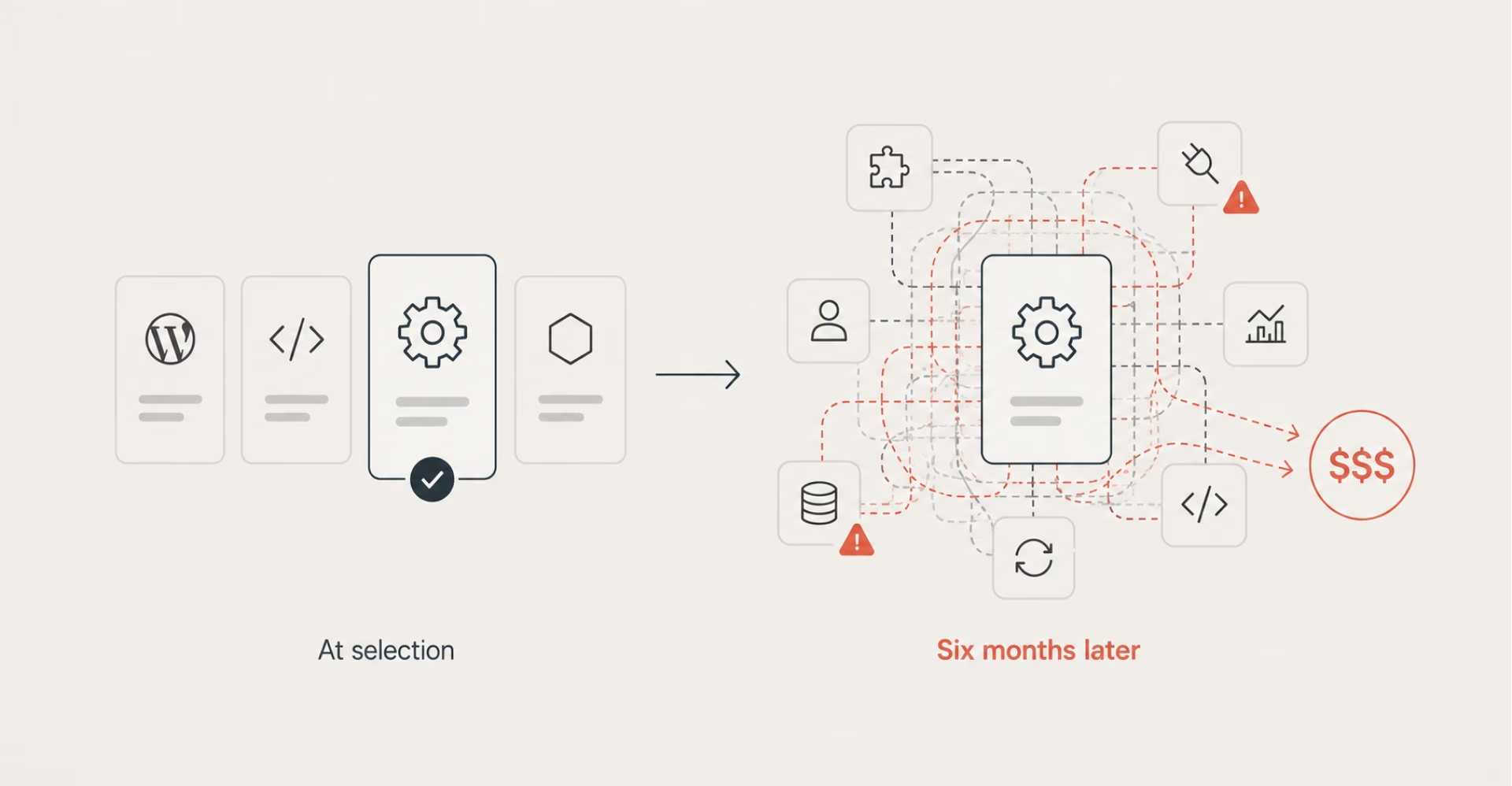
The challenge is rarely finding a good CMS. Most mature platforms are capable tools. The real question is whether a platform matches your project’s content structure, development model, editorial workflows, and long-term plans. Sanity is especially strong in some of these scenarios and a weaker fit in others. This guide explains where it works best, where its limitations begin, and how to use it effectively when it is the right choice.
Sanity is a headless, API-first CMS centered on one core idea: content is structured data with a clean delivery layer on top, free from the HTML-and-template coupling that defines traditional platforms. This distinction shapes everything about how it works in practice.
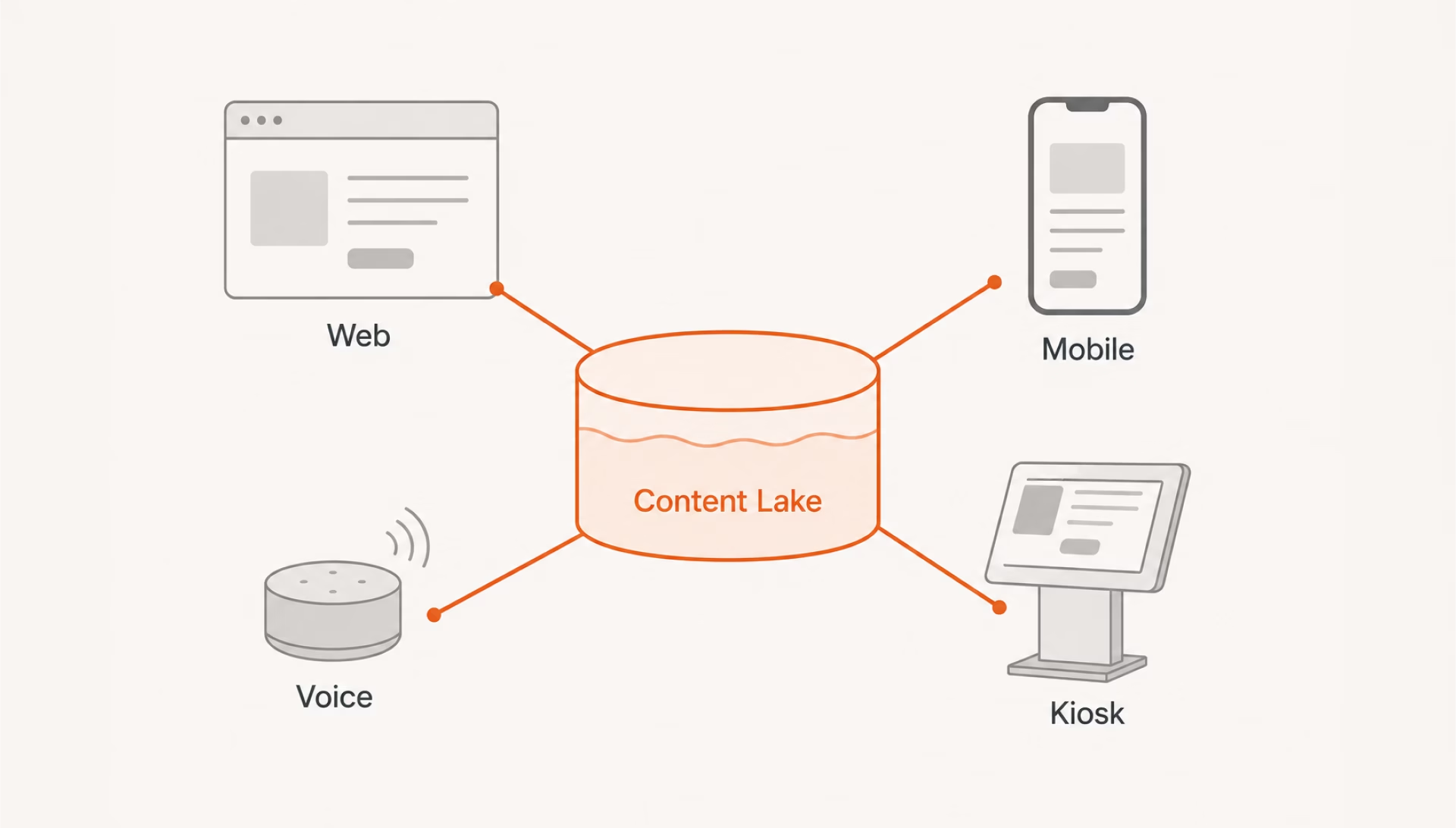
Instead of storing pages, Sanity stores everything in a cloud repository called the Content Lake — and delivers content via API to whatever frontend or surface needs it: a React app, a mobile app, a voice interface, or a digital kiosk. For projects used to thinking in terms of pages and templates, that’s a meaningful shift — and it comes with some specific practical aspects worth understanding before committing to the platform.
Most CMS platforms make a tradeoff: editorial simplicity at the cost of developer control, or developer flexibility at the cost of usability. Sanity approaches this tension differently — and a few specific properties make that possible:
If your project separates “who writes content” from “who builds the product,” Sanity is designed exactly for that gap.
At a basic level, Sanity offers many of the same capabilities as other modern CMS platforms. The more important differences lie in how it structures content, gives developers control, and adapts to specific editorial workflows. To make that distinction clearer, the features below are divided into standard CMS capabilities and the areas where Sanity stands out.
Sanity covers the familiar requirements most teams expect from a modern content platform. These capabilities are essential, although comparable features are available in many competing systems:
| Feature | Notes |
|---|---|
| Role-based access control | Editors, admins, viewers, custom roles |
| Media asset management | Built-in asset pipeline |
| Content versioning | Document history and restore |
| Multilingual content | Built-in i18n support |
| API-based delivery | REST API out of the box |
Beyond the standard feature set, Sanity provides greater control over how content is modeled, queried, and presented to editors:
Understanding where Sanity’s responsibility ends is as important as knowing what it does well. It is primarily a content platform, not a complete application backend. Although Functions, APIs, and integrations can extend its capabilities, several parts of a digital product usually require a separate service or application layer:
These boundaries are not necessarily shortcomings. They reflect Sanity’s role within a composable architecture: it manages structured content, while other parts of the stack handle users, transactions, communication, and product logic. When those operational requirements outweigh the content layer, Sanity may add more architectural complexity than value. For teams comparing this model with a traditional all-in-one CMS, the Sanity vs. WordPress comparison makes the trade-offs more concrete.
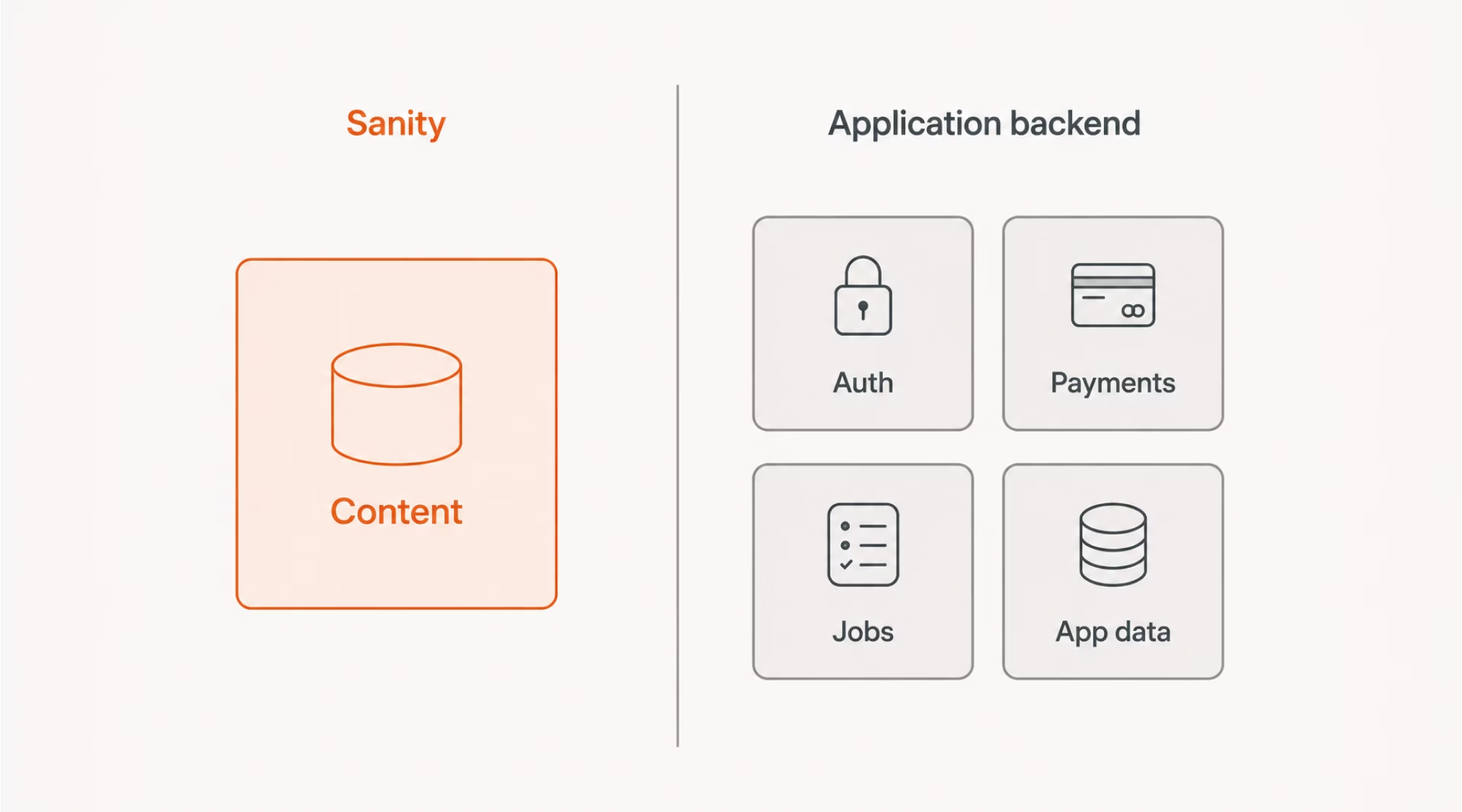
The clearest signal is a project where content management is a secondary concern — a marketplace with dynamic pricing, a fintech dashboard, a logistics platform. When business logic outweighs editorial need, a purpose-built content platform may introduce overhead that the project will not justify.
The checklist below is worth running through during project scoping:
If several of these points apply to the same project, another platform may be a better fit. For teams that still need a headless CMS but want a simpler content setup, Prismic may be worth considering — this detailed breakdown of what it offers is a good place to begin the evaluation.
A CMS becomes valuable when the volume, complexity, or pace of content outgrows what developers can reasonably manage through code alone. That point varies by project. Before deciding whether Sanity is the right platform, it helps to establish whether the website needs dedicated content infrastructure at all.
Each of the following signals that managing content without a dedicated system is starting to create unnecessary work:
The following websites often benefit from a CMS because their content changes frequently, follows a repeatable structure, or needs to be managed by several people:
| Site type | Why CMS makes sense |
|---|---|
| Marketing or brand website | Frequent copy and image updates |
| Editorial or publishing platform | High content volume and editorial workflows |
| Documentation site | Structured and versioned content |
| E-commerce storefront content layer | Product descriptions and landing pages |
| Portfolio or case study website | Regular additions and updates |
| Event or conference platform | Time-sensitive, structured event data |
Sanity is used in production across a wide range of industries. What connects these projects is less the sector itself and more the way content needs to be structured, managed, and delivered. Common use cases include:
Across these domains, the fit usually comes down to two questions:
When both answers are yes, the industry itself is usually less important than the project’s content and technical requirements.
Sanity is the right choice for a specific set of requirements. When those requirements do not match — for example, when a project needs self-hosting, application logic, an existing SQL database, or a more purpose-built editorial experience — the following alternatives represent some of the most common options:
| Tool | Best for | Key difference from Sanity |
|---|---|---|
| Contentful | Large enterprises, managed infrastructure | More standardized setup, higher cost ceiling |
| Strapi | Self-hosted and some backend logic | Open-source with REST and GraphQL APIs |
| Directus | Teams with existing SQL databases | Adds a CMS layer to a relational database |
| WordPress (headless) | Teams with deep WordPress familiarity | Extensive plugin ecosystem, more legacy overhead |
| Payload CMS | Projects needing a CMS and backend in one | Combines content, auth, and logic in one codebase |
| Ghost | Blogs, newsletters, and memberships | Purpose-built publishing and editorial tools |
Quick tip: If Sanity’s separation from application logic is the main concern, Payload CMS is one of the most direct alternatives, particularly for teams that want content management and backend functionality within the same codebase.
For companies still weighing their options, Halo Lab can help identify and implement the right platform through its CMS development services.
The architectural principle that allows Sanity to work alongside custom backend requirements is straightforward: content and application logic should remain in separate layers, with a clear boundary between them. Getting that boundary right determines how maintainable the integration remains as both sides evolve — and shapes every decision that follows.
A concrete example makes the boundary clearer:
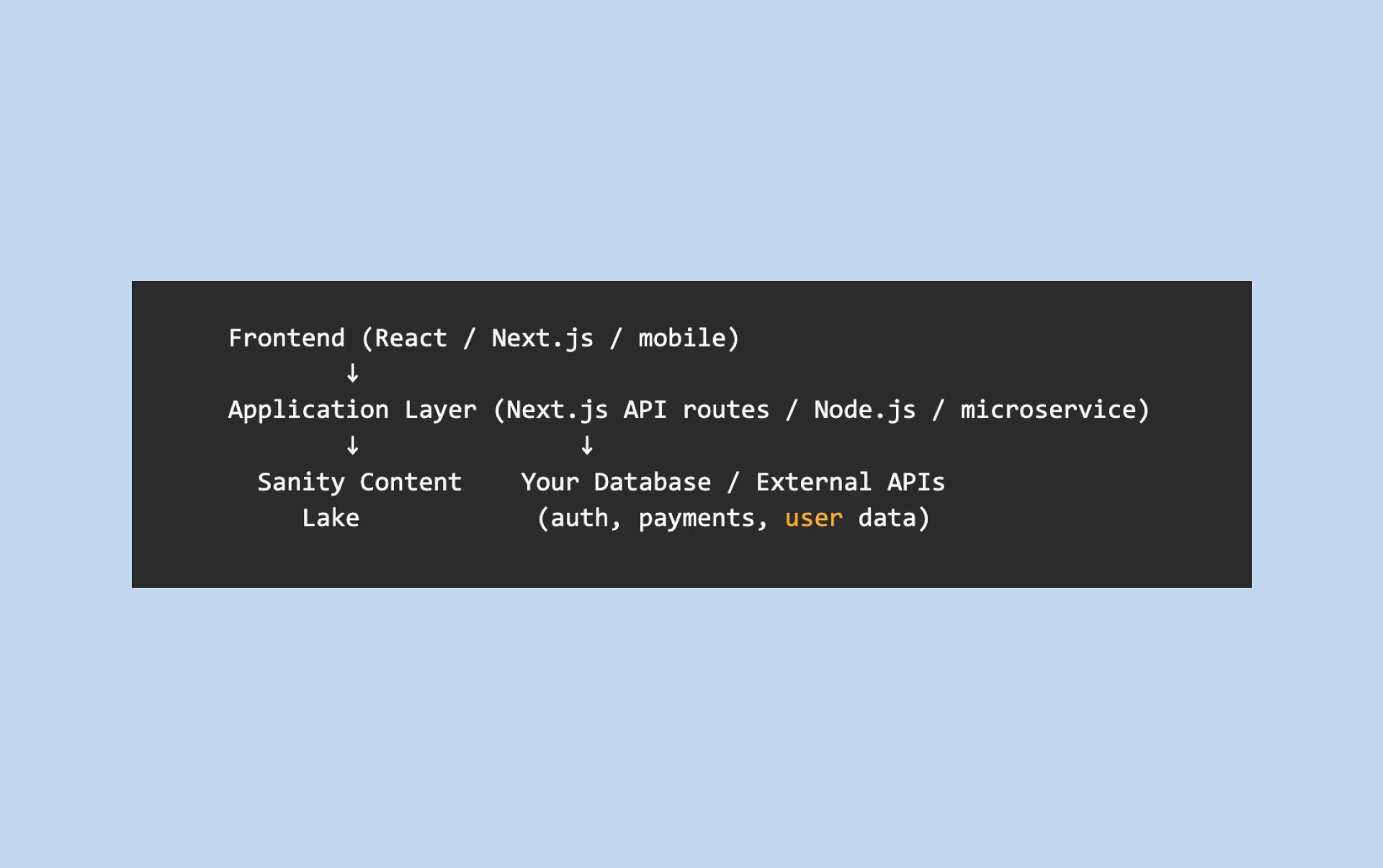
In practice, this means building a dedicated application layer — typically a Node.js, Next.js API route, or a separate microservice — that sits between Sanity and your frontend or your external integrations. The layer handles authentication, authorization, business rules, third-party API calls, and any data transformations that depend on application state rather than editorial content.
Your frontend makes requests to your application layer, which then queries Sanity’s Content Lake via GROQ when it needs editorial content, and queries your own database or services when it needs application data. The two data sources are merged at the API layer before being returned to the client, keeping Sanity’s role clean and bounded.
The boundary between content and logic holds as long as something is responsible for enforcing it.
The boundary between what belongs in Sanity and what belongs in the application layer is worth making explicit. Ambiguity here is where integrations tend to accumulate technical debt:
| Belongs in Sanity | Belongs in your backend |
|---|---|
| Page copy and headings | User authentication |
| Blog posts and articles | Payment processing |
| Product descriptions | Order and inventory state |
| Team member bios | Sensitive or transactional form data |
| SEO metadata | Transactional emails |
| Navigation structure | Business rules and computed data |
| Media assets | User accounts and activity |
Two patterns are particularly useful when Sanity needs to interact with application-side logic:
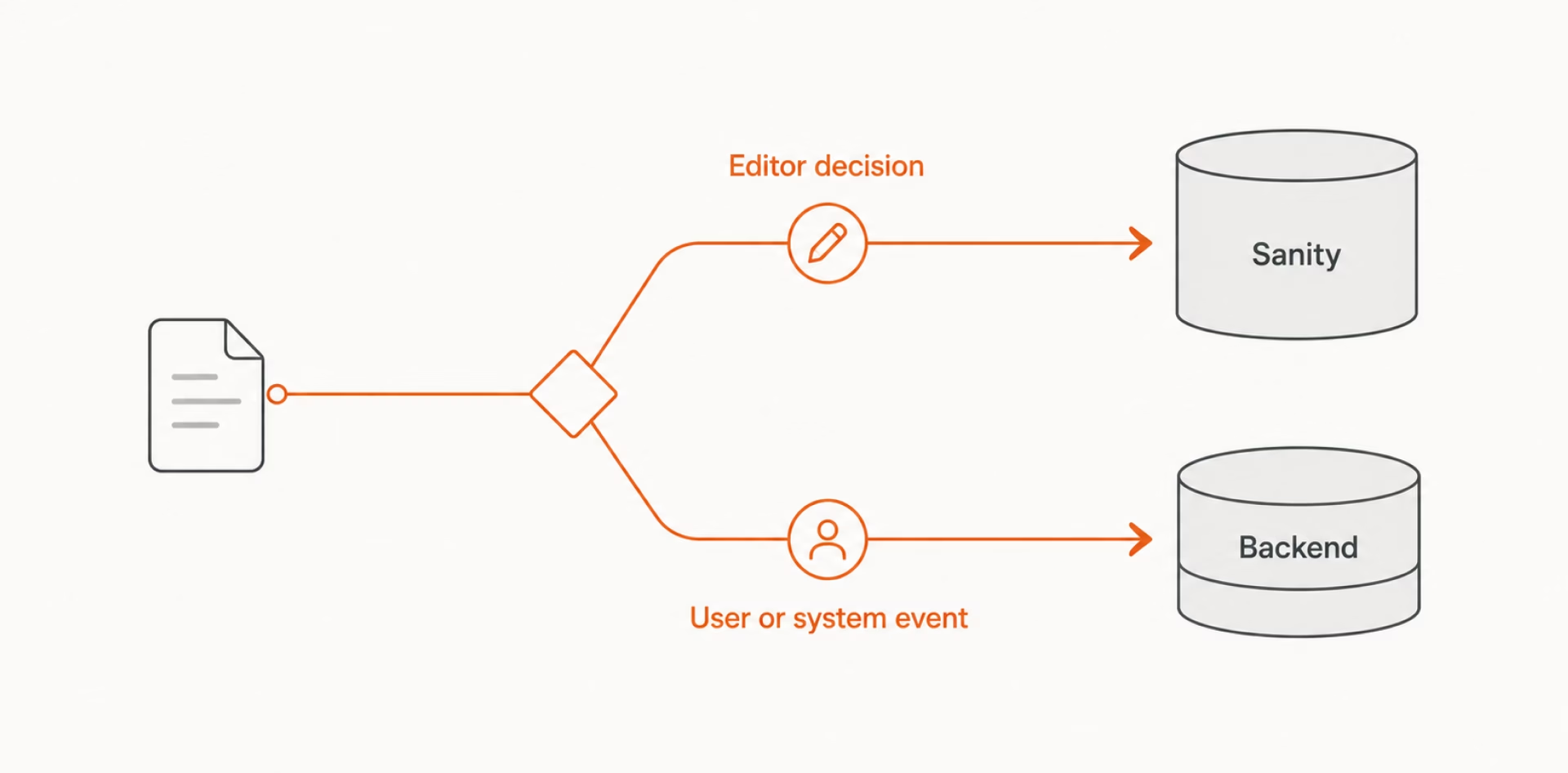
A useful heuristic: If data changes because an editor made a content decision, it usually belongs in Sanity. If it changes because of user activity, a transaction, or a system event, it usually belongs in your backend.
After weighing Sanity’s strengths, limitations, and integration requirements, your decision should come down to fit. Sanity is a strong choice when structured content is central to the product, needs to evolve across multiple channels, and the team has the technical capacity to shape the schema and editorial experience. If content is secondary or backend logic carries most of the complexity, another platform may serve your project better.
Ultimately, you will get the most from Sanity when you define its role clearly from the start. Used as dedicated content infrastructure and paired with the right application layer, it can give your team a flexible foundation that remains manageable as the product grows.
{{banner}}