







Cloudflare’s cloud costs rarely announce themselves. Bandwidth charges accumulate, edge logic starts bleeding into backend code, and the codebase that once felt clean becomes harder to reason about. At some point, the question becomes unavoidable: migrate everything, or keep paying the price?

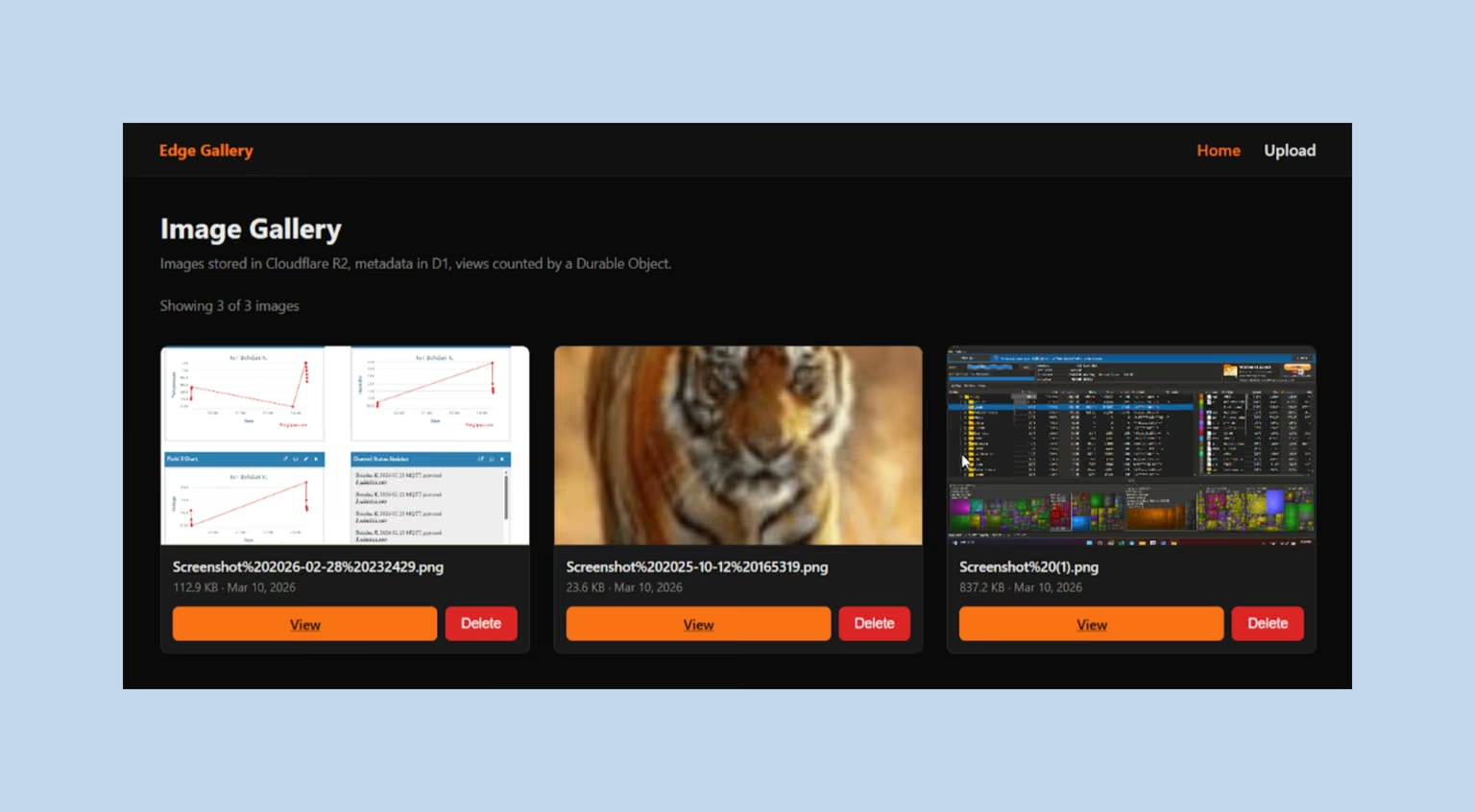
A common assumption says you have to choose: migrate everything to Cloudflare, or get nothing out of it. This guide proves otherwise. By walking through a real three-service codebase — a native Cloudflare Worker, a Next.js App Router frontend, and a plain Express server — we’ll show exactly how to adopt the edge incrementally, without rearchitecting your entire platform. Eliminating the egress tax and keeping LLM token costs under control turns out to require far less than most teams expect.
Every code example in this guide comes from the working Edge Gallery repository, so the architecture is shown as it was implemented, not just described in theory.
Most Cloudflare guides assume a greenfield project. This one starts from a more common reality: you already have a codebase, dependencies, and production constraints that cannot be erased overnight. The Triad Architecture gives the existing system a way to adopt Cloudflare incrementally, rather than turning migration into a rebuild.
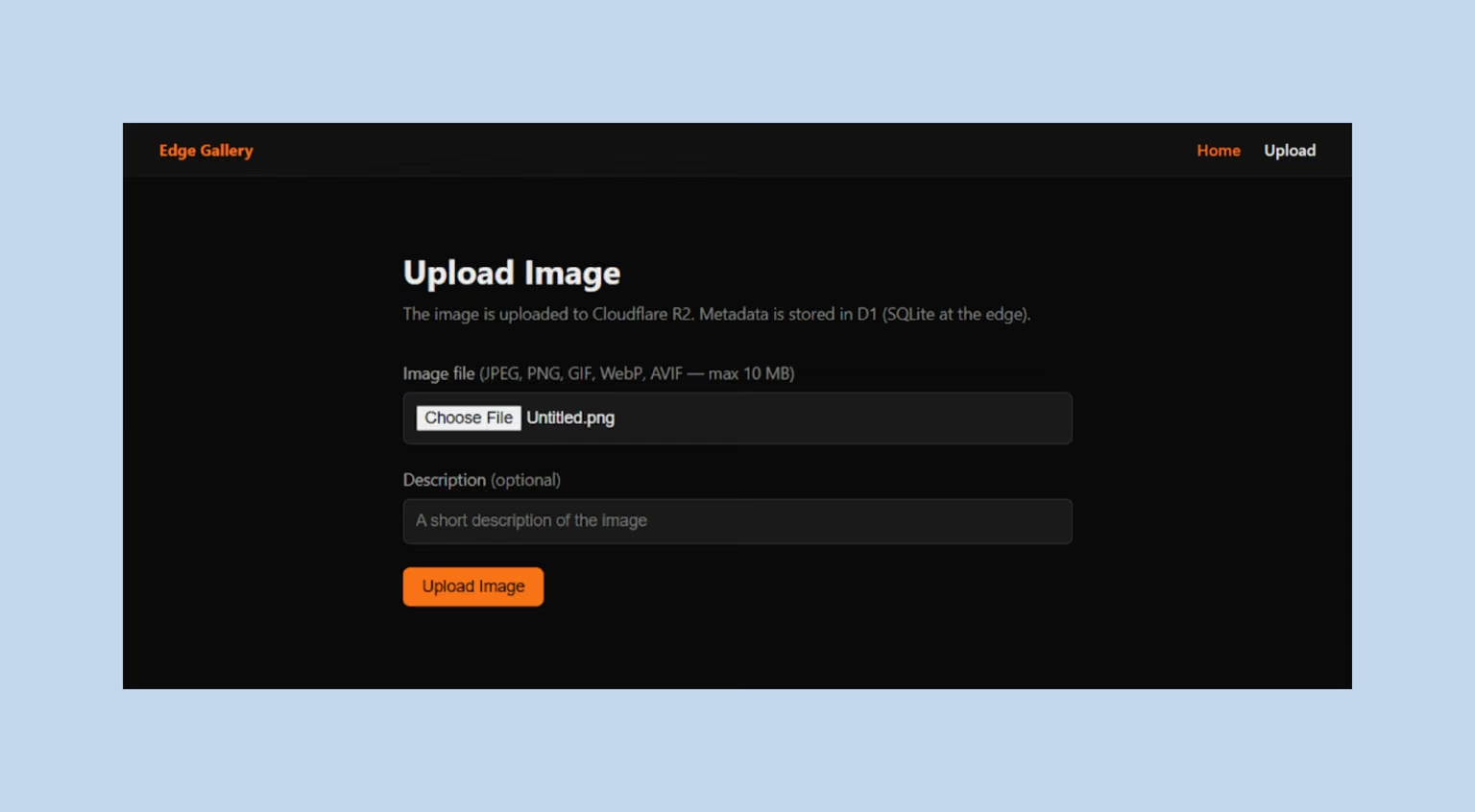
Each service occupies a distinct layer — edge, frontend, and backend — with clear boundaries between them and no overlap in responsibility. The edge handles global distribution and storage. The frontend stays close to the user. The backend keeps running exactly where it always has, with two configuration changes that unlock everything else.
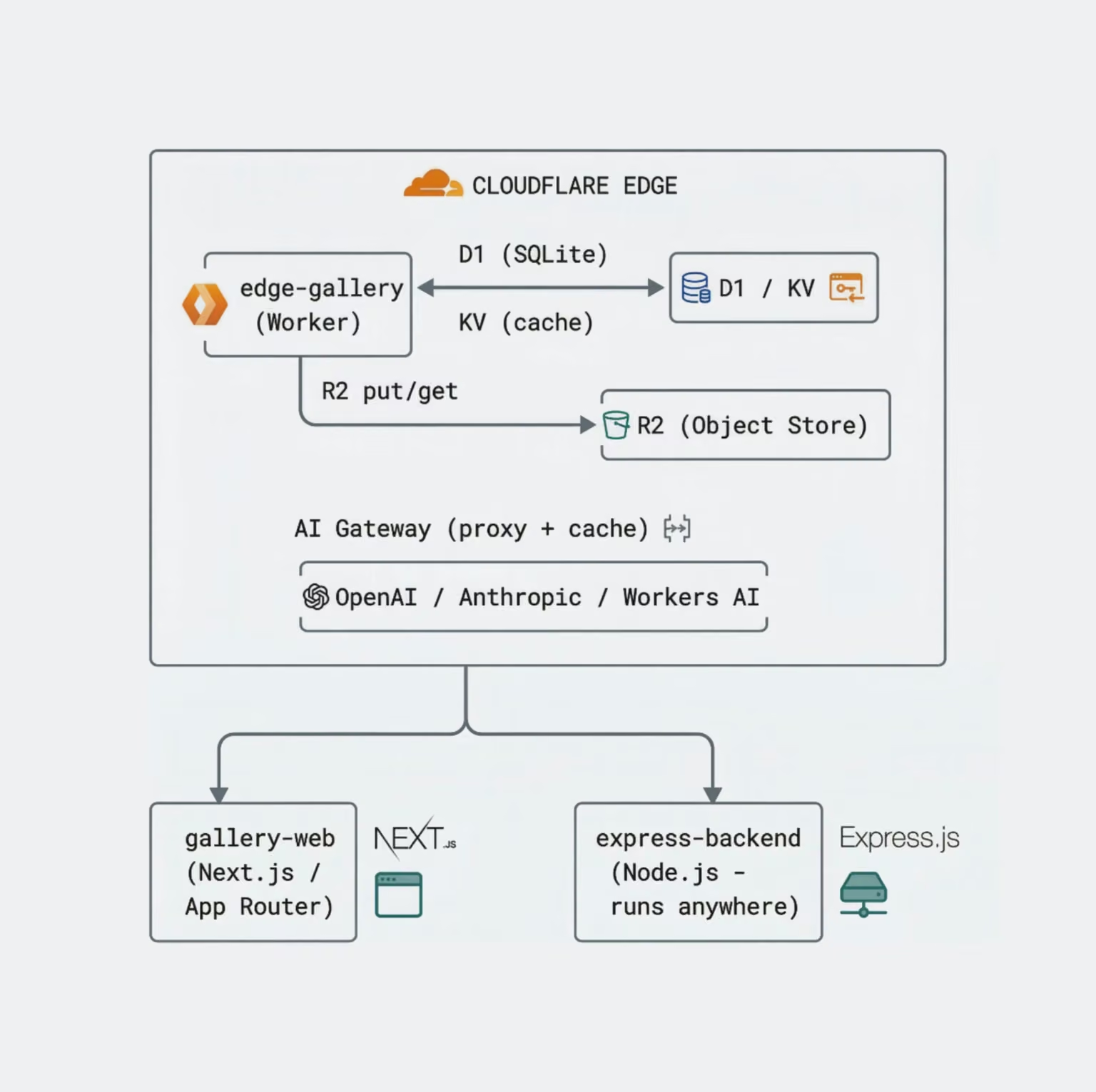
This diagram shows how the system is split between the edge and traditional backend services, and how each component interacts in real time.
The table maps each service to its role and the reason it runs at the edge:
| Service | Role | Why edge-hosted? |
|---|---|---|
| edge-gallery | Global API, metadata, image storage API | Native Worker — runs in 300+ cities |
| gallery-web | End-user UI | Next.js on Cloudflare Pages / OpenNext |
| express-backend | Existing Node server | Kept external; R2 + AI Gateway bolted on |
Each service, its role, and why it runs at the edge
What makes this pattern work is the last row. The Express server does not migrate. It changes two endpoint URLs — the S3 endpoint points to R2, and the OpenAI base URL points to AI Gateway — then immediately inherits zero-egress storage and prompt caching.
Each part of the Edge Gallery architecture handles a distinct task. The setup relies on separate components for storage, data access, caching, AI routing, and consistency. The sections below explain how these pieces work together and what role each one plays under real conditions.
Your existing aws-sdk code likely works with just a change of the endpoint URL.
This is not marketing shorthand. In this codebase, the switch to R2 really happens at the client configuration level. Here is the S3 client initialization from express-backend/src/routes/storage.ts:
const r2 = new S3Client({
  endpoint: `https://${env.CF_ACCOUNT_ID}.r2.cloudflarestorage.com`,
  region: 'auto',
  credentials: {
    accessKeyId: env.R2_ACCESS_KEY_ID,
    secretAccessKey: env.R2_SECRET_ACCESS_KEY,
  },
  requestChecksumCalculation: 'WHEN_REQUIRED',
  responseChecksumValidation: 'WHEN_REQUIRED',
});
Point endpoint at Cloudflare instead of s3.amazonaws.com, set region: 'auto' (R2 manages placement for you), and every ListObjectsV2Command, PutObjectCommand, GetObjectCommand, and DeleteObjectCommand works unchanged. The repository uses @aws-sdk/client-s3 ^3.750 — the same package you would install for AWS.
What you save: AWS S3 charges $0.09 / GB for data transferred out to the public internet. R2 bills nothing for the same transfer. For a gallery serving 10 TB / month, that is $900 / month saved on bandwidth alone, before storage charges.
What you don’t get (yet): R2 does have gaps: Object Locking (WORM compliance), S3 Inventory, complex KMS-managed encryption policies, and some of the more esoteric lifecycle rules. If your legal team requires those, AWS still wins. For a media-serving workload, R2 is the clear choice.
In a classic backend architecture, every request for a list of images round-trips to a single database region — US-East, EU-West, wherever you provisioned it. Users in Tokyo wait 150–300 ms just for the SQL query.
D1 is a distributed SQLite database. KV is a globally replicated key-value store. Together, they let the Worker serve metadata from the data center physically closest to the reader. The pattern used throughout edge-gallery/src/routes/images.ts is cache-aside:
// 1. Try KV first — ~1 ms, served from local PoP
const cacheKey = `list:p${page}:l${limit}`;
const hit = await env.CACHE.get<unknown>(cacheKey, 'json');
if (hit) {
  return Response.json(hit, {
    headers: { 'X-Cache': 'HIT', 'Cache-Control': 'public, max-age=60' },
  });
}

// 2. KV miss → hit D1 (also edge-distributed, but a round-trip)
const [rows, totalRow] = await Promise.all([
  env.DB.prepare(
    'SELECT id, file_name, content_type, size_bytes, upload_date, description ' +
    'FROM images ORDER BY upload_date DESC LIMIT ? OFFSET ?',
  ).bind(limit, offset).all<ImageRecord>(),
  env.DB.prepare('SELECT COUNT(*) AS total FROM images')
    .first<{ total: number }>(),
]);

// 3. Populate KV for next request (60-second TTL minimum)
await env.CACHE.put(cacheKey, JSON.stringify(body), { expirationTtl: 60 });
Two things are worth noting here beyond the pattern itself:
AI Gateway adds a control layer between the backend and every LLM provider, helping teams reduce repeated-token spend and manage model access from one place. The Express backend proxies all LLM calls through Cloudflare instead of hitting OpenAI directly. The configuration happens at client construction time in express-backend/src/routes/ai.ts:
function makeOpenAIClient(cacheTtl?: number): OpenAI {
  const headers: Record<string, string> = {
    'cf-aig-authorization': `Bearer ${env.CF_API_TOKEN}`,
  };

  if (cacheTtl !== undefined) {
    headers['cf-aig-cache-ttl'] = String(cacheTtl);
  }

  return new OpenAI({
    apiKey: env.OPENAI_API_KEY || 'no-key-provided',
    baseURL: `https://gateway.ai.cloudflare.com/v1/${env.CF_ACCOUNT_ID}/${env.CF_AI_GATEWAY_ID}/compat`,
    defaultHeaders: headers,
  });
}
The openai npm package is unmodified. The only changes are the redirected baseURL, which points to AI Gateway’s OpenAI-compatible endpoint, and two Cloudflare-specific headers: the gateway authorization token and a per-request cache TTL.
This gives the backend three practical advantages:
Here is a question worth asking: why not use KV for a view counter? Edge primitives are not interchangeable. The difference between KV and Durable Objects (DOs) becomes obvious the moment writes need to be strictly ordered.
KV is eventually consistent, which means that under concurrent traffic from multiple edge locations, two Workers can read the same value, both increment it, and write back the same result, leaving the counter barely moving. This is not a theoretical edge case. It is how distributed systems behave under concurrent writes.
Durable Objects address the consistency gap with a different model: each DO instance runs in exactly one data center worldwide, and all requests to that instance are serialized. The ViewCounter in edge-gallery/src/durable-objects/ViewCounter.ts demonstrates the critical pattern:
case '/increment': {
  // blockConcurrencyWhile serialises the read-modify-write cycle.
  // Concurrent /increment calls can never race and lose an update.
  const newCount = await this.state.blockConcurrencyWhile(async () => {
    const current = (await this.state.storage.get<number>('count')) ?? 0;
    const next = current + 1;
    await this.state.storage.put('count', next);
    return next;
  });
  return Response.json({ count: newCount });
}
blockConcurrencyWhile is the key. It pauses the event loop for this instance while the async read-modify-write runs, guaranteeing no other request can interleave. The result is an atomic counter that works correctly under any concurrency level — without a mutex, a Redis lock, or a database transaction. The DO identity is derived from the filename:
const id = env.VIEW_COUNTER.idFromName(record.file_name);
const stub = env.VIEW_COUNTER.get(id);
await stub.fetch('http://do/increment');
idFromName is deterministic: the same filename always routes to the same DO instance, from any Worker invocation, anywhere in the world. The view counter for sunset.jpg is always the same object. The view increment is kicked off with ctx.waitUntil(), so it does not block the HTTP response:
// In the GET /api/images/:id handler:
ctx.waitUntil(incrementViewCount(env, record.file_name));
return Response.json({ ...record, rawUrl: `/api/images/${id}/raw` });
The user gets their response immediately, and the counter updates in the background.
Behind the architecture, everything comes down to how data actually moves through the system. Each request follows a clear path across the edge, storage, and services, with performance and cost decisions built into every step. Here are three real flows that show how uploads, AI requests, and content delivery work in practice.
An image upload touches four components in sequence. The flow below shows the exact path:
Browser
  │  POST /api/images/upload
  │  Content-Type: image/jpeg
  │  Authorization: Bearer <key>
  ▼
edge-gallery Worker (auth + rate-limit middleware)
  │
  ├─► IMAGES.put(fileName, request.body)   ← R2, streaming — never buffered
  │
  ├─► DB.prepare('INSERT INTO images ...') ← D1 SQL, prepared statement
  │
  ├─► CACHE.put('LATEST_IMAGE', fileName)  ← KV, eager populate
  │
  └─► ctx.waitUntil(invalidateListCache)   ← Background KV invalidation
The R2 write uses request.body directly — a ReadableStream. The Worker never loads the file into memory. This is why the comment in the source reads “streamed (never buffered).” A 10 MB image upload consumes a negligible amount of Worker memory regardless of concurrency.
If the D1 insert fails after the R2 write succeeds, the code runs a compensating transaction — it attempts to delete the orphaned R2 object and rethrows the error:
} catch (err: unknown) {
  try {
    await env.IMAGES.delete(fileName);
  } catch {
    console.error(`R2 cleanup failed for '${fileName}' — manual cleanup needed`);
  }
  throw err;
}
This is not a full two-phase commit. However, it prevents orphaned objects from accumulating silently.
Every AI request passes through two checkpoints before reaching a provider. Tracing the complete path from browser to model reveals where the cache decision happens:
Browser / API Client
  │  POST /api/ai/chat
  │  { model: "openai/gpt-4o-mini", messages: [...], cacheTtl: 300 }
  ▼
express-backend (Node.js)
  │  requireAuth middleware
  │  model allowlist check
  │
  └─► OpenAI client → baseURL: AI Gateway compat endpoint
         │
         ├─ Cache HIT?  → Return cached response (0 provider tokens billed)
         │
         └─ Cache MISS? → Forward to OpenAI, cache response for 300 s
The caller can override cacheTtl per-request. Set it to 0 to bypass the cache (useful for non-deterministic or user-specific prompts). Set it to 86400 for FAQ-style endpoints that change once a day.
Every image request takes the shortest path through the system. Tracing it from browser to storage makes the routing logic explicit:
<img src="/api/images/42/raw" />
  ▼
edge-gallery Worker
  │  No auth check (public raw endpoint — browsers can't send Bearer tokens)
  │
  ├─► DB: SELECT file_name, content_type WHERE id = 42
  │
  └─► IMAGES.get(file_name)
         │
         └─► Response(obj.body, {         ← Stream, not buffer
               'Cache-Control': 'public, max-age=31536000, immutable',
               'ETag': obj.httpEtag,
             })
The raw endpoint is intentionally public. The auth middleware explicitly checks for this path:
const isRawImageGet =
  request.method === 'GET' &&
  /^\/api\/images\/\d+\/raw$/.test(url.pathname);
if (!isRawImageGet) {
  const authed = await verifyApiKey(request, env.API_SECRET);
  if (!authed) return withCors(unauthorized(), request);
}
Security often breaks in small details, not in big design decisions. The patterns below show how to handle authentication, rate limiting, and input validation in a way that holds up under real traffic. Each approach is simple, but together they prevent common vulnerabilities that are easy to miss in edge-based systems.
Both the Worker and the Express server use timing-safe comparison for API key validation. In the Worker, the Web Crypto API is used directly because node:crypto is not available in the standard runtime:
// edge-gallery/src/middleware/auth.ts
async function timingSafeEqual(a: string, b: string): Promise<boolean> {
  const enc = new TextEncoder();
  const key = await crypto.subtle.generateKey(
    { name: 'HMAC', hash: 'SHA-256' }, false, ['sign']
  );
  const [macA, macB] = await Promise.all([
    crypto.subtle.sign('HMAC', key, enc.encode(a)),
    crypto.subtle.sign('HMAC', key, enc.encode(b)),
  ]);
  // ...constant-time byte comparison
}
In the Express server, node:crypto.timingSafeEqual is used — but the keys are hashed before comparison, so the buffer lengths are always equal (a prerequisite for timingSafeEqual):
// express-backend/src/middleware/auth.ts
const EXPECTED = createHash('sha256').update(env.API_SECRET).digest();
// ...
const provided = createHash('sha256').update(token).digest();
if (!timingSafeEqual(provided, EXPECTED)) { ... }
This prevents timing attacks, in which an attacker measures response latency to progressively guess characters of the secret.
The rate limiter in edge-gallery/src/middleware/rate-limit.ts hashes the client IP with SHA-256 before using it as a KV key:
async function hashIp(ip: string): Promise<string> {
  const data = new TextEncoder().encode(`rl:${ip}`);
  const hash = await crypto.subtle.digest('SHA-256', data);
  return [...new Uint8Array(hash)].map(b => b.toString(16).padStart(2, '0')).join('');
}
Raw IP addresses stored in logs or KV are personal data under GDPR. The hash preserves the rate-limiting function (the same IP always hashes to the same key) while ensuring the IP itself is never written to storage.
File names from both upload paths go through a sanitizer before touching storage:
function sanitizeFileName(raw: string): string {
  return raw
    .replace(/[/\\:*?"<>|]/g, '_')   // path-injection characters
    .replace(/\.\./g, '__')          // directory traversal
    .slice(0, 200);                  // length cap
}
The Content-Type header is validated against an explicit allowlist, not an extension check — extensions are trivially spoofable:
const ALLOWED_TYPES: ReadonlySet<string> = new Set([
  'image/jpeg', 'image/png', 'image/gif', 'image/webp', 'image/avif',
]);
Size is checked against a hard cap (MAX_BYTES = 10 MB) before the R2 write begins, so oversized uploads are rejected at the edge without consuming storage write operations.
Every technology choice comes with trade-offs. Instead of ideal scenarios, the comparison looks at real costs, limitations, and practical benefits. If you’re deciding between Cloudflare services and traditional setups, the following side-by-side breakdowns will help you see where each option actually makes sense.
R2 and AWS S3 share an API. Where they diverge is worth examining closely:
| Criterion | R2 | AWS S3 |
|---|---|---|
| Egress to internet | $0.00 / GB | $0.09 / GB |
| Storage | $0.015 / GB / month | $0.023 / GB / month |
| API compatibility | S3-compatible (drop-in) | Native |
| Object Locking (WORM) | Limited | Full |
| Complex KMS encryption | No | Yes |
| Vendor ecosystem | Cloudflare only | Massive |
| Migration effort | Change one endpoint URL | — |
Cost and capability differences between R2 and AWS S3
For read-heavy media workloads, R2 is objectively cheaper. For compliance-heavy enterprise workloads requiring WORM or complex KMS, AWS wins. Because R2 is S3-compatible, you can run both simultaneously and migrate gradually.
AI Gateway and a direct provider API look similar on paper. In practice, the differences compound quickly:
| Criterion | AI Gateway | Direct API |
|---|---|---|
| Token cost | Up to 30% less (caching) | Full price |
| Observability | Unified dashboard | Per-provider |
| Multi-provider | Single auth token | Multiple keys |
| Kill switch | Instant, no deploy | Code change required |
| Rate limiting | Built-in | Roll your own |
| Network hop | +1 (negligible, <5 ms) | 0 |
| Setup | One baseURL change | Already set up |
What the gateway adds over calling a provider directly
AI Gateway is almost always the right choice the moment you’re spending real money on LLM tokens. The caching and observability alone justify the setup. The only downside is that it adds a dependency on Cloudflare’s infrastructure and one more credential to rotate.
The trade-offs between Workers and a traditional Node.js API are concrete and measurable:
| Criterion | Cloudflare Workers | Node.js / Express |
|---|---|---|
| Cold start | 0 ms (always warm) | 100–500 ms |
| Global deployment | 300+ PoPs, automatic | Manual per-region |
| Memory per request | 128 MB | Shared heap |
| CPU per request | 30 s (paid plan) | Unlimited |
| npm ecosystem | Mostly compatible | Full |
| Long-running processes | Not supported | Supported |
| WebSockets | Durable Objects | Native |
| Debugging | wrangler tail | Standard Node tools |
Runtime limits and deployment trade-offs, side by side
Workers are suitable for stateless request processing, auth, image serving, and API aggregation. They are a poor fit for CPU-intensive tasks, long-running jobs, or code that relies heavily on Node.js-specific built-ins. The hybrid model in this repository — Workers for the hot path, Express for the long tail — is a realistic production pattern.
Small operational decisions often have the biggest impact on stability and developer experience. The practices below come directly from real-world use, showing how to handle secrets, local environments, and runtime behavior in ways that avoid common mistakes and keep systems predictable as they grow.
The wrangler.toml stores only non-sensitive config (ENVIRONMENT). Secrets are injected via wrangler secret put API_SECRET, which encrypts them at rest and never surfaces them in the repository. In the Express server, secrets are loaded from .env via dotenv/config and validated at startup — the application fails fast with a descriptive error rather than silently using empty strings.
Never use your Global API Key. Create a scoped token with the minimum permissions required for the specific bucket or service.
Without --persist, every wrangler dev restart wipes D1, KV, and R2 local state. Discovering this after you’ve spent 20 minutes populating local test data is frustrating. The flag writes state to .wrangler/state/ in the project directory, which persists across restarts and can be committed to .gitignore.
The CACHE KV namespace is already in every Worker invocation. A MAINTENANCE_MODE key checked early in the request lifecycle gives you a global, sub-60-second circuit breaker:
// Add to the top of the fetch handler in index.ts:
const maintenance = await env.CACHE.get('MAINTENANCE_MODE');
if (maintenance === 'true') {
  return Response.json(
    { error: 'Service temporarily unavailable', retryAfter: 300 },
    { status: 503, headers: { 'Retry-After': '300' } },
  );
}
Every view count increment and cache invalidation in this codebase uses ctx.waitUntil:
ctx.waitUntil(incrementViewCount(env, record.file_name));
ctx.waitUntil(invalidateListCache(env));
waitUntil extends the Worker’s lifetime after the response is sent. The critical path (returning data to the user) is not blocked by work that doesn’t affect the response. Without it, the Worker would be terminated the moment return Response.json(...) executes, and the background work would be silently dropped.
The frontend layer carries as much weight as the edge services behind it. gallery-web uses Next.js App Router with open-next for Cloudflare Pages deployment. The following patterns make it edge-ready from day one:
The uploadImageAction and deleteImageAction in app/actions.ts are 'use server' functions. They run on the server (or edge), have access to environment variables with the API key, and are called directly from React components — no exposed API route, no client-side credential leakage.
After an upload or delete, the action calls updateTag('images-list') and updateTag('image-${id}'). It purges only the relevant Next.js use cache entries rather than doing a blanket invalidation — the rest of the page cache stays warm.
This is a pure client component ('use client') that receives a count from the server and renders it. The view increment happens in the Worker via waitUntil — the frontend never polls. It reads the count on page load from the server render.
The most practical edge architecture is the one your existing codebase can adopt without a rewrite.
Every team using Cloudflare eventually asks the same question: should we migrate fully or stay hybrid? The answer depends on a specific set of conditions.
The case for full migration is straightforward when these conditions apply:
The hybrid path has its own set of clear signals:
The hybrid approach demonstrated here is not a compromise. It is a legitimate production architecture used by companies that want Cloudflare’s economics without the risk of a flag-day migration.
The “edge tax” narrative — the idea that going edge means rewriting everything — is false, and this codebase is the proof. Three concrete wins, zero full migrations: R2 replaces S3 with one endpoint change and drops egress costs to zero; AI Gateway wraps OpenAI with one baseURL change and adds caching, observability, and a global kill switch; Workers handle the globally distributed hot path without asking the Express backend to move.
What makes these changes practical is not only the cost or performance gain, but the way they can be adopted. Each one is independent, reversible, and small enough to introduce without turning migration into a rebuild. For existing products with real constraints, that difference matters.
The architecture is not perfect — Durable Objects add complexity, D1 is still maturing, and the 30-second CPU limit requires careful design for compute-heavy work. But for a media workload with AI features and read-heavy traffic, the numbers are hard to argue with: zero egress fees, sub-5 ms cache hits at the edge, and LLM costs that do not scale linearly with repeated queries. This is the kind of incremental architecture thinking modern web development increasingly requires.