







A service crawls, and every instinct points at the application — the code, the framework, the API calls. Hours go into tuning it, adding caches, rewriting loops, and still nothing moves. The bottleneck is somewhere the app profiler usually does not look.

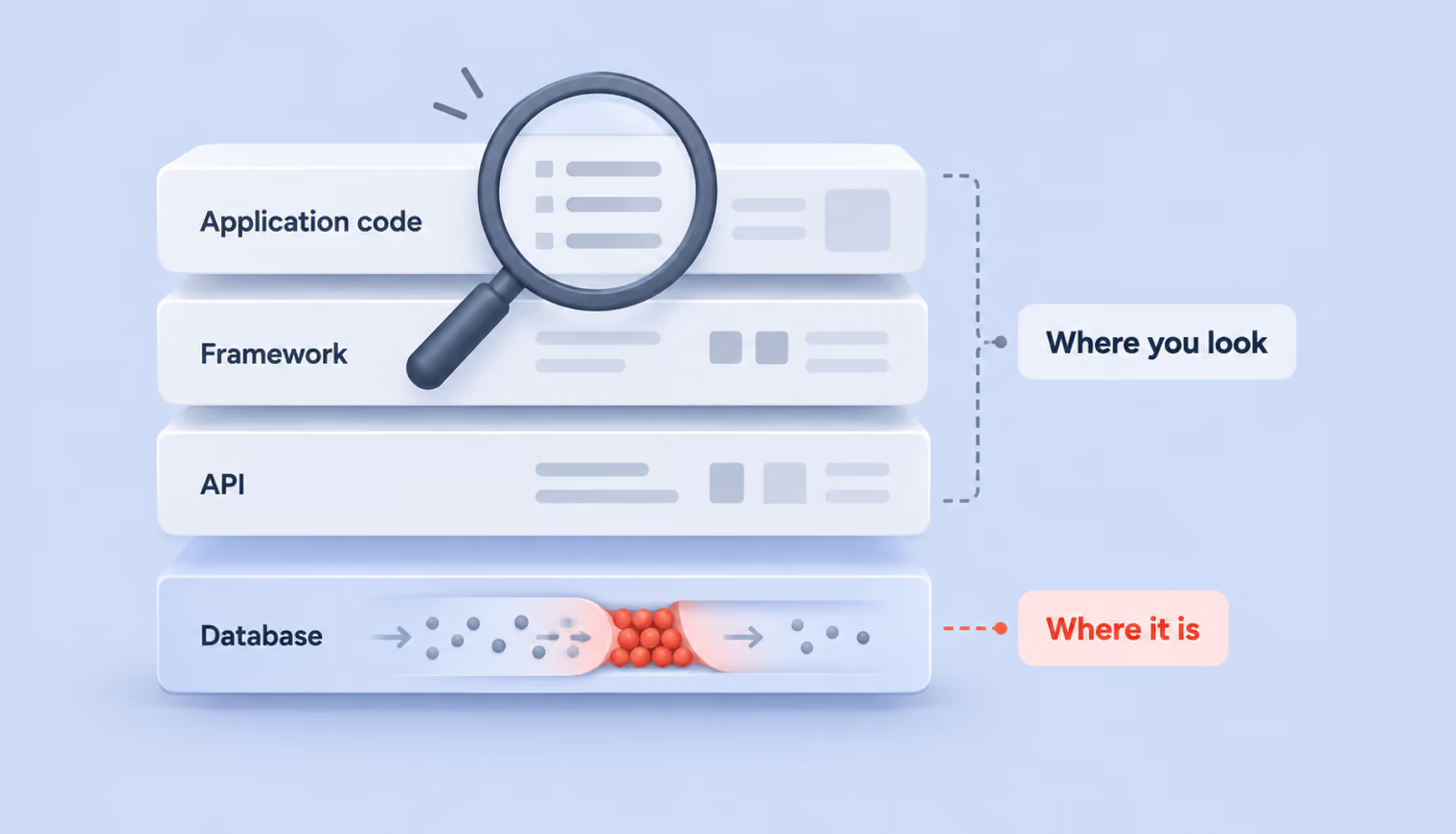
A common reason sits one layer below the code. The way an app talks to its database — the queries it sends, the indexes it relies on, the connections it opens — decides performance far more than most app logic does, and it’s the layer that often gets optimized last. Learning to read it and shape it is what separates a service that scales from one that needs constant firefighting.
This guide covers ten ways to do exactly that, from reading a query plan to designing a schema that scales, spanning most of what goes wrong between an app and its database in production.
{{banner}}
EXPLAIN (ANALYZE, BUFFERS) reports what a query did when it ran: how many rows it read, how long each step took, which operations the database chose. The BUFFERS option adds disk I/O detail, and without it you can’t tell whether a query hits disk or reads from cache:
EXPLAIN (ANALYZE, BUFFERS)
SELECT * FROM orders WHERE user_id = 42 AND status = 'completed';
The result looks something like this:
Seq Scan on orders  (cost=0.00..25412.00 rows=5 width=120)
                    (actual time=312.45..843.12 rows=3 loops=1)
  Filter: ((user_id = 42) AND (status = 'completed'))
  Rows Removed by Filter: 1000000
  Buffers: shared hit=8123 read=42841
Planning Time: 0.08 ms
Execution Time: 843.18 ms
The plan holds several signals, and a few of them tell you most of what you need. Start with these:
Seq Scan means the engine walked the entire table row by row — on a million rows, 843 ms instead of a couple. Index Scan means it used an index and jumped straight to the matches. A sequential scan isn’t always wrong: when a query genuinely needs most of the table, reading it in order beats scattered index lookups. The warning sign is a Seq Scan where you expect a handful of rows and the engine reads everything.
The plan above expected 5 rows and returned 3, which is healthy. Sometimes the gap is wider:
Index Scan on orders  (cost=... rows=10 ...)
                      (actual time=... rows=48523 loops=1)
Ten expected, forty-eight thousand returned — the statistics may be stale or insufficient for this data distribution. Recalculating them is a good first step:
ANALYZE orders;
Back in the Seq Scan output, the engine discarded a million rows to return three: it loaded them all, then threw most away. A suitable index would fetch only the rows the query asks for.
A line most people skip and shouldn’t. shared hit=8123 counts pages found in PostgreSQL’s cache; read=42841 counts pages pulled from disk. When the read figure dwarfs the hit figure, the query is I/O-bound — perhaps shared_buffers are too small, perhaps the data simply won’t fit in memory. Drop BUFFERS and none of these surfaces.
A simple query produces a flat plan. Add a JOIN, and it branches into a tree:
Hash Join  (actual time=120.00..534.00 rows=150 loops=1)
  -> Seq Scan on users  (actual time=0.01..45.00 rows=50000 loops=1)
  -> Hash  (actual time=89.00..89.00 rows=1000000 loops=1)
    -> Seq Scan on orders  (actual time=0.02..60.00 rows=1000000 loops=1)
The bulk of the time lands on the Hash Join, where the entire orders table is scanned to build a hash. An index on the join key could turn that scan into an Index Scan and cut the cost sharply. Watch the loops value too: loops=1000 means the step ran a thousand times, usually inside a Nested Loop, so multiply its per-run time by the loop count for the true figure.
Plain EXPLAIN prints the plan without executing the query, which makes it safer to use in production. The rule of thumb is to use EXPLAIN in production and EXPLAIN ANALYZE on a test database loaded with realistic data.
Since nobody profiles every query by hand, ongoing monitoring falls to two tools. The pg_stat_statements extension gathers statistics on all queries as they run:
SELECT query, calls, mean_exec_time, total_exec_time
FROM pg_stat_statements
ORDER BY total_exec_time DESC
LIMIT 10;
That surfaces the ten costliest queries, which is where the digging starts. The second tool, auto_explain, logs the plan for any query crossing a duration threshold, hands-free — a slow query arrives, and its plan lands in the log. It’s set in postgresql.conf:
shared_preload_libraries = 'auto_explain'
auto_explain.log_min_duration = '100ms'
auto_explain.log_buffers = true
MySQL offers the same reach through the Performance Schema and the slow query log.
An index is a separate structure alongside the table, like the contents page of a book — rather than flipping through all 500 pages, you check the contents and jump to the right one. On a million-row table, that’s the difference between a full scan and landing straight on the data. Most of the time, reaching for one is the right instinct. The value is in knowing where it pays off and where it quietly costs you.
Indexes reward a few specific access patterns:
SELECT * FROM users WHERE email = 'test@mail.com';
CREATE INDEX idx_orders_user ON orders (user_id) INCLUDE (status, total);
SELECT status, total FROM orders WHERE user_id = 42 runs as an Index Only Scan, never touching the main table.
CREATE INDEX idx_orders_active ON orders (user_id, created_at)
WHERE status = 'active';
If most of your queries target active orders and those are a small slice of the table, indexing only them saves both space and time.
An index over a common value earns its keep less than you’d hope:
SELECT * FROM users WHERE is_active = true;
With most users active, the planner reasons that it would read most of the table regardless and falls back to a sequential scan. As a rough rule of thumb, once a query returns roughly 5–10% of a table, an index may offer little benefit.
Wrapping a column in a function is the other case. The index stores the original values, so a function applied in the WHERE clause makes it unusable:
-- index on created_at exists but goes unused
SELECT * FROM orders WHERE YEAR(created_at) = 2025;
-- rewritten as a range, the index applies
SELECT * FROM orders
WHERE created_at >= '2025-01-01' AND created_at < '2026-01-01';
PostgreSQL does support functional indexes (CREATE INDEX ... ON users (LOWER(email))), though storing data in the right format from the start is the cleaner path.
Every index is a structure the database maintains on each INSERT, UPDATE, and DELETE. Five indexes on a table turn one insert into six write operations, and dropping unused ones can speed inserts up several times over. Finding the dead weight is a single query:
SELECT indexrelname, idx_scan
FROM pg_stat_user_indexes
WHERE idx_scan = 0;
An idx_scan of 0 means the index has never been used — it costs space and slows writes for nothing.
SELECT * is convenient while debugging and costly in production. Tables accumulate columns over time — a multi-megabyte avatar_blob, a JSONB metadata field, a long bio — and a query that needs nothing more than id and email ends up dragging all of it across.
The cost starts at the storage layer. The wider the row, the more pages the database reads, and more pages mean more disk I/O — a single heavy column can multiply the data read many times over:
-- pulls everything, including a 2 MB avatar
SELECT * FROM users WHERE is_active = true;
-- pulls only what's needed
SELECT id, email, name FROM users WHERE is_active = true;
It also undoes covering indexes. With an index that includes id and email, SELECT id, email runs as a fast Index Only Scan. Switch to SELECT * and the database visits the table for every row, leaving the index useless — one asterisk erases the optimization.
The waste continues past the database. Extra kilobytes per row, multiplied across thousands of rows, become megabytes of network traffic. ORMs map every returned column to an object field, inflating memory. Serialization then carries the unused fields into JSON and all the way to the client.
There are places where SELECT * is fine — one-off scripts, console debugging, an EXPLAIN ANALYZE. In code that hits the database thousands of times a minute, listing columns explicitly is the safer default. It also guards against a subtler problem: add a column later, and SELECT * starts pulling it automatically, which can break the app or quietly raise its resource use. An explicit list keeps that from happening.
“Every column you didn’t ask for still costs you at every layer it passes through.”
Both filter rows using data from another table, and they reach the answer differently. IN takes a list and checks membership against it, which works well for a fixed set:
SELECT * FROM employees WHERE department_id IN (1, 2, 3);
Feed it a subquery returning millions of rows, though, and performance can suffer depending on the execution plan the optimizer chooses. In some cases, the database may need to process a large intermediate result before it can evaluate the outer query.
EXISTS takes the other path. For each row of the outer query, it checks the subquery for a single match — one is enough to return true and move on, with no need to walk the whole list:
SELECT * FROM users u
WHERE EXISTS (
  SELECT 1 FROM orders o
  WHERE o.user_id = u.id AND o.total > 1000
);
The SELECT 1 is deliberate: EXISTS ignores what the subquery returns and cares only whether a row is there. That’s why it wins on large subqueries where a match turns up early. With a large orders table, EXISTS can be more efficient when the execution plan lets the database stop after finding a match. But the actual difference depends on the optimizer and the plan it chooses.
There’s also a correctness trap with NOT IN. If the subquery contains a NULL, the whole query can return nothing:
-- if any manager_id is NULL, this returns no rows
SELECT * FROM users
WHERE id NOT IN (SELECT manager_id FROM departments);
The reason is that NOT UNKNOWN evaluates to UNKNOWN, so every row fails the test. EXISTS sidesteps it entirely.
For choosing between them: a short, fixed list suits IN; a subquery over a large table suits EXISTS, and any chance of NULLs in the subquery makes EXISTS the safe call. Confirm with EXPLAIN ANALYZE either way — the optimizer sometimes rewrites IN as EXISTS on its own.
Small data hides it completely. Five records return instantly, the code looks tidy, and nothing flags a problem. Then the data grows, and the app slows to a crawl — behind a clean-looking loop, hundreds of queries no one can see.
The shape of it is simple:
const posts = await db.query('SELECT * FROM posts');  // 1 query
for (const post of posts) {
  const comments = await db.query(
    'SELECT * FROM comments WHERE post_id = $1', [post.id]
  );  // 1 more query per post
  post.comments = comments;
}
Five hundred posts mean 501 queries, each carrying its own parse, plan, execution, and network round-trip. Locally, that might read as 150 ms. In production, it becomes seconds.
ORMs make it harder to spot, because the queries vanish from the code:
// Sequelize -- each getAuthor() is a separate SELECT
const posts = await Post.findAll();
for (const post of posts) {
  const author = await post.getAuthor();  // query per post
}
The same trap appears in TypeORM, where a relation declared as a Promise loads lazily, and every await post.author is a database trip, and in Entity Framework, where a navigation property without .Include() does the same. The line reads like a plain property access while hundreds of queries run underneath it.
The fix is to fetch everything in one query with a JOIN:
const result = await db.query(`
  SELECT p.*, c.id AS comment_id, c.body
  FROM posts p
  LEFT JOIN comments c ON c.post_id = p.id
`);
Through an ORM, the equivalent is eager loading:
// Sequelize
const posts = await Post.findAll({ include: [{ model: Author }] });
// Prisma
const posts = await prisma.post.findMany({
  include: { comments: true, author: true }
});
// TypeORM
const posts = await postRepo.find({ relations: ['author', 'comments'] });
Catching it comes down to watching the queries. Turn on SQL logging, and a couple of hundred identical SELECTs scroll past the console. In PostgreSQL, pg_stat_statements surfaces the same thing — a simple SELECT with thousands of calls. APM tools like Datadog show it as a telltale “comb” of identical queries across the flame graph.
OFFSET looks simple enough — the first page is OFFSET 0, the hundredth is OFFSET 1980 — and it holds up fine while the data stays small. The trouble starts once the table reaches a million rows.
The gap between how OFFSET reads and how it runs shows up in a single query:
SELECT * FROM posts ORDER BY created_at DESC LIMIT 20 OFFSET 100000;
The database doesn’t leap to row 100,000. It reads all 100,000, discards them, and returns the next 20. On a two-million-row, table the cost climbs with depth:
The degradation is linear. An index can reduce the cost, but it cannot eliminate the work of skipping rows. There’s a correctness problem too: if a row is inserted between requests, every position shifts, and a reader sees the same record twice or misses one. On feeds, logs, and chats, that shows up often.
The alternative asks for rows after a specific point rather than skipping a count of them:
-- first page
SELECT * FROM posts ORDER BY id DESC LIMIT 20;
-- next page: last id from the previous page was 8340
SELECT * FROM posts WHERE id < 8340 ORDER BY id DESC LIMIT 20;
Here, the database seeks straight to the spot through the index, so the time holds steady no matter how deep you go:
Sorting by anything other than the ID needs a compound cursor, comparing both columns together:
SELECT * FROM posts
WHERE (created_at, id) < ('2025-06-15 10:30:00', 8340)
ORDER BY created_at DESC, id DESC
LIMIT 20;
-- matching index
CREATE INDEX idx_posts_created_id ON posts (created_at DESC, id DESC);
The cursor travels as a request parameter. A useful trick is to request one row more than the page size — ask for 21, and if 21 come back, there’s a next page, so you trim the extra and expose the last ID as the cursor:
app.get('/api/posts', async (req, res) => {
  const limit = 20;
  const cursor = req.query.cursor;
  let query = 'SELECT * FROM posts ORDER BY id DESC LIMIT $1';
  let params = [limit + 1];
  if (cursor) {
    query = 'SELECT * FROM posts WHERE id < $1 ORDER BY id DESC LIMIT $2';
    params = [cursor, limit + 1];
  }
  const result = await db.query(query, params);
  const hasNext = result.rows.length > limit;
  const posts = result.rows.slice(0, limit);
  res.json({
    data: posts,
    nextCursor: hasNext ? posts[posts.length - 1].id : null
  });
});
OFFSET still has its place — admin panels over small tables, cases that need a jump to a specific page number (which cursors can’t do), and prototypes. Below about 100,000 rows, the difference won’t register.
Every new database connection carries a TCP handshake, TLS negotiation, authentication, and session setup — overhead that happens before the query even begins. At high request volumes, repeatedly paying that setup cost adds unnecessary latency and load.
PostgreSQL commonly defaults to a maximum of 100 concurrent connections, so opening a new connection for every request can exhaust the available slots quickly. A pool solves both problems, and getting it right means understanding how it works, how to size it, and where it can still fail.
A pool keeps a set of connections open in advance. A request grabs a free one, runs its query, and hands it back, with no repeated handshakes:
const { Pool } = require('pg');
const pool = new Pool({
  host: process.env.DB_HOST,
  database: process.env.DB_NAME,
  user: process.env.DB_USER,
  password: process.env.DB_PASSWORD,
  max: 20,
  min: 2,
  idleTimeoutMillis: 30000,
  connectionTimeoutMillis: 5000,
});
const result = await pool.query('SELECT * FROM users WHERE id = $1', [userId]);
The pool is created once at startup:
// WRONG -- a new pool on every call
async function getUser(id) {
  const pool = new Pool();
  return pool.query('SELECT * FROM users WHERE id = $1', [id]);
}
// RIGHT -- one pool, export the method
const pool = new Pool();
module.exports.query = (text, params) => pool.query(text, params);
A commonly cited starting point is connections = (CPU cores × 2) + effective spindle count. For a four-core server with one effective spindle, that works out to nine connections. Treat it as a baseline rather than a fixed rule, and test against your actual workload.
The pg pool defaults to 10 connections, which is a reasonable starting point for many applications, but the right size depends on your workload and the number of application instances.
What matters more is the total across instances. Four instances at max: 20 means 80 connections, and against a max_connections setting of 100, that leaves 20 for monitoring, migrations, and other database clients. The per-instance ceiling follows from that:
max_per_instance = (max_connections - reserve) / number_of_instances
PgBouncer sits between the app and PostgreSQL, accepting hundreds of client connections while holding only a couple of dozen to the database. It runs in three modes:
Forget to call release(), and the connection disappears from the pool for good:
const client = await pool.connect();
try {
  await client.query('BEGIN');
  await client.query('INSERT INTO orders ...');
  await client.query('COMMIT');
} catch (e) {
  await client.query('ROLLBACK');
  throw e;
} finally {
  client.release();  // MANDATORY
}
Without the finally, every error swallows a connection. The pool drains, the app freezes, and nothing appears in the logs. For standalone queries, pool.query() avoids the risk entirely — it borrows and returns the connection on its own.
Each time the database receives a query, it parses the SQL, generates candidate plans, and picks one. For a query running thousands of times a second with only its parameters changing, that cycle is wasted work.
A prepared statement parses and plans once, then runs repeatedly with new parameters:
PREPARE get_user (int) AS
SELECT id, name, email FROM users WHERE id = $1;
EXECUTE get_user(42);
EXECUTE get_user(108);
PostgreSQL uses custom plans for the first five executions, accounting for the specific parameter values, then switches to a generic plan if it’s no worse and stops planning altogether.
In Node.js, parameterized queries such as pool.query('SELECT ... WHERE id = $1', [id]) keep values separate from the SQL text, but they are not automatically reusable named prepared statements. With node-postgres, you can create one by giving the query a name, allowing PostgreSQL to reuse the prepared statement on that connection.
One caveat with PgBouncer: in transaction pooling mode, connections rotate between clients, so a prepared statement made on one may not exist on another. Recent versions handle this through statement tracking, but older ones can break on it, so check compatibility.
Parameterized queries also improve safety by keeping values separate from the SQL text rather than interpolating them directly, which reduces the risk of SQL injection.
A query can be perfectly written, correctly indexed, and served from a well-sized pool, and still carry more overhead than reading the same data from an in-memory cache. Database access may involve query execution, storage access, and network round trips, while an in-memory cache can often serve repeated reads with sub-millisecond latency.
When the data rarely changes, going back to the database every time is work you can skip. What follows are the ways to skip it — from a cache in the process itself to a distributed one, and the invalidation that keeps either honest.
The simplest cache lives in the process itself. Country lists, categories, app config — data that turns over once a day — sit fine in memory:
const cache = new Map();
function getWithCache(key, ttlMs, fetchFn) {
  const cached = cache.get(key);
  if (cached && Date.now() - cached.timestamp < ttlMs) {
    return cached.data;
  }
  const data = fetchFn();
  cache.set(key, { data, timestamp: Date.now() });
  return data;
}
const categories = await getWithCache('categories', 5 * 60 * 1000, () =>
  db.query('SELECT * FROM categories')
);
The upside is very low latency and no external dependencies. The catch is that this cache lives in one process and vanishes on restart.
Point every instance at the same Redis, and they can share the same cached data:
const Redis = require('ioredis');
const redis = new Redis();
async function getUserProfile(userId) {
  const cacheKey = `user:${userId}`;
  const cached = await redis.get(cacheKey);
  if (cached) return JSON.parse(cached);
  const result = await db.query(
    'SELECT id, name, email FROM users WHERE id = $1', [userId]
  );
  const user = result.rows[0];
  await redis.set(cacheKey, JSON.stringify(user), 'EX', 600);
  return user;
}
This is the cache-aside pattern: check the cache, return on a hit, and on a miss, go to the database and store the result.
The hard part of caching is invalidation, and there are a few approaches. The simplest is a TTL — the entry expires after a set time, at the risk of serving stale data in between. Write-through updates the cache on every database write:
async function updateUserProfile(userId, data) {
  await db.query('UPDATE users SET name = $1 WHERE id = $2', [data.name, userId]);
  await redis.set(`user:${userId}`, JSON.stringify(data), 'EX', 600);
}
Event-driven invalidation goes the other way — on a change, delete the key and let the next reader repopulate it from the database:
async function updateProduct(productId, data) {
  await db.query('UPDATE products SET price = $1 WHERE id = $2', [data.price, productId]);
  await redis.del(`product:${productId}`);
}
There’s also query caching, where the key is a hash of the query and its parameters:
const crypto = require('crypto');
async function cachedQuery(sql, params, ttl = 300) {
  const hash = crypto.createHash('md5')
    .update(sql + JSON.stringify(params)).digest('hex');
  const cached = await redis.get(`query:${hash}`);
  if (cached) return JSON.parse(cached);
  const result = await db.query(sql, params);
  await redis.set(`query:${hash}`, JSON.stringify(result.rows), 'EX', ttl);
  return result.rows;
}
It saves inventing keys by hand, but it’s harder to invalidate, so it suits short TTLs.
A popular key expires, and in the same second, 500 requests all find a miss and rush the database for the same data. The database takes 500 identical heavy queries instead of one — a cache stampede, or thundering herd. In practice, it reads as a database that’s fine, spikes to 100% CPU for two seconds, and recovers, repeating every few minutes exactly as a hot key’s TTL runs out.
The fix is an application-level lock. The first request to find a miss sets a flag that it’s already loading, and the rest wait for that result rather than piling onto the database in parallel:
const locks = new Map();
async function getWithLock(cacheKey, ttl, fetchFn) {
  const cached = await redis.get(cacheKey);
  if (cached) return JSON.parse(cached);
  // someone is already loading -- wait for them
  if (locks.has(cacheKey)) {
    return locks.get(cacheKey);
  }
  const promise = fetchFn().then(async (data) => {
    await redis.set(cacheKey, JSON.stringify(data), 'EX', ttl);
    locks.delete(cacheKey);
    return data;
  });
  locks.set(cacheKey, promise);
  return promise;
}
A gentler alternative is background refresh: rather than waiting for the key to expire, renew it a few seconds before the TTL ends. Readers keep getting the current value while the fresh one loads, so there’s no miss and no stampede.
Caching pays off for data that’s read often and changes rarely — profiles, catalogs, settings, expensive aggregations. It’s the wrong tool when staleness causes real harm, like account balances or payment status, and unnecessary for data that’s already fast, like a primary-key lookup on a small table.
As tables grow very large, even well-chosen indexes can become expensive to maintain and keep in memory. VACUUM may take longer, and clearing large amounts of old data with DELETE can generate substantial write-ahead log and cleanup work. Partitioning can make these workloads easier to manage, but the reason it helps starts with VACUUM.
PostgreSQL uses MVCC, so an UPDATE doesn’t remove the old row version, and marks it dead. Dead rows pile up as bloat; the table and its indexes swell, and queries slow. VACUUM reclaims that space for reuse, and autovacuum does it in the background, but on a large table it falls behind — bloat grows faster than it can clear.
For hot tables showing bloat, the autovacuum thresholds are worth tuning. By default, autovacuum wakes at 20% of rows changed (autovacuum_vacuum_scale_factor = 0.2), which on a 100-million-row table means it waits for 20 million dead rows — far too late. Per-table thresholds fix that:
ALTER TABLE orders SET (
  autovacuum_vacuum_scale_factor = 0.01,   -- 1% instead of 20%
  autovacuum_analyze_scale_factor = 0.005  -- refresh stats more often
);
It’s worth checking default_statistics_target too, which sets how detailed the statistics from ANALYZE are. The default of 100 suits most cases, but a column with a skewed distribution benefits from more:
ALTER TABLE orders ALTER COLUMN status SET STATISTICS 500;
ANALYZE orders;
Partitioning can make bloat and retention easier to manage: VACUUM works on smaller partitions, and old data can often be removed by dropping or detaching a partition instead of running a large DELETE.
Partitioning replaces one giant table with a set of smaller ones, each with its own indexes and lifecycle. The app still sees a single table, while the database works across several:
CREATE TABLE orders (
  id BIGSERIAL,
  customer_id INT NOT NULL,
  total DECIMAL(10,2),
  created_at TIMESTAMP NOT NULL
) PARTITION BY RANGE (created_at);
CREATE TABLE orders_2024 PARTITION OF orders
  FOR VALUES FROM ('2024-01-01') TO ('2025-01-01');
CREATE TABLE orders_2025 PARTITION OF orders
  FOR VALUES FROM ('2025-01-01') TO ('2026-01-01');
INSERTs and SELECTs are written the usual way — PostgreSQL routes each row to the right partition on its own.
The payoff comes when a query filters on the partition key:
SELECT * FROM orders
WHERE created_at >= '2025-06-01' AND created_at < '2025-07-01';
PostgreSQL matches the condition against the partition boundaries and scans only orders_2025, leaving the rest untouched. EXPLAIN confirms it — only the relevant partitions should appear in the plan. The catch is that pruning depends on the partition key being in the WHERE clause; a query without a date filter scans every partition.
Partitions come in three kinds. Range partitions divide by value ranges — dates, time series, logs — and are the most common. List partitions divide by specific values, such as regions or categories:
CREATE TABLE orders_eu PARTITION OF orders_by_region
  FOR VALUES IN ('eu-west', 'eu-east', 'eu-central');
Hash partitions divide by a hash of the key, for when there’s no natural grouping but you want even distribution.
One of partitioning’s clearest wins is disposal. Without partitions, removing a year of history is a heavy operation:
DELETE FROM orders WHERE created_at < '2024-01-01'; -- row-by-row deletion generates WAL and leaves dead tuples for VACUUM to reclaim
With partitions, removing old data can be much faster because you can drop or detach the old partition instead of deleting rows one by one:
DROP TABLE orders_2023; -- removes the partition without a row-by-row DELETE
Partitioning becomes worth considering when a table grows large enough that indexes, VACUUM, or bulk data removal become difficult to manage. The exact point depends on the workload, table size, retention needs, and query patterns rather than a fixed row count.
Choose a partition key that matches common query filters and data lifecycle needs. If most queries filter by date, for example, date-based partitioning can let PostgreSQL prune unrelated partitions and make old data easier to remove. For creating partitions ahead of time and dropping old ones automatically, the pg_partman extension handles the routine.
“Partitioning only pays off when the split matches how the data is queried.”
The nine techniques so far all improve something that already exists — indexes, caches, pools bolted onto a schema that’s already in place. A schema shaped around its access patterns from the start can reduce how much optimization you need later.
The classic mistake is designing the database to mirror the domain: user, order, product, category as four tidy tables, foreign keys, third normal form. It looks clean on paper, and then every request runs six joins to reassemble what the domain split apart.
Third normal form stores every fact once and updates it in one place, which is ideal for writes. The trouble comes on reads — when a dashboard has to pull data from six tables through joins, that same normalization works against you.
The fix is deliberate duplication. Rather than joining for the customer’s name on every read, store it directly on the order:
SELECT id, total, customer_name, customer_email
FROM orders WHERE id = 123;
-- zero joins, a single Index Scan
The cost is that a name change now updates two places. But when names change once a year, and orders are read a thousand times a minute, that trade is trivial. The rule is to denormalize surgically: keep the write path normalized and make the read path fast.
A materialized view writes the join query once and stores the result as a table:
CREATE MATERIALIZED VIEW order_details AS
SELECT o.id, o.total, o.created_at,
  u.name AS customer_name,
  json_agg(json_build_object('product', p.title, 'price', oi.price)) AS items
FROM orders o
JOIN users u ON u.id = o.user_id
JOIN order_items oi ON oi.order_id = o.id
JOIN products p ON p.id = oi.product_id
GROUP BY o.id, u.name;
CREATE INDEX idx_order_details_id ON order_details (id);
A read against it (SELECT * FROM order_details WHERE id = 123) is a single Index Scan with no joins, and it refreshes on a schedule with REFRESH MATERIALIZED VIEW CONCURRENTLY order_details.
For metadata or attributes that vary from one category to the next, a JSONB column fits where rigid columns don’t:
ALTER TABLE products ADD COLUMN attrs JSONB DEFAULT '{}';
UPDATE products SET attrs = '{"ram": "16GB", "storage": "512GB"}'
WHERE id = 1;
CREATE INDEX idx_products_attrs ON products USING GIN (attrs);
SELECT * FROM products WHERE attrs @> '{"color": "black"}';
Without JSONB, the same kind of flexible attribute model may require a more complex relational structure, such as an EAV design or additional tables. JSONB with a GIN index gives you that flexibility inside a relational database.
The usefulness has a clear boundary, though, and crossing it causes problems. JSONB suits specific cases — dynamic attributes that differ from record to record, metadata, configuration — and doesn’t replace normalization. Structured data with a fixed schema that takes part in joins or aggregations belongs in regular columns. Pushing too much of the schema into JSONB for the sake of flexibility can make queries harder to optimize and reduce what the database can validate at the schema level.
The larger lesson is to settle the schema against how it will be read before creating it. A few questions are worth answering first:
If full-text search is coming, a tsvector column and GIN index from day one beat bolting on LIKE '%term%' later:
ALTER TABLE articles ADD COLUMN search_vector tsvector;
UPDATE articles SET search_vector = to_tsvector('english', title || ' ' || body);
CREATE INDEX idx_articles_search ON articles USING GIN (search_vector);
SELECT * FROM articles
WHERE search_vector @@ to_tsquery('english', 'optimization & database');
At the far end, high-load systems reach for CQRS: one model for writes, normalized and constrained, and a separate one for reads, flat and denormalized. Writes land on the clean tables and changes propagate to the read model through triggers or a message queue.
For most projects, materialized views cover this. CQRS earns its complexity only when read and write loads diverge so far that a single schema can’t serve both.
The techniques in this guide all have one thing in common: faster databases perform less unnecessary work. They read fewer rows, move less data, avoid repeated queries, and reuse work rather than starting from scratch.
While adding capacity can provide more room for growth, it does not eliminate underlying inefficiencies. Bigger gains often come from identifying unnecessary work and fixing it before adding more infrastructure.
This is the principle behind effective database optimization: measure what is happening, eliminate waste, and allow the architecture to carry less over time.
{{banner-2}}


.avif)
.avif)